Loading
Form preview
  • US Legal Forms
  • Other Templates
  • More Forms
  • More Uncategorized Forms
  • Bmo Investorline Transfer Form Rrsp To Rrif

Get Bmo Investorline Transfer Form Rrsp To Rrif

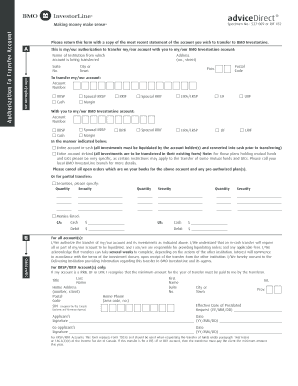
AdviceDirect Office Use Only FP/FSM Name FP/FSM Email Address Please return this form with a copy of the most recent statement of the account you wish to transfer to BMO InvestorLine. A This is my/our authorization to transfer my/our account with you to my/our BMO InvestorLine account Name of Institution from which account is being transferred MY AUTHORIZATION Suite No. Address no. street City or Town Postal Code Prov. To transfer my/our account .

How it works

  1. Open form

    Open form follow the instructions

  2. Easily sign form

    Easily sign the form with your finger

  3. Share form

    Send filled & signed form or save

How to fill out the Bmo Investorline Transfer Form Rrsp To Rrif online

Transferring assets from an RRSP to an RRIF can be a straightforward process with the right guidance. This guide provides step-by-step instructions on how to complete the Bmo Investorline Transfer Form Rrsp To Rrif online, ensuring all necessary information is accurately provided.

Follow the steps to complete the transfer form online.

  1. Click ‘Get Form’ button to obtain the form and open it for completion.
  2. Identify and fill in the name of the institution from which the account is being transferred. Provide the address details including suite number, street address, city, postal code, and province.
  3. Indicate the type of account you want to transfer (e.g., RRSP, RRIF, LIRA, etc.) by selecting the relevant options provided on the form.
  4. Specify whether you wish to transfer the entire account in cash or in-kind. If opting for in-kind transfers, ensure to note any specific details regarding mutual funds or GICs.
  5. For partial transfers, detail the securities you wish to transfer by listing the quantity and security names as required.
  6. Complete the authorization sections by providing your personal information such as first name, last name, address, social insurance number, and contact number.
  7. Sign and date the document, ensuring all necessary references to date and applicable signatures are completed, including co-applicants if applicable.
  8. Once the form is filled out, review for accuracy before submitting. You can choose to save changes, download for your records, print, or share the form as necessary.

Start completing your Bmo Investorline Transfer Form Rrsp To Rrif online today.

Get form

Experience a faster way to fill out and sign forms on the web. Access the most extensive library of templates available.
Get form

Related content

Bank of Montreal - SEC.gov
Notice of Annual Meeting of Shareholders of Bank of Montreal ... You will have received a...
Learn more
(PDF) Analysis of Canada's Largest Credit Unions |...
BMO InvestorLine is the new leader in Canadian online discount brokerage ... Guaranteed...
Learn more

Related links form

How To Fill In Form 2541 Online An Invitation To Collaborate - Food And Drug Administration - Fda Methods For Conducting Recall Effectiveness Checks PROGRAM Chapter 48 Bioresearch Monitoring 7348.808A ... - Fda

Questions & Answers

Get answers to your most pressing questions about US Legal Forms API.

Contact support

How to transfer your RRSP Open a new RRSP at another financial institution or discount brokerage. Fill out the paperwork and have the new financial institution request an RRSP transfer from your old financial institution. Choose between transfer in kind or transfer in cash. Initiate the transfer.

The RRSP transfer Choose in kind or in cash for your transfer. Speak to the new bank where you want to make the transfer and bring a printout of your investments from your current bank. Ask if they will pay some or all your transfer-out fees. Fees can vary but might be $50 to as much as $150+tax.

BMO RRSP and TFSA Transfer Fees When transferring your TFSA or RRSP account from BMO SmartFolio to another financial institution, you pay: RRSP transfer fees: $135. TFSA transfer fees: $135.

You can transfer certain types of payments to a registered retirement savings plan (RRSP) or from one registered plan to another, such as a registered pension plan (RPP), registered retirement income fund (RRIF), specified pension plan (SPP), a deferred profit sharing plan (DPSP), or a pooled registered pension plan ( ...

Start by sign in to BMO Online Banking and: Click Move money. Select Account transfers. Choose the From and To accounts, and enter the amount, and currency you'd like to transfer. ... Review the transaction details, and then click Continue. Click Confirm Transfer.

BMO InvestorLine will reimburse transfer fees based on standard industry rates, to a maximum of $200 (CDN) per transfer, and may limit this offer at its discretion.

How do I transfer my investments to BMO ? You'll need to fill out a transfer form to move your investments from one financial institution to another. Or just leave the heavy lifting to us. Our investment professionals are available to connect and help you through the process.

Get This Form Now!

Use professional pre-built templates to fill in and sign documents online faster. Get access to thousands of forms.
Get form
If you believe that this page should be taken down, please follow our DMCA take down processhere.
Get Bmo Investorline Transfer Form Rrsp To Rrif
Get form
  • Adoption
  • Bankruptcy
  • Contractors
  • Divorce
  • Home Sales
  • Employment
  • Identity Theft
  • Incorporation
  • Landlord Tenant
  • Living Trust
  • Name Change
  • Personal Planning
  • Small Business
  • Wills & Estates
  • Packages A-Z
  • Affidavits
  • Bankruptcy
  • Bill of Sale
  • Corporate - LLC
  • Divorce
  • Employment
  • Identity Theft
  • Internet Technology
  • Landlord Tenant
  • Living Wills
  • Name Change
  • Power of Attorney
  • Real Estate
  • Small Estates
  • Wills
  • All Forms
  • Forms A-Z
  • Other Templates
  • Legal Hub
  • About Us
  • Help Portal
  • Legal Resources
  • Blog
  • Affiliates
  • Contact Us
  • Delete My Account
  • Site Map
  • Industries
  • Forms in Spanish
  • Localized Forms
  • State-specific Forms
  • Forms Kit
  • Real Estate Handbook
  • All Guides
  • Notarize
  • Incorporation services
  • For Consumers
  • For Small Business
  • For Attorneys
  • USLegal
  • FormsPass
  • pdfFiller
  • signNow
  • altaFlow
  • DocHub
  • Instapage
Form Packages
  • Adoption
  • Bankruptcy
  • Contractors
  • Divorce
  • Home Sales
  • Employment
  • Identity Theft
  • Incorporation
  • Landlord Tenant
  • Living Trust
  • Name Change
  • Personal Planning
  • Small Business
  • Wills & Estates
  • Packages A-Z
Form Categories
  • Affidavits
  • Bankruptcy
  • Bill of Sale
  • Corporate - LLC
  • Divorce
  • Employment
  • Identity Theft
  • Internet Technology
  • Landlord Tenant
  • Living Wills
  • Name Change
  • Power of Attorney
  • Real Estate
  • Small Estates
  • Wills
  • All Forms
  • Forms A-Z
  • Other Templates
Customer Service
  • Legal Hub
  • About Us
  • Help Portal
  • Legal Resources
  • Blog
  • Affiliates
  • Contact Us
  • Delete My Account
  • Site Map
  • Industries
  • Forms in Spanish
  • Localized Forms
  • State-specific Forms
  • Forms Kit
Legal Guides
  • Real Estate Handbook
  • All Guides
Prepared for you
  • Notarize
  • Incorporation services
Our Customers
  • For Consumers
  • For Small Business
  • For Attorneys
Our Sites
  • USLegal
  • FormsPass
  • pdfFiller
  • signNow
  • altaFlow
  • DocHub
  • Instapage
Social Media
Call us now toll free:
+1 833 426 79 33
As seen in:
© Copyright 1999-2026 airSlate Legal Forms, Inc. 17 Station Street, Ste. 203, Brookline, MA 02445
  • Your Privacy Choices
  • Terms of Service
  • Privacy Notice
  • Content Takedown Policy
  • Bug Bounty Program