Loading
Form preview
  • US Legal Forms
  • Other Templates
  • More Forms
  • More Uncategorized Forms
  • Suffolk County District Court Complaint Form - Courts State Ny

Get Suffolk County District Court Complaint Form - Courts State Ny

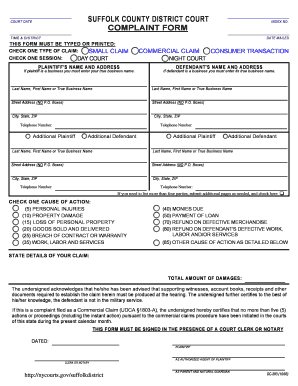
SUFFOLK COUNTY DISTRICT COURT COMPLAINT FORM COURT DATE INDEX NO. TIME & DISTRICT DATE MAILED THIS FORM MUST BE TYPED OR PRINTED: CHECK ONE TYPE OF CLAIM: SMALL CLAIM CHECK ONE SESSION: DAY COURT.

How it works

  1. Open form

    Open form follow the instructions

  2. Easily sign form

    Easily sign the form with your finger

  3. Share form

    Send filled & signed form or save

How to fill out the SUFFOLK COUNTY DISTRICT COURT COMPLAINT FORM - Courts State NY online

Filling out the Suffolk County District Court Complaint Form online can be a streamlined process if you follow the right steps. This guide provides clear, step-by-step instructions to assist you in completing the form effectively and accurately.

Follow the steps to complete your complaint form online.

  1. Click ‘Get Form’ button to obtain the form and open it in the editor.
  2. Indicate the court date, index number, time, and district in the relevant fields. These details will help in scheduling your case and tracking it within the court system.
  3. Select the type of claim you are filing by checking either 'Small Claim' or 'Commercial Claim'. Ensure you choose the correct type to avoid any delays.
  4. Choose your session by checking either 'Day Court' or 'Night Court'. This indicates when you wish your case to be heard.
  5. Provide your name and address in the 'Plaintiff's Name and Address' section. If you are representing a business, enter the true business name. Remember to use a physical street address, avoiding P.O. Boxes.
  6. Enter the defendant's name and address in the 'Defendant's Name and Address' section using the same rules as above.
  7. If there are additional plaintiffs or defendants, fill out the relevant sections provided. If you have more than four parties, you may need to submit additional pages.
  8. Select one cause of action that best describes your claim. Available options include personal injuries, property damage, and breach of contract, among others.
  9. Detail your claim in the designated space, providing a clear account of your grievance.
  10. Indicate the total amount of damages you are claiming. This should reflect your calculated loss or injury.
  11. Sign the form in the presence of a court clerk or notary, ensuring all information is complete and accurate before submission.
  12. Once completed, you can save your changes, download the form for printing, or share it as necessary.

Complete your documents online today to ensure your case is filed efficiently.

Get form

Experience a faster way to fill out and sign forms on the web. Access the most extensive library of templates available.
Get form

Related content

Forms - Suffolk District Court | NYCOURTS.GOV
To save the information you add to the forms you need additional software from Adobe. If...
Learn more
Forms - NY State Courts - Unified Court System
Sep 16, 2020 — Suffolk County Supreme Court - Referee Surplus Money Form · District...
Learn more
Private prosecution - Wikipedia
A private prosecution is a criminal proceeding initiated by an individual private citizen...
Learn more

Related links form

Budget Allocation Application - North American University - Na 2020 When I Grow Up I Want To Be A - Curious George 2020 Download Scholarship Application - Elect Edith Patterson 2020 Horseshoe Tournament Flyer 2020

Questions & Answers

Get answers to your most pressing questions about US Legal Forms API.

Contact support

In New York, various records are available to the public, including court records, property records, and vital records such as birth and death certificates. Accessing these records may vary by county, but Suffolk County offers online tools to help you find the information you need. The SUFFOLK COUNTY DISTRICT COURT COMPLAINT FORM - Courts State Ny can assist you in navigating the available resources for obtaining these records.

Yes, Suffolk County court records are generally considered public, meaning anyone can access them. You can review these records through the Suffolk County District Court's website or in person at the court clerk's office. For specific cases, the SUFFOLK COUNTY DISTRICT COURT COMPLAINT FORM - Courts State Ny can provide guidance on how to request the information you need.

In Suffolk County, the maximum amount you can claim in small claims court is $5,000. This limit allows individuals to settle minor disputes efficiently without requiring extensive legal representation. When preparing your claim, utilizing the SUFFOLK COUNTY DISTRICT COURT COMPLAINT FORM - Courts State Ny can streamline the process and ensure you meet all necessary requirements.

Judge Zuckerman serves as a notable figure in the Suffolk County court system, overseeing various types of cases. His experience and legal acumen contribute significantly to the judicial process in the area. If you need to file a complaint or understand court procedures, the SUFFOLK COUNTY DISTRICT COURT COMPLAINT FORM - Courts State Ny can provide valuable insights into the necessary steps and documentation.

To look up court cases in Suffolk County, you can visit the Suffolk County District Court's official website. There, you will find a case search tool that allows you to enter relevant details, such as the case number or parties involved. Additionally, you can access court records through the New York State Unified Court System's online platform. Utilizing the SUFFOLK COUNTY DISTRICT COURT COMPLAINT FORM - Courts State Ny can also help guide you in finding specific case information.

The three most common types of civil cases include contract disputes, personal injury claims, and landlord-tenant disputes. Each type of case requires a different approach and understanding of the law. To file a complaint regarding these issues, you will need the Suffolk County District Court Complaint Form - Courts State NY. USLegalForms can assist you in preparing the necessary documents and navigating the complexities of civil litigation.

In a civil case, you typically need to provide evidence that supports your claims, which may include documents, photographs, or witness statements. The type of proof required can vary based on the nature of your case. Use the Suffolk County District Court Complaint Form - Courts State NY to outline your claims and include references to your evidence. Platforms like USLegalForms offer resources to help you understand what evidence is necessary for your specific situation.

The Civil Court of New York handles a variety of cases, including small claims, landlord-tenant disputes, and civil lawsuits involving monetary damages. It is important to identify the nature of your case to determine if it falls under the jurisdiction of the Civil Court. For filing, you'll need the Suffolk County District Court Complaint Form - Courts State NY, which outlines your claims. Resources like USLegalForms can guide you through selecting the right forms for your case.

How can I commence a civil suit? Civil actions are generally commenced by an attorney filing a Summons and Verified Complaint with the correct filing fee. You must file a District Court civil summons form. ... The summons must be issued (signed) by an attorney, or a Judge, or a Court Clerk.

The Hauppauge Court of Claims is a court for civil litigation seeking damages against the State of New York or certain other State-related entities. The Court of Claims has no jurisdiction over any city, county or town government, or over any individual defendant. This court is located in Suffolk County, New York.

Get This Form Now!

Use professional pre-built templates to fill in and sign documents online faster. Get access to thousands of forms.
Get form
If you believe that this page should be taken down, please follow our DMCA take down processhere.
Get SUFFOLK COUNTY DISTRICT COURT COMPLAINT FORM - Courts State Ny
Get form
  • Adoption
  • Bankruptcy
  • Contractors
  • Divorce
  • Home Sales
  • Employment
  • Identity Theft
  • Incorporation
  • Landlord Tenant
  • Living Trust
  • Name Change
  • Personal Planning
  • Small Business
  • Wills & Estates
  • Packages A-Z
  • Affidavits
  • Bankruptcy
  • Bill of Sale
  • Corporate - LLC
  • Divorce
  • Employment
  • Identity Theft
  • Internet Technology
  • Landlord Tenant
  • Living Wills
  • Name Change
  • Power of Attorney
  • Real Estate
  • Small Estates
  • Wills
  • All Forms
  • Forms A-Z
  • Other Templates
  • Legal Hub
  • About Us
  • Help Portal
  • Legal Resources
  • Blog
  • Affiliates
  • Contact Us
  • Delete My Account
  • Site Map
  • Industries
  • Forms in Spanish
  • Localized Forms
  • State-specific Forms
  • Forms Kit
  • Real Estate Handbook
  • All Guides
  • Notarize
  • Incorporation services
  • For Consumers
  • For Small Business
  • For Attorneys
  • USLegal
  • FormsPass
  • pdfFiller
  • signNow
  • altaFlow
  • DocHub
  • Instapage
Form Packages
  • Adoption
  • Bankruptcy
  • Contractors
  • Divorce
  • Home Sales
  • Employment
  • Identity Theft
  • Incorporation
  • Landlord Tenant
  • Living Trust
  • Name Change
  • Personal Planning
  • Small Business
  • Wills & Estates
  • Packages A-Z
Form Categories
  • Affidavits
  • Bankruptcy
  • Bill of Sale
  • Corporate - LLC
  • Divorce
  • Employment
  • Identity Theft
  • Internet Technology
  • Landlord Tenant
  • Living Wills
  • Name Change
  • Power of Attorney
  • Real Estate
  • Small Estates
  • Wills
  • All Forms
  • Forms A-Z
  • Other Templates
Customer Service
  • Legal Hub
  • About Us
  • Help Portal
  • Legal Resources
  • Blog
  • Affiliates
  • Contact Us
  • Delete My Account
  • Site Map
  • Industries
  • Forms in Spanish
  • Localized Forms
  • State-specific Forms
  • Forms Kit
Legal Guides
  • Real Estate Handbook
  • All Guides
Prepared for you
  • Notarize
  • Incorporation services
Our Customers
  • For Consumers
  • For Small Business
  • For Attorneys
Our Sites
  • USLegal
  • FormsPass
  • pdfFiller
  • signNow
  • altaFlow
  • DocHub
  • Instapage
Social Media
Call us now toll free:
+1 833 426 79 33
As seen in:
© Copyright 1999-2026 airSlate Legal Forms, Inc. 17 Station Street, Ste. 203, Brookline, MA 02445
  • Your Privacy Choices
  • Terms of Service
  • Privacy Notice
  • Content Takedown Policy
  • Bug Bounty Program