Loading
Form preview
  • US Legal Forms
  • Other Templates
  • Industry Forms
  • Industry Insurance & Medical Forms
  • Spine And Sport Patient Registration 2020

Get Spine And Sport Patient Registration 2020-2026

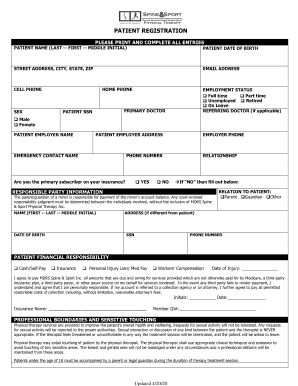
PATIENT REGISTRATION PLEASE PRINT AND COMPLETE ALL ENTRIESPATIENT NAME (LAST FIRST MIDDLE INITIAL)PATIENT DATE OF BIRTHSTREET ADDRESS, CITY, STATE, ZIPEMAIL ADDRESSCELL PHONESEXHOME PHONEEMPLOYMENT.

How it works

  1. Open form

    Open form follow the instructions

  2. Easily sign form

    Easily sign the form with your finger

  3. Share form

    Send filled & signed form or save

How to fill out the Spine And Sport Patient Registration online

Filling out the Spine And Sport Patient Registration form online is a crucial step in ensuring that your treatment proceeds smoothly. This guide will walk you through each section of the form, helping you provide all necessary information accurately.

Follow the steps to complete your patient registration form effectively.

  1. Press the ‘Get Form’ button to access the registration form and open it in your editor.
  2. Begin by entering your full name, including your last name, first name, and middle initial, in the designated fields.
  3. Provide your date of birth in the appropriate format. Be sure to check that it corresponds to your identification documents.
  4. Fill in your street address, city, state, and ZIP code accurately to ensure seamless communication.
  5. Enter your email address and cellphone number. This information is crucial for receiving updates regarding your appointment and treatment.
  6. Indicate your gender by selecting either male or female.
  7. Provide your home phone number if applicable. This serves as an additional method for the clinic to reach you.
  8. Select your employment status from the options provided: full-time, part-time, unemployed, retired, or on leave.
  9. If you have a referring doctor, please provide their name in the referring doctor field.
  10. Fill in your primary doctor's name, followed by your Social Security Number (SSN) to facilitate insurance processing.
  11. Enter your employer's name and address if applicable.
  12. Complete the emergency contact section by providing the name and phone number of a person to be contacted in case of emergencies.
  13. State whether you are the primary subscriber on your insurance by selecting 'Yes' or 'No.' If 'No,' fill in the relationship of the responsible party.
  14. If applicable, provide additional responsible party information, including their name, date of birth, relationship to you, and contact details.
  15. Indicate your financial responsibility by selecting one of the payment options available, and fill in the date of injury if necessary.
  16. Review the information provided in the financial responsibility section, including agreement to pay for services not covered by insurance.
  17. Sign and date the form where indicated, acknowledging the accuracy of the information provided and understanding of your responsibilities.
  18. Finally, save your changes, download, print, or share the completed form as needed.

Start completing your Spine And Sport Patient Registration form online today for a smooth and efficient process.

Get form

Experience a faster way to fill out and sign forms on the web. Access the most extensive library of templates available.
Get form

Related content

Spine Patient Outcomes Research Trial (SPORT):...
In this part of the study, we will treat patients with spinal stenosis (a narrowing of...
Learn more
Sports Medicine Symposium Tackles Spine Injuries...
SUNY Cortland will lead a sports medicine discussion that considers spine injuries and...
Learn more
Physical Therapy Products
Virtual Reality Gives Spinal Cord Stimulation a Boost ... $30 Discount on CEU Registration...
Learn more

Related links form

LUXE Property Tenancy Application Form WA Form MR9 2012 AU MICM Property Parental Guarantee Canada BSF386 E (Formerly RABC) 2008

Questions & Answers

Get answers to your most pressing questions about US Legal Forms API.

Contact support

The patient registration process involves several key steps, starting with the completion of the Spine And Sport Patient Registration form. After submitting the form, healthcare staff will review your information for accuracy and completeness. Next, they will create your patient profile, which includes your medical history and any necessary insurance details. This comprehensive process ensures that you receive tailored care, making your healthcare experience as seamless as possible.

A patient registration number is a unique identifier assigned to each individual during the Spine And Sport Patient Registration process. This number helps healthcare providers access your medical records quickly and efficiently. By using this registration number, providers can ensure that they have the correct information for your treatment and follow-up appointments. It acts as a secure way to manage your healthcare information throughout your journey.

The patient registration process in a hospital typically begins with filling out the Spine And Sport Patient Registration form. This involves providing personal information, such as your name, address, and insurance details, followed by a verification process. Once your information is confirmed, the hospital assigns a unique patient ID that helps track your medical records throughout your treatment. This streamlined process ensures that your care is coordinated and that all necessary information is readily available to your healthcare providers.

The patient registration form serves as a vital tool in the Spine And Sport Patient Registration process. It collects essential information, such as personal details, medical history, and insurance information, which helps healthcare providers understand your needs better. This form ensures that your experience is smooth and efficient, allowing for personalized care tailored to your situation. By completing this form accurately, you can significantly enhance your overall healthcare experience.

For new patients, the Spine And Sport Patient Registration requires a few key forms to be completed before your first visit. Generally, you will need to fill out the patient registration form, a medical history questionnaire, and any insurance-related documents. Having these forms ready helps streamline your appointment and ensures that we can focus on your care.

The Spine And Sport Patient Registration form includes essential personal information such as your name, contact details, and insurance information. It also collects medical history, including any previous treatments or conditions that may affect your care. This comprehensive approach ensures that we have all the necessary details to provide you with the best possible service.

Get This Form Now!

Use professional pre-built templates to fill in and sign documents online faster. Get access to thousands of forms.
Get form
If you believe that this page should be taken down, please follow our DMCA take down processhere.
Get Spine And Sport Patient Registration
Get form
  • Adoption
  • Bankruptcy
  • Contractors
  • Divorce
  • Home Sales
  • Employment
  • Identity Theft
  • Incorporation
  • Landlord Tenant
  • Living Trust
  • Name Change
  • Personal Planning
  • Small Business
  • Wills & Estates
  • Packages A-Z
  • Affidavits
  • Bankruptcy
  • Bill of Sale
  • Corporate - LLC
  • Divorce
  • Employment
  • Identity Theft
  • Internet Technology
  • Landlord Tenant
  • Living Wills
  • Name Change
  • Power of Attorney
  • Real Estate
  • Small Estates
  • Wills
  • All Forms
  • Forms A-Z
  • Other Templates
  • Legal Hub
  • About Us
  • Help Portal
  • Legal Resources
  • Blog
  • Affiliates
  • Contact Us
  • Delete My Account
  • Site Map
  • Industries
  • Forms in Spanish
  • Localized Forms
  • State-specific Forms
  • Forms Kit
  • Real Estate Handbook
  • All Guides
  • Notarize
  • Incorporation services
  • For Consumers
  • For Small Business
  • For Attorneys
  • USLegal
  • FormsPass
  • pdfFiller
  • signNow
  • altaFlow
  • DocHub
  • Instapage
Form Packages
  • Adoption
  • Bankruptcy
  • Contractors
  • Divorce
  • Home Sales
  • Employment
  • Identity Theft
  • Incorporation
  • Landlord Tenant
  • Living Trust
  • Name Change
  • Personal Planning
  • Small Business
  • Wills & Estates
  • Packages A-Z
Form Categories
  • Affidavits
  • Bankruptcy
  • Bill of Sale
  • Corporate - LLC
  • Divorce
  • Employment
  • Identity Theft
  • Internet Technology
  • Landlord Tenant
  • Living Wills
  • Name Change
  • Power of Attorney
  • Real Estate
  • Small Estates
  • Wills
  • All Forms
  • Forms A-Z
  • Other Templates
Customer Service
  • Legal Hub
  • About Us
  • Help Portal
  • Legal Resources
  • Blog
  • Affiliates
  • Contact Us
  • Delete My Account
  • Site Map
  • Industries
  • Forms in Spanish
  • Localized Forms
  • State-specific Forms
  • Forms Kit
Legal Guides
  • Real Estate Handbook
  • All Guides
Prepared for you
  • Notarize
  • Incorporation services
Our Customers
  • For Consumers
  • For Small Business
  • For Attorneys
Our Sites
  • USLegal
  • FormsPass
  • pdfFiller
  • signNow
  • altaFlow
  • DocHub
  • Instapage
Social Media
Call us now toll free:
+1 833 426 79 33
As seen in:
© Copyright 1999-2026 airSlate Legal Forms, Inc. 17 Station Street, Ste. 203, Brookline, MA 02445
  • Your Privacy Choices
  • Terms of Service
  • Privacy Notice
  • Content Takedown Policy
  • Bug Bounty Program