Loading
Form preview
  • US Legal Forms
  • Other Templates
  • More Forms
  • More Multi-State Forms
  • Form601pdf Agreement Of Compliance - Sba

Get Form601pdf Agreement Of Compliance - Sba

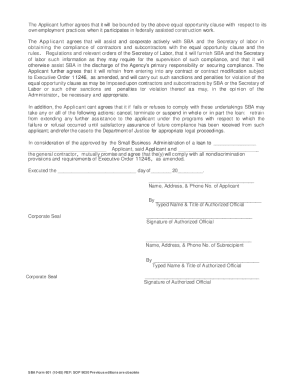
U.S. Small Business Administration AGREEMENT OF COMPLIANCE In compliance with Executive Order 11246, as amended (Executive Order 11246, as amended prohibits discrimination because of race, color,.

How it works

  1. Open form

    Open form follow the instructions

  2. Easily sign form

    Easily sign the form with your finger

  3. Share form

    Send filled & signed form or save

How to fill out the Form601PDF Agreement Of Compliance - Sba online

The Form601PDF Agreement Of Compliance - Sba is a crucial document that outlines the compliance requirements for contractors and subcontractors under Executive Order 11246. This guide provides clear, step-by-step instructions on how to properly complete the form online, ensuring that users understand each section and its significance.

Follow the steps to successfully complete the form online.

  1. Click ‘Get Form’ button to access the Form601PDF Agreement Of Compliance - Sba and open it in your editing interface.
  2. Begin by filling out the applicant's information at the designated section, ensuring that all details, including name, address, and contact number, are accurately completed.
  3. In the section labeled ‘Agreement’, confirm your understanding of the nondiscrimination provisions and clearly indicate your commitment to comply with Executive Order 11246 by selecting the appropriate options.
  4. Complete the commitments section to acknowledge your agreement to assist SBA and the Secretary of Labor in obtaining compliance while providing all necessary reports and information.
  5. Ensure that the signature section is completed by the authorized official. Provide the typed name and title, and ensure that the corporate seal is affixed where applicable.
  6. Once all sections are duly filled and validated, you can save your changes, download the completed document, print it, or share it as necessary.

Take the next step towards compliance by completing your Form601PDF Agreement Of Compliance - Sba online today.

Get form

Experience a faster way to fill out and sign forms on the web. Access the most extensive library of templates available.
Get form

Related content

Agreement of Compliance
Aug 10, 2020 — The purpose of this form is to evidence compliance with Executive Order...
Learn more

Related links form

JC 05b, Order To Take Child(ren) Into Protective Custody And Place (Child Protective Proceedings) Gottland Pdf Structural Dynamics Mario Paz Solutions Pdf Prior Authorization Fax Request Form - Who's In The AdvantUs ...

Questions & Answers

Get answers to your most pressing questions about US Legal Forms API.

Contact support

The 20% rule for SBA financing requires that at least 20% of the business's assets must be financed with owner equity, and the remaining 80% can be financed through loans. This rule ensures that business owners have a vested interest in the success of their venture. By understanding this rule, you can better navigate your application process. Using tools like the Form601PDF Agreement Of Compliance - Sba can help you stay compliant while securing necessary funding.

Filling out an SBA form, such as the Form601PDF Agreement Of Compliance - Sba, requires attention to detail. Start by gathering all necessary information, including your business details and financial data. Follow the instructions provided with the form carefully to ensure accuracy. If you need assistance, consider using US Legal Forms, which offers user-friendly templates and guides to simplify the process.

This form must be executed by both the borrower and the construction contractor for any loan involving construction of more than $10,000.

After decisioning, SBA legal prepares the closing documents to send to the borrower. After receipt of the signed documents the funds are direct deposited typically in 3 -5 business days.

What is a Compliance Agreement? A Compliance Agreement is a document in a closing loan document package in which a borrower agrees to “comply” with requests from the lender or closing agent to correct typographical or clerical errors and inadvertent mistakes in the loan documentation after the loan has closed.

How to Fill Out SBA Form 601? The main part of the form lists the conditions of the agreement. ... The form will then require the name, address and phone number of the applicant business and the typed name, title, and signature of their authorized representative.

What Is SBA Form 601? Also known as an Agreement of Compliance form, the SBA Form 601 was released in October 1985. It must be completed by a borrower and construction contractor for any SBA loan that involves construction costs that exceed $10,000.

Once the loan documents have been signed, the escrow officer delivers them back to the lender for review. When the lender is satisfied that all required documents have been signed and all outstanding loan conditions have been met, the lender will notify escrow that they are ready to disburse the loan funds to escrow.

What Is SBA Form 601? SBA Form 601, Agreement of Compliance is a form required to be completed by the Borrower and the construction Contractor for any Small Business Administration (SBA) loan involving any construction that costs more than $10,000.

Get This Form Now!

Use professional pre-built templates to fill in and sign documents online faster. Get access to thousands of forms.
Get form
If you believe that this page should be taken down, please follow our DMCA take down processhere.
Get Form601PDF Agreement Of Compliance - Sba
Get form
  • Adoption
  • Bankruptcy
  • Contractors
  • Divorce
  • Home Sales
  • Employment
  • Identity Theft
  • Incorporation
  • Landlord Tenant
  • Living Trust
  • Name Change
  • Personal Planning
  • Small Business
  • Wills & Estates
  • Packages A-Z
  • Affidavits
  • Bankruptcy
  • Bill of Sale
  • Corporate - LLC
  • Divorce
  • Employment
  • Identity Theft
  • Internet Technology
  • Landlord Tenant
  • Living Wills
  • Name Change
  • Power of Attorney
  • Real Estate
  • Small Estates
  • Wills
  • All Forms
  • Forms A-Z
  • Other Templates
  • Legal Hub
  • About Us
  • Help Portal
  • Legal Resources
  • Blog
  • Affiliates
  • Contact Us
  • Delete My Account
  • Site Map
  • Industries
  • Forms in Spanish
  • Localized Forms
  • State-specific Forms
  • Forms Kit
  • Real Estate Handbook
  • All Guides
  • Notarize
  • Incorporation services
  • For Consumers
  • For Small Business
  • For Attorneys
  • USLegal
  • FormsPass
  • pdfFiller
  • signNow
  • altaFlow
  • DocHub
  • Instapage
Form Packages
  • Adoption
  • Bankruptcy
  • Contractors
  • Divorce
  • Home Sales
  • Employment
  • Identity Theft
  • Incorporation
  • Landlord Tenant
  • Living Trust
  • Name Change
  • Personal Planning
  • Small Business
  • Wills & Estates
  • Packages A-Z
Form Categories
  • Affidavits
  • Bankruptcy
  • Bill of Sale
  • Corporate - LLC
  • Divorce
  • Employment
  • Identity Theft
  • Internet Technology
  • Landlord Tenant
  • Living Wills
  • Name Change
  • Power of Attorney
  • Real Estate
  • Small Estates
  • Wills
  • All Forms
  • Forms A-Z
  • Other Templates
Customer Service
  • Legal Hub
  • About Us
  • Help Portal
  • Legal Resources
  • Blog
  • Affiliates
  • Contact Us
  • Delete My Account
  • Site Map
  • Industries
  • Forms in Spanish
  • Localized Forms
  • State-specific Forms
  • Forms Kit
Legal Guides
  • Real Estate Handbook
  • All Guides
Prepared for you
  • Notarize
  • Incorporation services
Our Customers
  • For Consumers
  • For Small Business
  • For Attorneys
Our Sites
  • USLegal
  • FormsPass
  • pdfFiller
  • signNow
  • altaFlow
  • DocHub
  • Instapage
Social Media
Call us now toll free:
+1 833 426 79 33
As seen in:
© Copyright 1999-2026 airSlate Legal Forms, Inc. 17 Station Street, Ste. 203, Brookline, MA 02445
  • Your Privacy Choices
  • Terms of Service
  • Privacy Notice
  • Content Takedown Policy
  • Bug Bounty Program