Loading
Get Warenbegleitschein - Herbert Waldmann Gmbh & Co. Kg
How it works
-

Open form follow the instructions
-

Easily sign the form with your finger
-

Send filled & signed form or save
How to use or fill out the Warenbegleitschein - Herbert Waldmann GmbH & Co. KG online
The Warenbegleitschein is an essential document for returning goods to Herbert Waldmann GmbH & Co. KG. This guide will walk you through the online filling process, ensuring you complete each section accurately and efficiently.
Follow the steps to fill out the Warenbegleitschein online.
- Click the ‘Get Form’ button to obtain the form and open it in the editor.
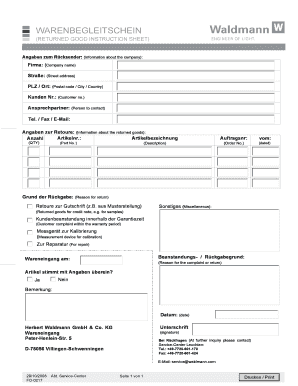
- Provide the company information in the section titled 'Angaben zum Rücksender.' Fill in the company name ('Firma'), street address ('Straße'), postal code and city ('PLZ / Ort'), customer number ('Kunden Nr.'), and contact person ('Ansprechpartner'). Also include their telephone, fax, and email details.
- In the 'Angaben zur Retoure' section, enter the article number ('Artikelnr.'), article description ('Artikelbezeichnung'), and quantity ('Anzahl'). Make sure to check the specifics of each item being returned.
- Complete the order number ('Auftragsnr.') and the date ('vom:') of the original order.
- Provide the reason for the return in the 'Grund der Rückgabe' section, selecting appropriate options such as issues relating to a credit note or other reasons.
- If applicable, describe the issue under 'Beanstandungs- / Rückgabegrund' and indicate the date of goods receipt ('Wareneingang am:').
- Respond to the question 'Artikel stimmt mit Angaben überein?' by selecting either 'Ja' or 'Nein' depending on whether the article matches the presented information.
- Add any additional remarks in the 'Bemerkung' section. Ensure to include the date and signature at the bottom of the form.
- Review all information for accuracy. Once finalized, save your changes, and choose the option to download, print, or share the form as needed.
Complete your Warenbegleitschein online today!