Get Allegheny Health Network Him-1000-001 2018-2026
How it works
-

Open form follow the instructions
-

Easily sign the form with your finger
-

Send filled & signed form or save
How to fill out the Allegheny Health Network HIM-1000-001 online
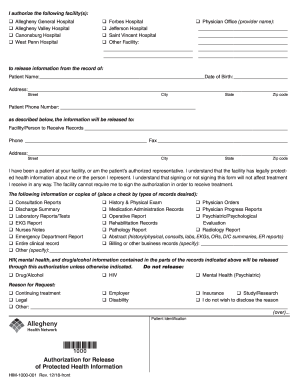
Completing the Allegheny Health Network HIM-1000-001 form online is a straightforward process that helps facilitate the release of your protected health information. This guide provides step-by-step instructions to ensure that you fill out the form accurately and efficiently.
Follow the steps to fill out the HIM-1000-001 form with ease.
- Press the ‘Get Form’ button to access the form and open it in your editor.
- In the section titled 'I authorize the following facility(s)', select the hospitals from which you wish to obtain records by marking the checkboxes next to the selected facilities. If you wish to include another facility not listed, use the space provided under 'Other Facility' to specify the name.
- Provide the name of the Physician Office and the provider’s name if applicable in the respective fields.
- Complete the 'Patient Name', 'Date of Birth', and 'Address' sections accurately, including street, city, state, and zip code. Ensure this information is current to avoid any issues with record retrieval.
- Fill out the 'Patient Phone Number' clearly, as this may be used for follow-up communication regarding your request.
- In the section 'the information will be released to', specify the recipient's name, phone number, fax number, and address in the respective fields. This ensures that your records are sent to the correct place.
- Check the types of records you wish to receive by marking the appropriate boxes in the section labeled 'The following information or copies of.' Be sure to select all that apply.
- If you do not wish to authorize the release of sensitive information like drug/alcohol, mental health, or HIV records, check the respective boxes provided.
- Indicate the reason for your request by selecting from the available options or writing your reason in the 'Other' field.
- Fill out the 'Dates of Service for record requests' section to specify the relevant time frame for the records requested.
- Specify the expiration date of the authorization – either in six months or by entering another date.
- Sign the form in the 'Patient or Representative Signature' section and include the date and time. If you are completing the form on behalf of someone else, provide your relationship and authority to act as a representative.
- If applicable, have a witness sign the form in the designated witness signature areas.
- Review the completed form for accuracy and completeness, then save your changes. You may then download, print, or share the form as needed.
Start filling out the Allegheny Health Network HIM-1000-001 form online today for seamless access to your health records.
In Pennsylvania, laws regarding medical records ensure patient privacy and accessibility. Patients have the right to access their medical records while healthcare providers are obligated to keep these records confidential. The Allegheny Health Network HIM-1000-001 can guide you on how to navigate these legal requirements effectively. Understanding your rights can enhance your interactions with healthcare providers.