Loading
Form preview
  • US Legal Forms
  • Other Templates
  • More Forms
  • More Uncategorized Forms
  • Georgia United Credit Union Direct Deposit Form

Get Georgia United Credit Union Direct Deposit Form

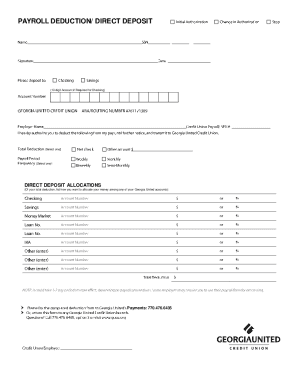
Instructions for Completing a Payroll Deduction Form General Information: This form is used to start, stop and change payroll deduction or direct deposit for account holders that are employed by one.

How it works

  1. Open form

    Open form follow the instructions

  2. Easily sign form

    Easily sign the form with your finger

  3. Share form

    Send filled & signed form or save

How to fill out the Georgia United Credit Union Direct Deposit Form online

This guide provides you with detailed instructions on filling out the Georgia United Credit Union Direct Deposit Form online. Follow these steps carefully to ensure a smooth setup for your direct deposit.

Follow the steps to complete your direct deposit form online.

  1. Click ‘Get Form’ button to obtain the form and open it in the editor.
  2. Identify the type of request you are making by selecting one of the options: Initial Authorization, Change in Authorization, or Stop. This will indicate whether you are setting up a new deposit, altering an existing one, or halting the deposits.
  3. Enter your full name in the designated field, ensuring it matches the name associated with your account.
  4. Input your Social Security number in the appropriate box for identification purposes.
  5. Provide your signature in the specified area to authorize the request.
  6. Fill in the current date to establish when the form is being completed.
  7. Select the account where you prefer your funds to be deposited. Ensure that you choose the correct type of account and provide the account number. For checking or money market accounts, a 13-digit checking account number is required; otherwise, please enter your member number.
  8. List the name of your employer, which must be a part of Georgia United's Select Employer Groups.
  9. If you are employed by a State of Georgia Agency, provide the agency's name in the Credit Union Payroll section. If you are not, leave this section blank.
  10. Choose your desired deduction amount. You can select the entire net check or specify a different amount as per your preference.
  11. Indicate your payroll period by selecting the frequency with which you are paid, such as weekly, bi-weekly, or monthly.
  12. If you wish to allocate funds to specific accounts, indicate how you would like to distribute the funds among your Georgia United accounts. If allocating to a loan, include the Loan ID number.
  13. List either the amount or the percentage to be credited to the specified account for each allocation.
  14. Review all entries for accuracy before saving your changes. You can then download, print, or share the form as needed.

Complete your direct deposit form online today to enjoy the convenience of automatic payments.

Get form

Experience a faster way to fill out and sign forms on the web. Access the most extensive library of templates available.
Get form

Related content

Onboarding - Geogia DOT
Oct 1, 2025 — Direct Deposit. Payroll Direct Deposit. Required Onboarding Documents...
Learn more
Employee Handbook
Jan 5, 2018 — Southern Crescent Technical College participates with the Georgia United...
Learn more
CRA Guide to Data Reporting and Collection
CRA requires that each insured depository institution's record in helping to meet the...
Learn more

Related links form

Cdac Is An Equal Opportunity Employer And Observes All Federal, State And Local Laws By Not State Employee Race / Ethnicity Questionnaire - Calhr Ca CSRA WOMEN S TENNIS LEAGUE MATCH REPORT FORM Note: If This ...

Questions & Answers

Get answers to your most pressing questions about US Legal Forms API.

Contact support

You can get a bank direct deposit form by visiting your Georgia United Credit Union branch or downloading it from their official website. Fill this form with your personal and account information and submit it to your employer to initiate direct deposit. This process will help you receive your funds directly into your credit union account.

A bank document for direct deposit typically includes your account number, routing number, and sometimes a verification letter. This document is necessary for your employer or other organizations to reliably deposit funds directly into your account. You can get this document from your Georgia United Credit Union.

To request a TD direct deposit form, you can visit your local branch or go to their website. Ensure to provide your account details accurately to avoid any hiccups. Additionally, you may also find resources on uslegalforms to streamline this request.

To obtain a bank letter for direct deposit, contact your Georgia United Credit Union branch and request one. The bank will issue a verification letter that includes your account details, which you can then present to your employer. This letter confirms your banking information for easy deposit.

Yes, you can access the Georgia United Credit Union Direct Deposit Form through online banking. Just log into your account and navigate to the forms section. Here, you will find the direct deposit form available for download, allowing you to complete it from home.

Setting up direct deposit with United Bank involves requesting the Georgia United Credit Union Direct Deposit Form. Complete the form with your details and provide it to your employer or the organization that is depositing funds. This ensures that your payments go directly into your credit union account without delays.

To set up direct debit with your Georgia United Credit Union account, obtain the direct deposit form and provide it to the organization from which you receive funds. Make sure you include your account details accurately to prevent any issues. This setup allows for automatic transfers, which makes managing your finances much easier.

To obtain the Georgia United Credit Union Direct Deposit Form, you can visit your local Georgia United Credit Union branch. They also provide the form online through their official website. Simply download it, fill it out, and return it to your employer for processing.

To fill out the Georgia United Credit Union direct deposit form, start by entering your personal information, including name and Social Security number. Then provide your account details, such as the account number and routing number. Finally, review your information carefully before submitting it to ensure everything is accurate.

In the context of a direct deposit form, calculation typically refers to ensuring your account number and routing number are entered correctly. It's crucial that these numbers are accurate because they determine where the funds will be deposited. Mistakes in this section could lead to delays or incorrect deposits.

Get This Form Now!

Use professional pre-built templates to fill in and sign documents online faster. Get access to thousands of forms.
Get form
If you believe that this page should be taken down, please follow our DMCA take down processhere.
Get Georgia United Credit Union Direct Deposit Form
Get form
  • Adoption
  • Bankruptcy
  • Contractors
  • Divorce
  • Home Sales
  • Employment
  • Identity Theft
  • Incorporation
  • Landlord Tenant
  • Living Trust
  • Name Change
  • Personal Planning
  • Small Business
  • Wills & Estates
  • Packages A-Z
  • Affidavits
  • Bankruptcy
  • Bill of Sale
  • Corporate - LLC
  • Divorce
  • Employment
  • Identity Theft
  • Internet Technology
  • Landlord Tenant
  • Living Wills
  • Name Change
  • Power of Attorney
  • Real Estate
  • Small Estates
  • Wills
  • All Forms
  • Forms A-Z
  • Other Templates
  • Legal Hub
  • About Us
  • Help Portal
  • Legal Resources
  • Blog
  • Affiliates
  • Contact Us
  • Delete My Account
  • Site Map
  • Industries
  • Forms in Spanish
  • Localized Forms
  • State-specific Forms
  • Forms Kit
  • Real Estate Handbook
  • All Guides
  • Notarize
  • Incorporation services
  • For Consumers
  • For Small Business
  • For Attorneys
  • USLegal
  • FormsPass
  • pdfFiller
  • signNow
  • altaFlow
  • DocHub
  • Instapage
Form Packages
  • Adoption
  • Bankruptcy
  • Contractors
  • Divorce
  • Home Sales
  • Employment
  • Identity Theft
  • Incorporation
  • Landlord Tenant
  • Living Trust
  • Name Change
  • Personal Planning
  • Small Business
  • Wills & Estates
  • Packages A-Z
Form Categories
  • Affidavits
  • Bankruptcy
  • Bill of Sale
  • Corporate - LLC
  • Divorce
  • Employment
  • Identity Theft
  • Internet Technology
  • Landlord Tenant
  • Living Wills
  • Name Change
  • Power of Attorney
  • Real Estate
  • Small Estates
  • Wills
  • All Forms
  • Forms A-Z
  • Other Templates
Customer Service
  • Legal Hub
  • About Us
  • Help Portal
  • Legal Resources
  • Blog
  • Affiliates
  • Contact Us
  • Delete My Account
  • Site Map
  • Industries
  • Forms in Spanish
  • Localized Forms
  • State-specific Forms
  • Forms Kit
Legal Guides
  • Real Estate Handbook
  • All Guides
Prepared for you
  • Notarize
  • Incorporation services
Our Customers
  • For Consumers
  • For Small Business
  • For Attorneys
Our Sites
  • USLegal
  • FormsPass
  • pdfFiller
  • signNow
  • altaFlow
  • DocHub
  • Instapage
Social Media
Call us now toll free:
+1 833 426 79 33
As seen in:
© Copyright 1999-2026 airSlate Legal Forms, Inc. 17 Station Street, Ste. 203, Brookline, MA 02445
  • Your Privacy Choices
  • Terms of Service
  • Privacy Notice
  • Content Takedown Policy
  • Bug Bounty Program