Loading
Get Premier Spine Care Patient Registration Information 2019-2026
How it works
-

Open form follow the instructions
-

Easily sign the form with your finger
-

Send filled & signed form or save
How to fill out the Premier Spine Care Patient Registration Information online
Filling out the Premier Spine Care Patient Registration Information form is an essential step in ensuring your medical needs are met efficiently. This guide offers clear, step-by-step instructions designed to help you complete the registration process smoothly and accurately.
Follow the steps to complete your registration online.
- Press the ‘Get Form’ button to obtain the form and open it in the editor.
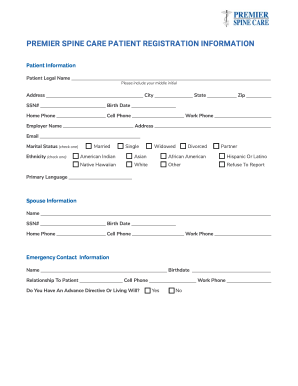
- Begin filling out the Patient Information section. Enter your patient legal name, including your middle initial, and complete your address, city, state, and zip code.
- Provide your social security number and date of birth. Include both home and cell phone numbers, as well as your employer's name and work phone.
- Indicate your marital status by checking the appropriate box. Select from options such as married, single, widowed, divorced, or partner.
- Identify your ethnicity by checking one of the provided options, including American Indian, Asian, African American, Hispanic or Latino, Native Hawaiian, White, Other, or refuse to report.
- Specify your primary language in the designated field.
- For the Spouse Information section, if applicable, fill in the required fields including their name, social security number, birthdate, home and cell phone numbers, and work phone.
- Fill out the Emergency Contact Information section by providing the name, relationship to you, birthdate, and cell phone number of your emergency contact.
- Answer whether you have an advance directive or living will by selecting yes or no, and provide the work phone number if applicable.
- In the Insurance Information section, complete all fields for your primary insurance, including insurance provider, policy number, group number, account holder details, and employer.
- If you have secondary insurance, repeat the same process for the secondary insurance section.
- Provide details for your Referring Physician and Primary Care Physician by including their names, addresses, and phone numbers.
- Acknowledge the Patient Confidentiality section by authorizing the release of medical information as directed, selecting the preferred method of communication for messages.
- Finally, read the Insurance/Self-Pay Patients Only section carefully, then provide your name and date to authorize insurance benefits or self-payment responsibilities.
- Once all sections are completed, save your changes, and you may download, print, or share the filled-out form as necessary.
Complete your registration form online today for a streamlined experience.