Loading
Form preview
  • US Legal Forms
  • Other Templates
  • More Forms
  • More Multi-State Forms
  • Faculty And Staff Evaluation Fy0 Annual Employee - Austincc 2020

Get Faculty And Staff Evaluation Fy0 Annual Employee - Austincc 2020-2026

How it works

  1. Open form

    Open form follow the instructions

  2. Easily sign form

    Easily sign the form with your finger

  3. Share form

    Send filled & signed form or save

How to fill out the Faculty And Staff Evaluation FY0 Annual Employee - Austincc online

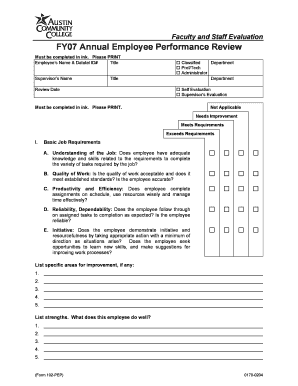
This guide provides a clear and supportive approach to filling out the Faculty And Staff Evaluation FY0 Annual Employee form for Austin Community College. Follow these steps to ensure a complete and accurate evaluation.

Follow the steps to successfully complete the evaluation form.

  1. Press the ‘Get Form’ button to download and access the form in a convenient online editor.
  2. Begin filling out the employee's information, which includes their name and Datatel ID number, and their job title.
  3. Enter the supervisor's name and title for proper identification.
  4. Record the review date to document when the evaluation is being conducted.
  5. Select the relevant category that applies to the employee, such as 'Classified', 'Prof/Tech', or 'Administrator', and indicate whether it is a self-evaluation or a supervisor's evaluation.
  6. For the basic job requirements section, evaluate each criterion by selecting the appropriate performance rating: 'Not Applicable', 'Needs Improvement', 'Meets Requirements', or 'Exceeds Requirements'.
  7. Provide specific areas for improvement and strengths in the designated sections, listing at least five points for each.
  8. Proceed to the job specific attributes section and repeat the evaluation process by rating each attribute and documenting any areas for improvement or strengths.
  9. Continue to the interpersonal skills section and complete it in a similar manner as the previous sections.
  10. In the 'Other Comments' section, add any additional remarks that may be pertinent to the evaluation.
  11. Ensure that both the employee and supervisor sign and date the form to validate the evaluation.
  12. Once all sections are filled out, save any changes, download the completed form, or print it for records.

Complete your Faculty And Staff Evaluation form online today!

Get form

Experience a faster way to fill out and sign forms on the web. Access the most extensive library of templates available.
Get form

Related content

Accountability Report Transmittal Form
Accountability is monitored through the performance evaluation systems for both faculty...
Learn more
Fiscal Year 2000 Operating and Capital Budget...
Feb 4, 1999 — TVC staff and faculty have forged close ties with businesses and local...
Learn more

Related links form

APPLICATION PACKET FOR FOOD ESTABLISHMENTS For Your Convenience And To Save Time, This Form May Be Completed Online At Httppda WASHOE EDUCATION ASSOCIATION 2011 ERNIE JOHNSON MEMORIAL - Weatoday South Medrox Farm

Questions & Answers

Get answers to your most pressing questions about US Legal Forms API.

Contact support

Writing an employee evaluation for good performance starts with highlighting the employee's key achievements and contributions accurately. Utilize the Faculty And Staff Evaluation FY0 Annual Employee - Austincc to ensure you include all necessary components, such as objectives met and skills demonstrated. A positive acknowledgment of their efforts, combined with suggestions for future growth, will foster motivation and job satisfaction.

Filling an employee performance evaluation form requires clarity and honesty. Begin by reviewing the criteria outlined in the Faculty And Staff Evaluation FY0 Annual Employee - Austincc model to ensure compliance with standards. Provide specific examples and evidence for each section, focusing on achievements and development needs. This approach not only informs the employee but also encourages continuous improvement.

The five critical words of a performance review include feedback, goals, strengths, areas, and improvement. These words encapsulate the core components of the evaluation process. The Faculty And Staff Evaluation FY0 Annual Employee - Austincc emphasizes these elements, promoting a culture of accountability and growth within the organization.

An annual evaluation of an employee's job performance is a comprehensive review that occurs once a year. This assessment typically includes feedback from supervisors, benchmarking against goals, and an analysis of the employee's overall contributions to the organization. The Faculty And Staff Evaluation FY0 Annual Employee - Austincc helps ensure each evaluation is systematic, fair, and beneficial for both the employee and the institution.

An example of a performance evaluation might include reviewing an employee's ability to meet project deadlines, communicate effectively with team members, and contribute to department goals. The Faculty And Staff Evaluation FY0 Annual Employee - Austincc provides a structured approach for this process, allowing evaluators to assess various competencies. This example underscores the importance of a balanced perspective that recognizes strengths and identifies areas for potential growth.

To fill out an employee performance evaluation, start by gathering all necessary documents that reflect the employee's contributions. Review specific achievements and areas for improvement from the past year. Use the Faculty And Staff Evaluation FY0 Annual Employee - Austincc framework to guide your comments, ensuring that they are specific and constructive. Finally, ensure the evaluation aligns with the institution's goals and values.

When creating a sample for evaluating employee performance within the Faculty And Staff Evaluation FY0 Annual Employee - Austincc, include specific examples of tasks completed and contributions made during the evaluation period. An effective sample demonstrates how the employee meets or exceeds established standards. Use structured feedback to enhance the evaluation process.

Employee evaluation can be calculated by gathering performance data throughout the evaluation period for the Faculty And Staff Evaluation FY0 Annual Employee - Austincc. Organize this data into a scoring system that reflects the employee's achievements and contributions. This approach allows for a balanced and objective evaluation.

To calculate the evaluation for the Faculty And Staff Evaluation FY0 Annual Employee - Austincc, start by defining clear evaluation criteria. Collect scores based on these criteria, ensuring to include both qualitative and quantitative data. The calculated score provides insight into an employee's strengths and areas for improvement.

Calculating overall evaluation in the context of the Faculty And Staff Evaluation FY0 Annual Employee - Austincc requires aggregating individual performance scores and feedback. You may use weighted averages if certain criteria hold more importance. The final score reflects the comprehensive assessment of various skills and achievements.

Get This Form Now!

Use professional pre-built templates to fill in and sign documents online faster. Get access to thousands of forms.
Get form
If you believe that this page should be taken down, please follow our DMCA take down processhere.
Get Faculty And Staff Evaluation FY0 Annual Employee - Austincc
Get form
  • Adoption
  • Bankruptcy
  • Contractors
  • Divorce
  • Home Sales
  • Employment
  • Identity Theft
  • Incorporation
  • Landlord Tenant
  • Living Trust
  • Name Change
  • Personal Planning
  • Small Business
  • Wills & Estates
  • Packages A-Z
  • Affidavits
  • Bankruptcy
  • Bill of Sale
  • Corporate - LLC
  • Divorce
  • Employment
  • Identity Theft
  • Internet Technology
  • Landlord Tenant
  • Living Wills
  • Name Change
  • Power of Attorney
  • Real Estate
  • Small Estates
  • Wills
  • All Forms
  • Forms A-Z
  • Other Templates
  • Legal Hub
  • About Us
  • Help Portal
  • Legal Resources
  • Blog
  • Affiliates
  • Contact Us
  • Delete My Account
  • Site Map
  • Industries
  • Forms in Spanish
  • Localized Forms
  • State-specific Forms
  • Forms Kit
  • Real Estate Handbook
  • All Guides
  • Notarize
  • Incorporation services
  • For Consumers
  • For Small Business
  • For Attorneys
  • USLegal
  • FormsPass
  • pdfFiller
  • signNow
  • altaFlow
  • DocHub
  • Instapage
Form Packages
  • Adoption
  • Bankruptcy
  • Contractors
  • Divorce
  • Home Sales
  • Employment
  • Identity Theft
  • Incorporation
  • Landlord Tenant
  • Living Trust
  • Name Change
  • Personal Planning
  • Small Business
  • Wills & Estates
  • Packages A-Z
Form Categories
  • Affidavits
  • Bankruptcy
  • Bill of Sale
  • Corporate - LLC
  • Divorce
  • Employment
  • Identity Theft
  • Internet Technology
  • Landlord Tenant
  • Living Wills
  • Name Change
  • Power of Attorney
  • Real Estate
  • Small Estates
  • Wills
  • All Forms
  • Forms A-Z
  • Other Templates
Customer Service
  • Legal Hub
  • About Us
  • Help Portal
  • Legal Resources
  • Blog
  • Affiliates
  • Contact Us
  • Delete My Account
  • Site Map
  • Industries
  • Forms in Spanish
  • Localized Forms
  • State-specific Forms
  • Forms Kit
Legal Guides
  • Real Estate Handbook
  • All Guides
Prepared for you
  • Notarize
  • Incorporation services
Our Customers
  • For Consumers
  • For Small Business
  • For Attorneys
Our Sites
  • USLegal
  • FormsPass
  • pdfFiller
  • signNow
  • altaFlow
  • DocHub
  • Instapage
Social Media
Call us now toll free:
+1 833 426 79 33
As seen in:
© Copyright 1999-2026 airSlate Legal Forms, Inc. 17 Station Street, Ste. 203, Brookline, MA 02445
  • Your Privacy Choices
  • Terms of Service
  • Privacy Notice
  • Content Takedown Policy
  • Bug Bounty Program