Get Medical Clearance For Surgery/anesthesia - Crescent View Surgery ... 2020-2026
How it works
-

Open form follow the instructions
-

Easily sign the form with your finger
-

Send filled & signed form or save
How to fill out the Medical Clearance For Surgery/Anesthesia - Crescent View Surgery online
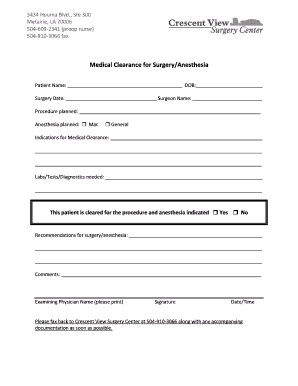
Filling out the Medical Clearance For Surgery/Anesthesia form is a crucial step in preparing for your upcoming surgery or anesthesia. This guide will provide you with user-friendly instructions to complete this document accurately and efficiently.
Follow the steps to complete the form seamlessly.
- Click ‘Get Form’ button to access the Medical Clearance For Surgery/Anesthesia form. This will open the document in an online editor for your convenience.
- Begin by entering the patient’s name in the designated field. Make sure to write the full name clearly, followed by the date of birth (DOB) in the appropriate section.
- Next, fill in the planned surgery date. Provide the name of the surgeon who will be performing the procedure in the corresponding field.
- Indicate the surgical procedure that is planned. Be as specific as possible to ensure accuracy in the clearance process.
- Select the type of anesthesia planned for use during the procedure. You must check either 'Mac' for monitored anesthesia care or 'General' for general anesthesia.
- Provide any indications that may necessary for medical clearance in the specified area. This might include existing medical conditions or previous surgeries.
- List any labs, tests, or diagnostics that are required prior to surgery. This helps ensure the patient is in optimal health for the procedure.
- Indicate whether the patient is cleared for surgery and anesthesia by checking 'Yes' or 'No.' This section is critical for the final clearance decision.
- Provide recommendations for surgery or anesthesia in the next section, if applicable. Include any special instructions or considerations that may be important.
- Utilize the comments section for any additional notes that may assist the medical team in the clearance process.
- At the bottom of the form, enter the name of the examining physician. After that, the physician should sign the form and include the date and time of completion.
- Once all fields are completed and reviewed, you can save changes, download, or print the filled form. Be sure to fax it back to Crescent View Surgery Center along with any required documentation at 504-910-3066.
Take the next step in your surgical journey by completing the Medical Clearance For Surgery/Anesthesia form online today.
To medically clear a patient for surgery, a provider conducts a thorough review of the patient's health, including physical exams and necessary tests. Communication about any existing health issues and medications is vital in this process. Utilizing platforms like uslegalforms can assist in preparing necessary documentation and ensuring that patients meet the required medical clearance for surgery/anesthesia at Crescent View Surgery.