Loading
Form preview
  • US Legal Forms
  • Other Templates
  • Tax Forms
  • Executive Department Treasury IRS Forms
  • Irs 1096 2013

Get Irs 1096 2013

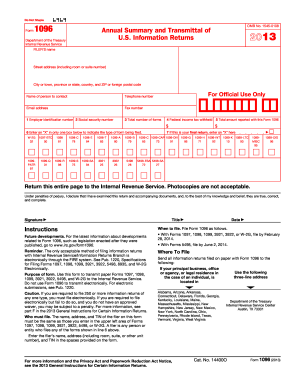
Nalty. For more information, see part F in the 2013 General Instructions for Certain Information Returns. Who must file. The name, address, and TIN of the filer on this form must be the same as those you enter in the upper left area of Forms 1097, 1098, 1099, 3921, 3922, 5498, or W-2G. A filer is any person or entity who files any of the forms shown in line 6 above. Enter the filer s name, address (including room, suite, or other unit number), and TIN in the spaces provided on the form. Date.

This website is not affiliated with IRS

How it works

  1. Open form

    Open form follow the instructions

  2. Easily sign form

    Easily sign the form with your finger

  3. Share form

    Send filled & signed form or save

How to fill out the IRS 1096 online

Filling out the IRS 1096 form online is an essential step when transmitting certain information returns. This guide will walk you through each component of the form to ensure accuracy and compliance.

Follow the steps to accurately complete and submit Form 1096 online.

  1. Press the ‘Get Form’ button to access the necessary version of the IRS 1096 form online.
  2. Enter the filer's name, street address (including room or suite number), city or town, province or state, country, and ZIP or foreign postal code in the designated fields.
  3. Provide the name and contact information of the person to contact regarding this form, including their telephone number, email address, and fax number.
  4. Indicate the Employer Identification Number (EIN) or the Social Security Number (SSN) in Boxes 1 or 2, using the appropriate one for your situation.
  5. In Box 3, enter the total number of correctly completed forms you are transmitting with the IRS 1096. Do not include any blank or voided forms.
  6. For Box 4, insert the total federal income tax withheld as shown on the submitted forms.
  7. Fill in Box 5 with the total amount reported associated with the Forms 1097, 1098, 1099, etc., as required, ensuring correct calculations based on figures from the individual forms.
  8. Mark the appropriate box in section 6 to indicate the type of form(s) being transmitted.
  9. If this is your final return, indicate this by placing an 'X' in the designated box.
  10. Review all entries for accuracy. Once completed, save your changes, then download, print, or share the form as necessary.

Complete and submit your IRS 1096 electronically for a smooth filing experience.

Get form

Experience a faster way to fill out and sign forms on the web. Access the most extensive library of templates available.

Related content

About Form 1096, Annual Summary and Transmittal of...
Jun 6, 2025 — Use Form 1096 to transmit paper Forms 1097, 1098, 1099, 3921, 3922, 5498...
Learn more
1096 Form 2024: Essential Guide to Filing and...
The form is used to report various types of income, including nonemployee compensation...
Learn more
Form 3921 (Rev. October 2017)
Caution: Because paper forms are scanned during processing, you cannot file Forms 1096...
Learn more

Related links form

IRS 940-PR 2012 IRS 940-PR 2011 IRS 941 2019 IRS 941 2018

Questions & Answers

Get answers to your most pressing questions about US Legal Forms API.

Contact support

Yes, you can download and print Form 1096 directly from the IRS website or platforms like USLegalForms. Once downloaded, you can print the form for completion. Just make sure to use the latest version of the form to avoid any issues. Having a physical copy allows for easier tracking and filing as you manage your tax documentation.

No, the IRS 1096 is still required for paper filings of certain information returns, such as 1099 forms. While electronic filing options are increasingly popular, the need for the 1096 form remains for specific circumstances. It's vital to stay informed about IRS regulations to ensure compliance. Always consult platforms like USLegalForms for the latest updates and resources.

Yes, you can fill out the IRS 1096 by hand, but ensure you write clearly and legibly. This traditional method is acceptable as long as each field is completed accurately. However, using e-filing software can reduce mistakes and save you time. If you choose to fill it out by hand, double-check your entries before submission.

To file a 1096 electronically with the IRS, begin by using a compatible e-filing software that supports 1096 submissions. Enter the required information accurately, following the software’s prompts. After verifying your entries, your software will generate and transmit the 1096 form directly to the IRS. This method offers an efficient way to fulfill your filing requirements.

Yes, you must still file the IRS 1096 along with the 1099-NEC when you submit paper copies of these forms to the IRS. The IRS 1096 acts as a cover sheet for the submissions, helping the IRS process them efficiently. It's important to ensure this form is included with your filings to avoid any delays. Utilizing resources like USLegalForms can help keep your documents organized.

You can obtain the IRS Form 1096 directly from the IRS website, where it is available for download. Additionally, USLegalForms offers easy access to this form, complete with instructions on how to fill it out. This platform simplifies the process, ensuring you have the accurate forms you need for your filing. Always obtain your forms from reliable sources to avoid complications.

The IRS 1096 serves as a summary transmittal form for paper filings of certain types of information returns, such as 1099 forms. It provides the IRS with a comprehensive overview of the data you report about payments made to others. Essentially, it ensures proper tracking and reconciliation by the IRS. Understanding its use is critical for compliance and handling your tax obligations.

To file the IRS 1096 electronically, you need to use an IRS-approved e-filing software. Start by completing your 1099 forms and then use the software to submit those along with the 1096 form electronically. This process streamlines your filing and reduces the risk of errors. Make sure to keep copies of all submissions for your records.

To fill out the IRS 1096 form, gather all your 1099 forms and ensure you have the necessary information, including the total amount reported. Follow the instructions provided on the form carefully, entering accurate details in the required sections. Utilizing platforms like US Legal Forms can simplify this process and ensure compliance with IRS regulations.

The main difference is that a 1099 form reports specific income details for individuals or entities, while a 1096 form serves as a summary for these 1099s when submitted to the IRS. The IRS 1096 does not report income directly; instead, it consolidates the data from the 1099s you have filed. Understanding this distinction is vital for accurate tax reporting.

Get This Form Now!

Use professional pre-built templates to fill in and sign documents online faster. Get access to thousands of forms.
If you believe that this page should be taken down, please follow our DMCA take down processhere.
Get IRS 1096
  • Adoption
  • Bankruptcy
  • Contractors
  • Divorce
  • Home Sales
  • Employment
  • Identity Theft
  • Incorporation
  • Landlord Tenant
  • Living Trust
  • Name Change
  • Personal Planning
  • Small Business
  • Wills & Estates
  • Packages A-Z
  • Affidavits
  • Bankruptcy
  • Bill of Sale
  • Corporate - LLC
  • Divorce
  • Employment
  • Identity Theft
  • Internet Technology
  • Landlord Tenant
  • Living Wills
  • Name Change
  • Power of Attorney
  • Real Estate
  • Small Estates
  • Wills
  • All Forms
  • Forms A-Z
  • Other Templates
  • Legal Hub
  • About Us
  • Help Portal
  • Legal Resources
  • Blog
  • Affiliates
  • Contact Us
  • Delete My Account
  • Site Map
  • Industries
  • Forms in Spanish
  • Localized Forms
  • State-specific Forms
  • Forms Kit
  • Real Estate Handbook
  • All Guides
  • Notarize
  • Incorporation services
  • For Consumers
  • For Small Business
  • For Attorneys
  • USLegal
  • FormsPass
  • pdfFiller
  • signNow
  • altaFlow
  • DocHub
  • Instapage
Form Packages
  • Adoption
  • Bankruptcy
  • Contractors
  • Divorce
  • Home Sales
  • Employment
  • Identity Theft
  • Incorporation
  • Landlord Tenant
  • Living Trust
  • Name Change
  • Personal Planning
  • Small Business
  • Wills & Estates
  • Packages A-Z
Form Categories
  • Affidavits
  • Bankruptcy
  • Bill of Sale
  • Corporate - LLC
  • Divorce
  • Employment
  • Identity Theft
  • Internet Technology
  • Landlord Tenant
  • Living Wills
  • Name Change
  • Power of Attorney
  • Real Estate
  • Small Estates
  • Wills
  • All Forms
  • Forms A-Z
  • Other Templates
Customer Service
  • Legal Hub
  • About Us
  • Help Portal
  • Legal Resources
  • Blog
  • Affiliates
  • Contact Us
  • Delete My Account
  • Site Map
  • Industries
  • Forms in Spanish
  • Localized Forms
  • State-specific Forms
  • Forms Kit
Legal Guides
  • Real Estate Handbook
  • All Guides
Prepared for you
  • Notarize
  • Incorporation services
Our Customers
  • For Consumers
  • For Small Business
  • For Attorneys
Our Sites
  • USLegal
  • FormsPass
  • pdfFiller
  • signNow
  • altaFlow
  • DocHub
  • Instapage
Social Media
Call us now toll free:
+1 833 426 79 33
As seen in:
© Copyright 1999-2026 airSlate Legal Forms, Inc. 17 Station Street, Ste. 203, Brookline, MA 02445
  • Your Privacy Choices
  • Terms of Service
  • Privacy Notice
  • Content Takedown Policy
  • Bug Bounty Program
IRS 1096
This form is available in several versions.
Select the version you need from the drop-down list below.
2024 IRS 1096
Select form
  • 2024 IRS 1096
  • 2022 IRS 1096
  • 2019 IRS 1096 _test_kw
  • 2018 IRS 1096
  • 2017 IRS 1096
  • 2016 IRS 1096
  • 2015 IRS 1096
  • 2014 IRS 1096
  • 2013 IRS 1096
  • 2012 IRS 1096
  • 2011 IRS 1096
  • 2010 IRS 1096
  • 2009 IRS 1096
  • 2008 IRS 1096
  • 2003 IRS 1096
  • 2000 IRS 1096
  • 1999 IRS 1096
  • 1958 IRS 1096
  • 1096
Select form