Loading
Form preview
  • US Legal Forms
  • Other Templates
  • Tax Forms
  • Executive Department Treasury IRS Forms
  • Irs 1040 - Schedule Se 2015

Get Irs 1040 - Schedule Se 2015

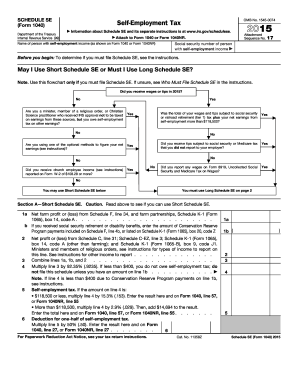
E 57, or Form 1040NR, line 55 . . . . . . . Deduction for one-half of self-employment tax. Multiply line 5 by 50% (.50). Enter the result here and on Form 1040, line 27, or Form 1040NR, line 27 . . . . . . . . 6 For Paperwork Reduction Act Notice, see your tax return instructions. Cat. No. 11358Z 1a 1b ( ) 2 3 4 5 Schedule SE (Form 1040) 2015 Page 2 Schedule SE (Form 1040) 2015 Attachment Sequence No. 17 Name of person with self-employment income (as shown on Form 1040 or Form 1040NR.

This website is not affiliated with IRS

How it works

  1. Open form

    Open form follow the instructions

  2. Easily sign form

    Easily sign the form with your finger

  3. Share form

    Send filled & signed form or save

How to fill out the IRS 1040 - Schedule SE online

Filling out the IRS 1040 - Schedule SE is essential for individuals with self-employment income to calculate their self-employment tax. This guide will help you navigate the form with clear, step-by-step instructions designed for users of all experience levels.

Follow the steps to fill out the IRS 1040 - Schedule SE.

  1. Click ‘Get Form’ button to acquire the IRS 1040 - Schedule SE form and open it in the editing mode.
  2. Begin by entering your name and social security number in the designated fields for the person with self-employment income.
  3. Determine whether you need to use the Short Schedule SE or the Long Schedule SE by following the initial flowchart instructions on the form.
  4. If using the Short Schedule SE, fill out Section A by entering your net farm profit or loss, net profit or loss from sole proprietorships, and any applicable adjustments.
  5. Calculate your self-employment tax based on the instructions provided in Section A. If applicable, report it on Form 1040, line 57.
  6. If using the Long Schedule SE, move to Section B and complete all the required fields in Part I, following the detailed guidelines for reporting your earnings.
  7. In Part II of the Long Schedule SE, decide if you are eligible to apply optional methods to calculate your net earnings, and input the relevant figures as per the instructions.
  8. Once all sections are complete, review the entered information for accuracy before proceeding to save, download, print, or share the form as needed.

Take the next step in your tax preparation by completing the IRS 1040 - Schedule SE online.

Get form

Experience a faster way to fill out and sign forms on the web. Access the most extensive library of templates available.

Related content

Schedule SE (Form 1040) - Prior Year Products
Results 1 - 74 of 74 - Form 1040 (Schedule SE), Self-Employment Tax, 2015. Inst 1040...
Learn more
(PDF) SCHEDULE SE (Form 1040) Self-Employment Tax...
2015 Attachment Internal Revenue Service (99) ? Attach to Form 1040 or Form ... 11358Z...
Learn more

Related links form

IRS 1120 - Schedule D 2009 IRS 1120 - Schedule D 1994 IRS 1120 - Schedule G 2011 IRS 1120 - Schedule G 2010

Questions & Answers

Get answers to your most pressing questions about US Legal Forms API.

Contact support

To show exempt income on your tax return, you'll need to clearly specify it on the IRS 1040 - Schedule SE and provide the necessary documentation. Make sure to differentiate it from taxable income to avoid overreporting. Using professional services, such as those offered by USLegalForms, can ensure that your exempt income is presented correctly.

To report notary public income, you will first gather all documentation of your earnings. Then, report this income on IRS 1040 - Schedule SE, ensuring it is categorized properly under self-employment income. If you need assistance with documentation or reporting, consider using the USLegalForms platform to simplify the process.

The IRS sets specific income thresholds for optional methods on Schedule SE, which may change annually. Generally, these methods allow self-employed individuals with lower income to simplify their tax reporting. It's important to stay updated on these limits to ensure compliance with IRS regulations.

Calculating Schedule SE involves determining your total net earnings from self-employment, which is reported on your IRS Form 1040. You will need to complete the SE form to figure out your self-employment tax owed. For a straightforward guidance, consider utilizing resources from USLegalForms for accurate calculations.

When you encounter exempt notary income, it requires special attention during tax filing. Typically, you will report it on the IRS 1040 - Schedule SE but indicate its exempt status appropriately. Utilizing platforms like USLegalForms can help streamline this process, ensuring you report accurately.

Certain types of notary income may be exempt from taxation, including income from specific government services or various states' regulations. However, to ensure accurate reporting, carefully assess your earnings against IRS guidelines. When filing your income on the IRS 1040 - Schedule SE, listing these exemptions properly is crucial.

To calculate your self-employment tax, you start by determining your net earnings from self-employment. Use IRS 1040 - Schedule SE to report your income and apply the self-employment tax rate to that figure. Additionally, remember you can deduct half of your self-employment tax when calculating your adjusted gross income.

Exempt notary income refers to income earned by notaries that is not subject to self-employment tax. Generally, this income may relate to certain government positions or services performed under state law. Understanding this concept is important when filling out the IRS 1040 - Schedule SE, as it can significantly impact tax calculations.

You record self-employment income by documenting it in Schedule C on your IRS 1040. List all your earnings and any related business expenses to determine your net income. Accuracy in this recording is vital, and tools like US Legal Forms can assist in ensuring everything is completed correctly.

Schedule SE is submitted as an attachment to your main IRS 1040 form. This schedule specifically calculates your self-employment tax based on the income reported on Schedule C. Ensuring that Schedule SE is correctly attached will help you avoid potential tax issues.

Get This Form Now!

Use professional pre-built templates to fill in and sign documents online faster. Get access to thousands of forms.
If you believe that this page should be taken down, please follow our DMCA take down processhere.
Get IRS 1040 - Schedule SE
  • Adoption
  • Bankruptcy
  • Contractors
  • Divorce
  • Home Sales
  • Employment
  • Identity Theft
  • Incorporation
  • Landlord Tenant
  • Living Trust
  • Name Change
  • Personal Planning
  • Small Business
  • Wills & Estates
  • Packages A-Z
  • Affidavits
  • Bankruptcy
  • Bill of Sale
  • Corporate - LLC
  • Divorce
  • Employment
  • Identity Theft
  • Internet Technology
  • Landlord Tenant
  • Living Wills
  • Name Change
  • Power of Attorney
  • Real Estate
  • Small Estates
  • Wills
  • All Forms
  • Forms A-Z
  • Other Templates
  • Legal Hub
  • About Us
  • Help Portal
  • Legal Resources
  • Blog
  • Affiliates
  • Contact Us
  • Delete My Account
  • Site Map
  • Industries
  • Forms in Spanish
  • Localized Forms
  • State-specific Forms
  • Forms Kit
  • Real Estate Handbook
  • All Guides
  • Notarize
  • Incorporation services
  • For Consumers
  • For Small Business
  • For Attorneys
  • USLegal
  • FormsPass
  • pdfFiller
  • signNow
  • altaFlow
  • DocHub
  • Instapage
Form Packages
  • Adoption
  • Bankruptcy
  • Contractors
  • Divorce
  • Home Sales
  • Employment
  • Identity Theft
  • Incorporation
  • Landlord Tenant
  • Living Trust
  • Name Change
  • Personal Planning
  • Small Business
  • Wills & Estates
  • Packages A-Z
Form Categories
  • Affidavits
  • Bankruptcy
  • Bill of Sale
  • Corporate - LLC
  • Divorce
  • Employment
  • Identity Theft
  • Internet Technology
  • Landlord Tenant
  • Living Wills
  • Name Change
  • Power of Attorney
  • Real Estate
  • Small Estates
  • Wills
  • All Forms
  • Forms A-Z
  • Other Templates
Customer Service
  • Legal Hub
  • About Us
  • Help Portal
  • Legal Resources
  • Blog
  • Affiliates
  • Contact Us
  • Delete My Account
  • Site Map
  • Industries
  • Forms in Spanish
  • Localized Forms
  • State-specific Forms
  • Forms Kit
Legal Guides
  • Real Estate Handbook
  • All Guides
Prepared for you
  • Notarize
  • Incorporation services
Our Customers
  • For Consumers
  • For Small Business
  • For Attorneys
Our Sites
  • USLegal
  • FormsPass
  • pdfFiller
  • signNow
  • altaFlow
  • DocHub
  • Instapage
Social Media
Call us now toll free:
+1 833 426 79 33
As seen in:
© Copyright 1999-2026 airSlate Legal Forms, Inc. 17 Station Street, Ste. 203, Brookline, MA 02445
  • Your Privacy Choices
  • Terms of Service
  • Privacy Notice
  • Content Takedown Policy
  • Bug Bounty Program
IRS 1040 - Schedule SE
This form is available in several versions.
Select the version you need from the drop-down list below.
2021 IRS 1040 - Schedule SE
Select form
  • 2021 IRS 1040 - Schedule SE
  • 2020 IRS 1040 - Schedule SE
  • 2019 IRS 1040 - Schedule SE
  • 2018 IRS 1040 - Schedule SE
  • 2017 IRS 1040 - Schedule SE
  • 2016 IRS 1040 - Schedule SE
  • 2015 IRS 1040 - Schedule SE
  • 2014 IRS 1040 - Schedule SE
  • 2013 IRS 1040 - Schedule SE
  • 2012 IRS 1040 - Schedule SE
  • 2011 IRS 1040 - Schedule SE
  • 2010 IRS 1040 - Schedule SE
Select form