Loading
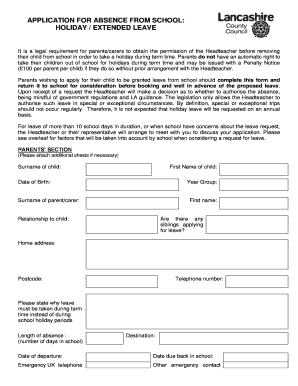
Get Application For Absence From School: Holiday / Extended Leave It Is A Legal Requirement For
How it works
-

Open form follow the instructions
-

Easily sign the form with your finger
-

Send filled & signed form or save
How to fill out the APPLICATION FOR ABSENCE FROM SCHOOL: HOLIDAY / EXTENDED LEAVE online
Completing the application for absence from school due to a holiday or extended leave is essential for parents and guardians. This guide will help you navigate the process effectively to ensure that your request is submitted correctly.
Follow the steps to complete your absence application accurately.
- Click ‘Get Form’ button to access the application form and open it in your preferred editor.
- Fill in the surname and first name of the child, along with their date of birth and year group. This information is crucial for identifying the student requesting leave.
- Complete the section for the parent or carer by providing their surname, first name, and relationship to the child. This ensures that the school knows who to contact regarding the application.
- Indicate if there are any siblings applying for leave. This may influence the decision made by the Headteacher regarding the family's circumstances.
- Provide the home address, postcode, and telephone number for contact purposes. This information is vital for the school to reach out if necessary.
- Clearly state the reason why the leave must be taken during term time instead of during school holiday periods. This explanation should be as specific and detailed as possible.
- Specify the length of the absence in days, alongside the destination, date of departure, and date due back in school. Accurate dates help the school with scheduling.
- Include emergency contact information, both in the UK and any other emergency contact details if the leave falls outside the UK. This is important for the safety of the child while away.
- If applicable, fill in the employer details and provide evidence of work commitments that prevent taking leave during school holidays.
- Sign and date the application to confirm that all information provided is accurate and true.
- Once completed, review the application for any errors or missing information. After ensuring everything is accurate, save changes or print for submission to the school.
Submit your completed application online to ensure a timely review of your leave request.
Related links form
Reasons can include studying abroad, medical conditions, death in the family, or other emergencies. They can last anywhere from a few weeks to a few years. In terms of Leaves related to mental health, schools have different policies and procedures depending on the circumstances.
Industry-leading security and compliance
US Legal Forms protects your data by complying with industry-specific security standards.
-
In businnes since 199725+ years providing professional legal documents.
-
Accredited businessGuarantees that a business meets BBB accreditation standards in the US and Canada.
-
Secured by BraintreeValidated Level 1 PCI DSS compliant payment gateway that accepts most major credit and debit card brands from across the globe.