Loading
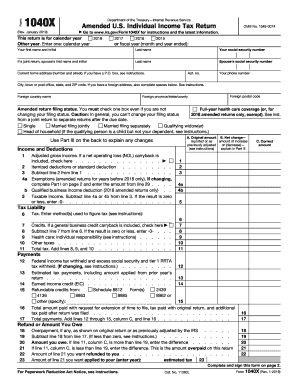
Get Irs 1040-x 2019
This website is not affiliated with IRS
How it works
-

Open form follow the instructions
-

Easily sign the form with your finger
-

Send filled & signed form or save
How to fill out the IRS 1040-X online
Filing an amended return can be a vital step in correcting your tax information. This guide provides clear, step-by-step instructions on how to complete the IRS 1040-X form online to ensure a smooth process.
Follow the steps to successfully complete your IRS 1040-X online.
- Click the ‘Get Form’ button to obtain the form and open it in your preferred editing tool.
- Indicate the tax year for which you are amending your return by selecting the appropriate option provided on the form.
- Fill in your personal information including your first name, last name, and social security number. If filing jointly, include your partner’s information as well.
- Provide your current home address, including city, state, and ZIP code, ensuring all details are accurate.
- Select your amended return filing status by checking one of the available boxes, ensuring to follow the guidance for any applicable changes.
- In the income and deductions section, input the original amounts and the net changes for each line as necessary.
- Calculate your tax liability by properly entering amounts for each line and ensuring any applicable credits are included.
- In the payments section, list any federal income tax withheld, estimated tax payments, and refundable credits.
- Complete the refund or amount you owe section by calculating overpayments or amounts due, based on your entries.
- In the second part of the form, update any information regarding exemptions and dependents, marking any changes from your original return.
- Provide an explanation of the changes in Part III, detailing the reasons for filing the amended return.
- Once all sections are filled, sign the form where indicated, including your occupation and date.
- Review your completed form for accuracy, then save your changes. You may choose to print, download, or share the finalized document.
Take the next step in managing your tax documents by completing your IRS 1040-X online today.
Get form
Experience a faster way to fill out and sign forms on the web. Access the most extensive library of templates available.
If you did not receive your recovery rebate credit, it could be due to a few reasons, such as eligibility requirements not being met or errors in your previous tax return. Review your IRS 1040-X for accuracy and ensure you properly calculated your credit. If you still have questions, consider using US Legal Forms to find additional resources and guidance on how to address your concerns.
Get This Form Now!
Use professional pre-built templates to fill in and sign documents online faster. Get access to thousands of forms.