Loading
Form preview
  • US Legal Forms
  • Other Templates
  • Tax Forms
  • Executive Department Treasury IRS Forms
  • Irs 8880 2019

Get Irs 8880 2019

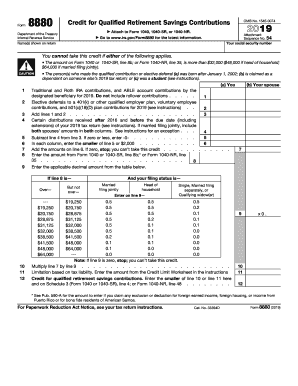
Using, or income from Puerto Rico or for bona fide residents of American Samoa. For Paperwork Reduction Act Notice, see your tax return instructions. Cat. No. 33394D Form 8880 (2018) Page 2 Form 8880 (2018) General Instructions Section references are to the Internal Revenue Code. What s New Designated beneficiary Achieving a Better Life Experience (ABLE) account contributions. Beginning in 2018, as part of a provision contained in the Tax Cuts and Jobs Act of 2017, a retirement savings.

This website is not affiliated with IRS

How it works

  1. Open form

    Open form follow the instructions

  2. Easily sign form

    Easily sign the form with your finger

  3. Share form

    Send filled & signed form or save

How to fill out the IRS 8880 online

Filing the IRS 8880 form enables users to claim the retirement savings contributions credit, also known as the saver’s credit. This guide provides clear, step-by-step instructions to assist users in accurately completing this form online.

Follow the steps to successfully fill out the IRS 8880 online.

  1. Press the ‘Get Form’ button to access the IRS 8880 form and open it in the respective editor.
  2. Enter your social security number in the designated field at the top of the form.
  3. Fill in the names shown on your tax return in the appropriate section.
  4. For line 1, enter the total contributions made to traditional and Roth IRAs for 2019, excluding rollover contributions.
  5. On line 2, record any elective deferrals made to a 401(k) or other qualified employer plan in the same year.
  6. Add the amounts from lines 1 and 2 and enter the total on line 3.
  7. If you received qualified distributions after 2016 and before the due date of your 2019 tax return, enter the total on line 4.
  8. Subtract line 4 from line 3 and enter the result on line 5. If this amount is zero or less, enter 0.
  9. On line 6, enter the smaller amount between line 5 and $2,000 for each column if filing jointly.
  10. Add the amounts from line 6 together. If this total is zero, you cannot take the credit.
  11. Input the amount from Form 1040 or 1040-SR, line 8b; or Form 1040-NR, line 35 on line 8.
  12. Use the referenced table to determine the decimal amount to enter on line 9 based on the amount from line 8 and your filing status.
  13. Multiply the amount on line 7 by the decimal amount from line 9, and enter this on line 10.
  14. Refer to the Credit Limit Worksheet to calculate the limitation based on your tax liability and enter the result on line 11.
  15. Finally, enter the smaller amount from line 10 or line 11 on line 12 and ensure it's included on your respective Form 1040 or 1040-SR.
  16. After completing the form, save your changes, download it, print it, or share it as needed.

Start completing the IRS 8880 form online today to claim your retirement savings contributions credit!

Get form

Experience a faster way to fill out and sign forms on the web. Access the most extensive library of templates available.

Related content

Credit for Qualified Retirement Savings...
Use Form 8880 to figure the amount, if any, of your retirement savings ... Also enter this...
Learn more
Form 8880, credit for qualified retirement savings...
Form 8880, credit for qualified retirement savings contributions. Online. Available...
Learn more
2016 Publication 560
Jan 26, 2017 — To take the credit, use Form 8880, Credit for Qualified Re tirement...
Learn more

Related links form

PH Security Bank Savings Home Loan Application PH SSS MAT-2 1999 PH Annex B Taxpayer-User's Sworn Statement PH BIR 1901 Part II

Questions & Answers

Get answers to your most pressing questions about US Legal Forms API.

Contact support

To fill out IRS Form 8880 effectively, gather your income information and details about your retirement account contributions. Follow the form's specific sections, which guide you through the calculations needed for your tax credit. If needed, utilize resources such as US Legal Forms to ensure accuracy and completeness during the process. Completing this form correctly can lead to significant financial benefits.

Yes, the Saver's Credit can potentially increase your tax refund if you qualify. It directly reduces your tax liability based on the contributions you made to eligible retirement accounts, reflecting on your tax return. By filing IRS Form 8880, you can calculate the exact amount of credit you can receive. Therefore, it could positively impact your overall tax outcome.

To qualify for the Saver's Credit as indicated on IRS Form 8880, you must meet specific income criteria and have made contributions to an eligible retirement account. This includes plans such as IRAs or 401(k)s. Additionally, your filing status and other tax conditions may affect your eligibility. Checking eligibility is crucial, and platforms like US Legal Forms can help clarify these requirements.

You can choose to skip IRS Form 8880 if you do not wish to claim the Saver's Credit. However, if you have made contributions to retirement accounts and qualify for the credit, skipping this form means you may miss out on valuable tax savings. Always assess your eligibility before deciding. Consult resources like US Legal Forms for detailed assistance regarding this form.

Yes, by contributing to your 401(k), you may qualify for a tax credit through IRS Form 8880. This credit reduces your tax bill, encouraging savings for retirement. The amount of credit you receive depends on your income and contribution level. Therefore, it is important to file Form 8880 correctly to take full advantage of the benefits.

You are not required to file IRS Form 8880 unless you want to claim the Saver's Credit. If your contributions to eligible retirement accounts qualify and you want to receive the credit, then completing this form is necessary. Always consider your financial situation and consult a tax professional if you're unsure. Filing this form can potentially lead to tax savings.

Filling out IRS Form 8880 involves several straightforward steps. Start by entering your personal information and the amounts you contributed to your retirement accounts. Next, you will follow the instructions provided to determine your credit amount based on your income level and filing status. If you need assistance, platforms like US Legal Forms can guide you through the process.

To claim the retirement savings credit, also known as the Saver's Credit, you need to complete IRS Form 8880. This form helps calculate your eligible credit based on your contributions to retirement accounts. Make sure you meet the income requirements and contributed to an eligible plan, such as a 401(k) or an IRA. Once you file your tax return, you can attach this form to ensure you receive your credit.

To delete form 8880 from TurboTax, you can navigate through your completed tax return. Look for the IRS 8880 form under your forms or review section, and select the option to remove it. If you face any challenges, TurboTax support offers comprehensive help to guide you through the process. Managing your forms correctly ensures your tax return remains accurate and efficient.

You should fill out form 8880 if you believe you qualify for the Saver's credit based on your retirement contributions and income. If you meet the eligibility criteria, completing the form can lead to potential tax savings. It's always a good practice to evaluate your financial situation and determine whether this credit can benefit you. Utilizing resources like uslegalforms can simplify the filling process.

Get This Form Now!

Use professional pre-built templates to fill in and sign documents online faster. Get access to thousands of forms.
If you believe that this page should be taken down, please follow our DMCA take down processhere.
Get IRS 8880
  • Adoption
  • Bankruptcy
  • Contractors
  • Divorce
  • Home Sales
  • Employment
  • Identity Theft
  • Incorporation
  • Landlord Tenant
  • Living Trust
  • Name Change
  • Personal Planning
  • Small Business
  • Wills & Estates
  • Packages A-Z
  • Affidavits
  • Bankruptcy
  • Bill of Sale
  • Corporate - LLC
  • Divorce
  • Employment
  • Identity Theft
  • Internet Technology
  • Landlord Tenant
  • Living Wills
  • Name Change
  • Power of Attorney
  • Real Estate
  • Small Estates
  • Wills
  • All Forms
  • Forms A-Z
  • Other Templates
  • Legal Hub
  • About Us
  • Help Portal
  • Legal Resources
  • Blog
  • Affiliates
  • Contact Us
  • Delete My Account
  • Site Map
  • Industries
  • Forms in Spanish
  • Localized Forms
  • State-specific Forms
  • Forms Kit
  • Real Estate Handbook
  • All Guides
  • Notarize
  • Incorporation services
  • For Consumers
  • For Small Business
  • For Attorneys
  • USLegal
  • FormsPass
  • pdfFiller
  • signNow
  • altaFlow
  • DocHub
  • Instapage
Form Packages
  • Adoption
  • Bankruptcy
  • Contractors
  • Divorce
  • Home Sales
  • Employment
  • Identity Theft
  • Incorporation
  • Landlord Tenant
  • Living Trust
  • Name Change
  • Personal Planning
  • Small Business
  • Wills & Estates
  • Packages A-Z
Form Categories
  • Affidavits
  • Bankruptcy
  • Bill of Sale
  • Corporate - LLC
  • Divorce
  • Employment
  • Identity Theft
  • Internet Technology
  • Landlord Tenant
  • Living Wills
  • Name Change
  • Power of Attorney
  • Real Estate
  • Small Estates
  • Wills
  • All Forms
  • Forms A-Z
  • Other Templates
Customer Service
  • Legal Hub
  • About Us
  • Help Portal
  • Legal Resources
  • Blog
  • Affiliates
  • Contact Us
  • Delete My Account
  • Site Map
  • Industries
  • Forms in Spanish
  • Localized Forms
  • State-specific Forms
  • Forms Kit
Legal Guides
  • Real Estate Handbook
  • All Guides
Prepared for you
  • Notarize
  • Incorporation services
Our Customers
  • For Consumers
  • For Small Business
  • For Attorneys
Our Sites
  • USLegal
  • FormsPass
  • pdfFiller
  • signNow
  • altaFlow
  • DocHub
  • Instapage
Social Media
Call us now toll free:
+1 833 426 79 33
As seen in:
© Copyright 1999-2026 airSlate Legal Forms, Inc. 17 Station Street, Suite 303, Brookline, MA 02445
  • Your Privacy Choices
  • Terms of Service
  • Privacy Notice
  • Content Takedown Policy
  • Bug Bounty Program
IRS 8880
This form is available in several versions.
Select the version you need from the drop-down list below.
2024 IRS 8880
Select form
  • 2024 IRS 8880
  • 2022 IRS 8880
  • 2021 IRS 8880
  • 2020 IRS 8880
  • 2019 IRS 8880
  • 2018 IRS 8880
  • 2017 IRS 8880
  • 2016 IRS 8880
  • 2015 IRS 8880
  • 2003 IRS 8880
  • Form 880
Select form