Loading
Get Ucr Extension Iep Parental Or Guardian Release Form
How it works
-

Open form follow the instructions
-

Easily sign the form with your finger
-

Send filled & signed form or save
How to fill out the UCR Extension IEP Parental Or Guardian Release Form online
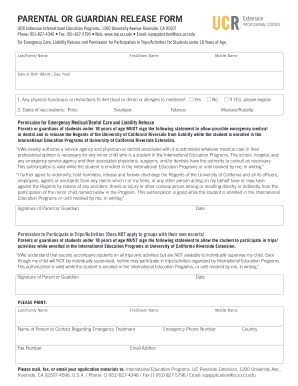
Filling out the UCR Extension IEP Parental or Guardian Release Form online is a straightforward process designed to ensure that your child's participation in various programs is adequately documented. This guide will walk you through each section of the form, providing clear instructions to help you complete it with confidence.
Follow the steps to effectively fill out the form online.
- Click the ‘Get Form’ button to access the form and open it in your preferred editor.
- Begin by entering the student’s last or family name in the appropriate field, followed by their first and middle names.
- Provide the date of birth in the format of month, day, and year.
- Indicate whether there are any physical handicaps, dietary restrictions, or allergies by selecting 'Yes' or 'No'. If 'Yes', provide further details in the space provided.
- Enter the dates of vaccinations for Polio, Smallpox, Tetanus, and Measles/Rubella in the corresponding fields.
- In the 'Permission for Emergency Medical/Dental Care and Liability Release' section, ensure that you read the statement carefully before signing it. This section must be signed by the parent or guardian, and the date should be filled in appropriately.
- Continue to the 'Permission to Participate in Trips/Activities' section. Read the statement and sign as the parent or guardian, adding the date.
- Next, fill in the contact details for emergency treatment, including the last or family name, first name, the name of a contact person, their fax number, emergency phone number, country, and email address.
- Review the completed form for accuracy and ensure that all required fields are filled out.
- Once you are satisfied with the information provided, save any changes made to the form. You may download, print, or share the form as needed.
Complete your documents online today for a smooth submission process!
Related links form
Your UCR net ID can usually be found in your admission documentation or by logging into your student portal. This ID is essential for accessing online resources and services provided by the university. If you are filling out the UCR Extension IEP Parental Or Guardian Release Form, having your net ID will help streamline your experience.