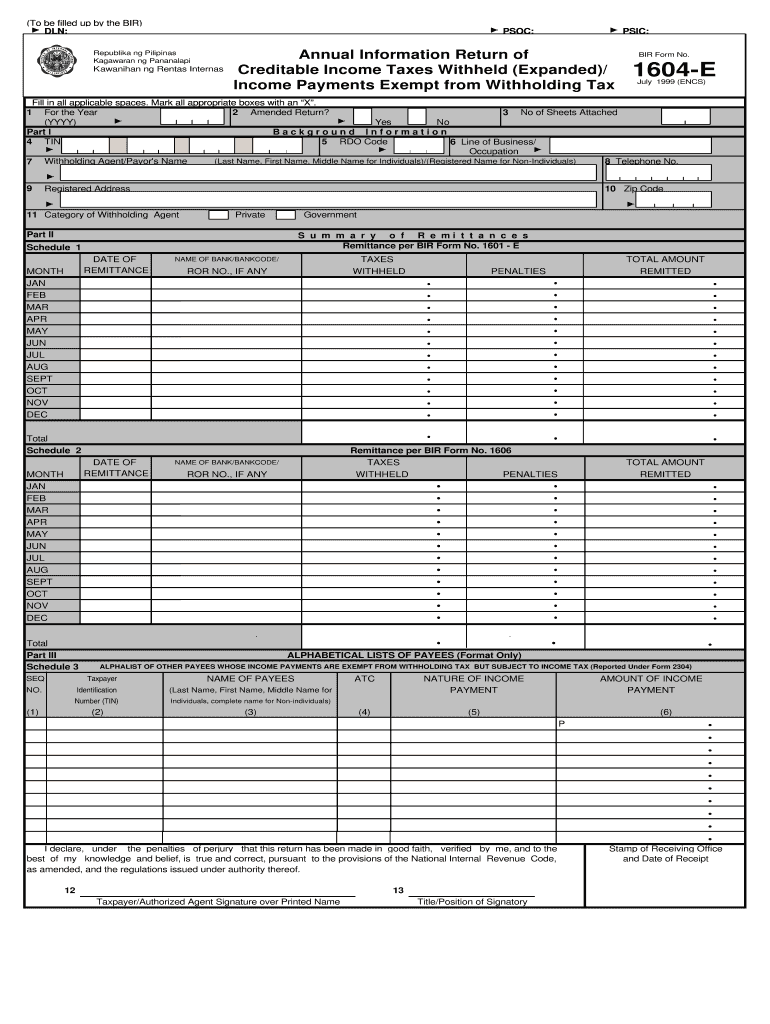
Ed)/ Income Payments Exempt from Withholding Tax BIR Form No. 1604-E July 1999 (ENCS) Fill in all applicable spaces. Mark all appropriate boxes with an “X”. 1 For the Year 2 Amended Return? 3 No of Sheets Attached (YYYY) Yes No Part I Background Information 4 TIN 5 RDO Code 6 Line of Business/ Occupation (Last Name, First Name, Middle Name for Individuals)/(Registered Name for Non-Individuals) 8 Telephone No. 7 Withholding Agent/Payor's Name 9 Registered Address 10 Zip Code 11 Category.

Open form follow the instructions

Easily sign the form with your finger

Send filled & signed form or save
How to fill out the PH BIR 1604-E online
The PH BIR 1604-E form is an annual information return designed for reporting creditable income taxes withheld and income payments exempt from withholding tax. This guide provides step-by-step instructions on filling out this form online, ensuring users can complete their submissions efficiently and accurately.
Follow the steps to complete the form with confidence.
- Click ‘Get Form’ button to obtain the form and open it in your preferred digital document editor.
- Begin by entering the year in Box 1. Ensure you record the correct transaction year instead of the date of filing.
- Check the box for 'Amended Return?' in Box 2 if applicable, otherwise mark it as ‘No.’
- Count and enter the number of sheets you are attaching in Box 3.
- In Part I, fill in the withholding agent/payor's name in Box 7, using either the last name, first name, and middle name for individuals, or the registered name for non-individuals.
- Enter the Taxpayer Identification Number (TIN) in Box 4. The last three digits of the 12-digit TIN refer to the branch code.
- In Box 5, input the Revenue District Office (RDO) code.
- Fill in your line of business or occupation in Box 6.
- Input your telephone number in Box 8.
- Enter the registered address in Box 9 and the zip code in Box 10.
- Select the category of withholding agent (private or government) in Box 11.
- Proceed to Part II and document the details of remittances in Schedule 1, ensuring to include the date of remittance, name of bank, and taxes withheld.
- Continue to Schedule 2, where you will summarize the total amount remitted and any penalties, if applicable.
- In Schedule 3, provide an alphabetical list of payees whose payments are exempt from withholding tax.
- In Schedule 4, list the alphalist of payees subject to expanded withholding tax. Make sure to report using the correct taxpayer identification number and nature of income payment.
- Review all entered information for accuracy. Once confirmed, you can choose to save your changes, download, print, or share the completed form.
Start filling out the PH BIR 1604-E online today to ensure timely and accurate compliance.
Experience a faster way to fill out and sign forms on the web. Access the most extensive library of templates available.
Related content
by C Willson · 2018 · Cited by 27 — Pulmonary hypertension (PH) is characterized by...
... BIR Form No. 1604CF and BIR No. 1604E shall be immediately discontinued beginning...
If you experience any of the above symptoms, get out into fresh air immediately. The best...
Get answers to your most pressing questions about US Legal Forms API.
What is the deadline for filing form 1604E?
The deadline for filing Form 1604E is generally set for January 31 each year. This allows you a complete month to gather all necessary data and fulfill your filing requirements. Staying ahead of this deadline reduces stress and ensures compliance with the BIR.
How to submit alphalist thru e-submission?
To submit your alphalist via e-submission, you must first format your data according to BIR's requirements. Following that, log into the BIR e-Filing system to complete and upload your alphalist. This method simplifies the filing process and helps ensure timely and correct submission.
How to prepare 1604E?
Preparing Form 1604E involves gathering relevant income and deduction data for the year. Utilize software platforms like US Legal Forms, which can guide you through the preparation process with templates and detailed instructions. Make sure to review the guidelines from the BIR to ensure all information is accurately captured.
Who is required to file an alphalist?
Any taxpayer subject to tax withholding is required to file an alphalist of employees or payees. This could include companies, businesses, and other entities that disburse compensation. Creating an accurate alphalist helps to maintain transparency and compliance with BIR regulations.
What is the difference between 1604C and 1604E?
The key difference between 1604C and 1604E lies in their purpose. Form 1604C is used for compensation payment reporting, while Form 1604E focuses on the annual income tax return for non-individual taxpayers. Understanding this distinction is essential for ensuring you file the correct forms for your situation.
Who is required to file 1604C?
Individuals and businesses that withhold tax on compensation payments must file Form 1604C. This includes employers who must report taxes withheld from employee salaries. Be sure to review your specific circumstances or consult with a tax professional to confirm your obligations.
What is the deadline to send out tax forms?
The deadline to send out tax forms related to the PH BIR 1604-E typically falls on January 31 of the following year. This gives you ample time to compile necessary information for accurate reporting. Ensure you check for any updates or specific guidance from the BIR to avoid missing changes.
Who is required to file BIR form 1701?
The BIR form 1701 must be filed by individuals earning income, including self-employed individuals and professionals. This form captures income, deductions, and tax payments, ensuring accurate reporting to the BIR. Filing your taxes correctly is critical for compliance and avoiding penalties. Utilizing platforms such as uslegalforms can facilitate this process, helping you submit your form without hassle.
Who is required to submit an alphalist?
Employers and withholding agents who withhold taxes from employee compensation must submit an alphalist. This comprehensive list includes the details of employees and the corresponding amounts withheld. Submitting this accurately helps you avoid penalties and maintain transparency with the BIR. Consider using uslegalforms to simplify the preparation of your alphalist.
How much is the penalty for late filing of an alphalist?
Penalties for late filing of an alphalist can vary, but they typically include interest charges and possible fixed penalties set by the BIR. Timeliness is essential in reducing these costs, as late submissions can lead to increased scrutiny from the tax authority. It’s wise to be proactive and use resources like uslegalforms to ensure you maintain compliance and file on time.
Use professional pre-built templates to fill in and sign documents online faster. Get access to thousands of forms.
If you believe that this page should be taken down, please follow our DMCA take down process here.