Loading
Form preview
  • US Legal Forms
  • Form Library
  • Foreign Forms
  • Foreign Philippines Other Forms
  • Ph Sss Cld-9n 1974

Get Ph Sss Cld-9n 1974-2026

Her reason (s) ______________________________________________________________________________________________ 4. COMPANY HAS NO WAY OF VERIFYING THE SICKNESS BECAUSE: He/she notified us only upon returning to work on _______________ Company has no physician The place of confinement was in ____________________ which is ___________ kms. away Company ID Number ____________________ MEDICAL EVALUATION Sign Here _______________________________________________ PRINTED NAME & Signature of Company .

How it works

  1. Open form

    Open form follow the instructions

  2. Easily sign form

    Easily sign the form with your finger

  3. Share form

    Send filled & signed form or save

How to fill out the PH SSS CLD-9N online

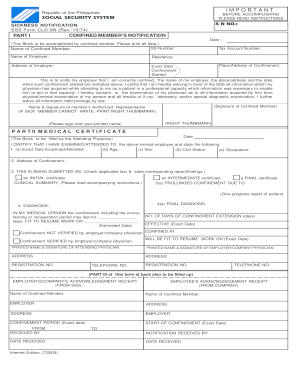
The PH SSS CLD-9N is a crucial form used for notifying the Social Security System about a member's sickness or confinement. This guide provides a clear, step-by-step approach to accurately complete this form online, ensuring that all necessary information is properly submitted.

Follow the steps to fill out the PH SSS CLD-9N online effectively.

  1. Press the ‘Get Form’ button to access the PH SSS CLD-9N document and open it for editing.
  2. In Part I, enter the date of the notification. This should be filled out by the confined member. Ensure all information is printed clearly, including the member's SS number, full name, and the employer's name.
  3. Fill in the residence address of the confined member as well as the employer's address, including the tax account number associated with the employer.
  4. Indicate the exact date when the confinement started and provide the address where the confinement is taking place.
  5. Acknowledge and sign the participation consent regarding medical information. The confined member must sign below the certification statement. If the member cannot write, an authorized representative can fill this out, providing their printed name and a thumb mark.
  6. In Part II, the attending physician will complete the medical certificate section by providing the examination date, the age, sex, civil status, and occupation of the confined member.
  7. The physician should also indicate the exact address of confinement and specify whether this is an initial, final, or intermediate certificate by checking the appropriate box.
  8. Proceed to detail the diagnosis and the expected duration of confinement, along with the estimated date the member will be fit to resume work.
  9. Ensure the printed name and signature of both the attending physician and the employer/company physician are included, along with their respective addresses and registration numbers.
  10. Once all parts of the form are complete, review the information for accuracy. Users can save amendments, download, print the completed form, or opt to share it for submission.

Complete your PH SSS CLD-9N form online swiftly to ensure timely processing of your sickness notification.

Get form

Experience a faster way to fill out and sign forms on the web. Access the most extensive library of templates available.
Get form

Related content

The Characterization of Modified Starch Branching...
by C Li · 2015 · Cited by 40 — SSS is primarily responsible for the elongation of...
Learn more
Results of observations with the nine-inch transit...
by WS Eichelberger · 1920 · Cited by 3 — ADS Classic is now deprecated. It will be...
Learn more
AFS FUNDAMENTAL CON~BPT~ AND SYSTEM ...
Mar 15, 1971 — This is the third eJitioll ot th~ APS logical architectULe by the...
Learn more

Related links form

Edumbe Municipality Vacancies CSD515 Energy Service Agreement For Rental Units - Community ... - Capoc Employee Direct Deposit Form 2020 Rule 716

Questions & Answers

Get answers to your most pressing questions about US Legal Forms API.

Contact support

SSS PH stands for the Social Security System in the Philippines, designed to provide social insurance and support to workers. This includes various benefits such as sickness, maternity, and disability benefits essential for safeguarding your well-being. It plays a crucial role under the PH SSS CLD-9N in ensuring workers receive necessary assistance during difficult times. To make the most of these benefits, familiarize yourself with SSS services and resources they offer.

The amount you receive from SSS sickness benefits is based on your average daily salary credit and the length of your illness. Generally, you can expect to receive about 90% of your average daily earnings during your sick leave. Understanding the PH SSS CLD-9N parameters will help you better estimate your potential benefits. For specific calculations and details, consult the SSS website or use resources like uslegalforms.

The processing time for an SSS disability claim can vary, typically taking around 30 to 60 days depending on the completeness of your submitted documents. The PH SSS CLD-9N outlines clear protocols to help streamline this process. To avoid delays, ensure you provide all necessary certifications and documentation. If you need further assistance, platforms like uslegalforms can help simplify your submission process.

To qualify for SSS sickness benefits, you must be a member actively contributing to the SSS fund and must have been hospitalized or unable to work due to medical reasons. The PH SSS CLD-9N stipulates specific eligibility criteria that must be met. If you are unsure about your status, it’s advisable to check with SSS or use uslegalforms, which provides guidance on the necessary requirements. Getting familiar with these can help you secure your benefits faster.

To contact SSS regarding your sickness benefit, you can visit their official website or reach out to their customer service line. They offer multiple ways to inquire and process claims conveniently. With the PH SSS CLD-9N in mind, make sure to have your documentation ready to speed up the process. For more tailored assistance, consider using platforms like uslegalforms to access needed forms and information.

SSS provides sickness benefits for a maximum of 120 days for each illness, covering a range of health issues. Under the PH SSS CLD-9N program, this period can significantly aid your recovery without financial strain. Ensure you follow the necessary procedures to receive your benefits in a timely manner. If you have further questions about your eligibility, consult with SSS or refer to their official guidelines.

SSS sickness notification is a formal process that informs the Social Security System about an employee's illness that affects their ability to work. This notification allows you to access benefits for medical absences covered under the PH SSS CLD-9N scheme. It's important to submit this notification promptly to avoid delays in receiving your benefits. Always check your eligibility and the specific requirements set by SSS.

The deadline for your SSS sickness benefit application is usually within one year from the first day of your sickness. It's essential to submit your notification and documents before this deadline to ensure eligibility. For added support, consider using resources like USLegalForms, which can guide you with the PH SSS CLD-9N.

You typically have five days from the onset of your illness to claim the SSS sickness benefit online. It’s crucial to submit your SSS sickness notification promptly to avoid delays. Utilizing the PH SSS CLD-9N can ensure that you lodge your claim within the required timeframe.

The Magna Carta leave provides special leave benefits to specific groups, such as female employees with medical conditions. On the other hand, the SSS sickness benefit aids eligible members during periods of illness by providing financial assistance. Understanding these benefits helps you maximize support available through the PH SSS CLD-9N process.

Get This Form Now!

Use professional pre-built templates to fill in and sign documents online faster. Get access to thousands of forms.
Get form
If you believe that this page should be taken down, please follow our DMCA take down processhere.

Industry-leading security and compliance

US Legal Forms protects your data by complying with industry-specific security standards.
  • In businnes since 1997
    25+ years providing professional legal documents.
  • Accredited business
    Guarantees that a business meets BBB accreditation standards in the US and Canada.
  • Secured by Braintree
    Validated Level 1 PCI DSS compliant payment gateway that accepts most major credit and debit card brands from across the globe.
Get PH SSS CLD-9N
Get form
  • Adoption
  • Bankruptcy
  • Contractors
  • Divorce
  • Home Sales
  • Employment
  • Identity Theft
  • Incorporation
  • Landlord Tenant
  • Living Trust
  • Name Change
  • Personal Planning
  • Small Business
  • Wills & Estates
  • Packages A-Z
  • Affidavits
  • Bankruptcy
  • Bill of Sale
  • Corporate - LLC
  • Divorce
  • Employment
  • Identity Theft
  • Internet Technology
  • Landlord Tenant
  • Living Wills
  • Name Change
  • Power of Attorney
  • Real Estate
  • Small Estates
  • Wills
  • All Forms
  • Forms A-Z
  • Form Library
  • Legal Hub
  • About Us
  • Help Portal
  • Legal Resources
  • Blog
  • Affiliates
  • Contact Us
  • Delete My Account
  • Site Map
  • Industries
  • Forms in Spanish
  • Localized Forms
  • State-specific Forms
  • Forms Kit
  • Real Estate Handbook
  • All Guides
  • Notarize
  • Incorporation services
  • For Consumers
  • For Small Business
  • For Attorneys
  • USLegal
  • FormsPass
  • pdfFiller
  • signNow
  • altaFlow
  • DocHub
  • Instapage
Form Packages
  • Adoption
  • Bankruptcy
  • Contractors
  • Divorce
  • Home Sales
  • Employment
  • Identity Theft
  • Incorporation
  • Landlord Tenant
  • Living Trust
  • Name Change
  • Personal Planning
  • Small Business
  • Wills & Estates
  • Packages A-Z
Form Categories
  • Affidavits
  • Bankruptcy
  • Bill of Sale
  • Corporate - LLC
  • Divorce
  • Employment
  • Identity Theft
  • Internet Technology
  • Landlord Tenant
  • Living Wills
  • Name Change
  • Power of Attorney
  • Real Estate
  • Small Estates
  • Wills
  • All Forms
  • Forms A-Z
  • Form Library
Customer Service
  • Legal Hub
  • About Us
  • Help Portal
  • Legal Resources
  • Blog
  • Affiliates
  • Contact Us
  • Delete My Account
  • Site Map
  • Industries
  • Forms in Spanish
  • Localized Forms
  • State-specific Forms
  • Forms Kit
Legal Guides
  • Real Estate Handbook
  • All Guides
Prepared for you
  • Notarize
  • Incorporation services
Our Customers
  • For Consumers
  • For Small Business
  • For Attorneys
Our Sites
  • USLegal
  • FormsPass
  • pdfFiller
  • signNow
  • altaFlow
  • DocHub
  • Instapage
Social Media
Call us now toll free:
+1 833 426 79 33
As seen in:
© Copyright 1999-2026 airSlate Legal Forms, Inc. 3720 Flowood Dr, Flowood, Mississippi 39232
  • Your Privacy Choices
  • Terms of Service
  • Privacy Notice
  • Content Takedown Policy
  • Bug Bounty Program