Get Pa Rev-1705 R 2017-2026
How it works
-

Open form follow the instructions
-

Easily sign the form with your finger
-

Send filled & signed form or save
How to fill out the PA REV-1705 R online
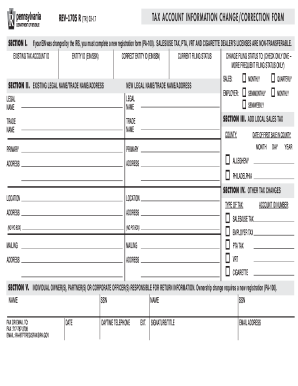
The PA REV-1705 R is a crucial form for reporting changes in tax account information, including entity ID updates and filing status modifications. This guide will provide you with clear, step-by-step instructions to assist you in completing the form online.
Follow the steps to successfully complete the PA REV-1705 R form.
- Click the ‘Get Form’ button to obtain the form and open it in your editor.
- In Section I, enter your existing tax account ID number and correct entity ID (EIN/SSN) if applicable. Remember, if the IRS has changed your EIN, you will need to complete a new registration form (PA-100).
- Move to Section II to update your existing legal/trade name and address if any changes are necessary. Ensure the primary location is accurate and avoid using a post office box for physical addresses.
- In Section III, report any local sales tax changes if your business has opened in Allegheny or Philadelphia counties. Enter the date of the first sale for these counties if applicable.
- For Section IV, check the appropriate box if you are changing information for other taxes and include the corresponding account ID number(s).
- Section V requires information about the individual owner(s), partner(s), or corporate officer(s) responsible for return information. Provide all details necessary, particularly if there have been changes in ownership requiring a new PA-100 registration.
- Lastly, sign and date the form, including a daytime telephone number and your title. Once completed, you can fax it to 717-787-3708 or email it to RA-BTFTREGISFAX@PA.GOV.
- After finalizing your entries, ensure to save the changes, and if needed, download, print, or share the completed form for your records.
Complete your PA REV-1705 R form online today to ensure your tax account information is accurate and up to date.
When writing a check to the PA Department of Revenue, begin by making it out to the 'Pennsylvania Department of Revenue'. Include your name and address on the front, along with your Social Security number or tax identification number in the memo line. Make sure the amount is accurate and send it along with any required tax forms, such as the PA REV-1705 R. This ensures that your payment is processed correctly.