Loading
Form preview
  • US Legal Forms
  • Other Templates
  • More Forms
  • More Multi-State Forms
  • Cornell University Emergency Care Fund Application

Get Cornell University Emergency Care Fund Application

How it works

  1. Open form

    Open form follow the instructions

  2. Easily sign form

    Easily sign the form with your finger

  3. Share form

    Send filled & signed form or save

How to fill out the Cornell University Emergency CARE Fund Application online

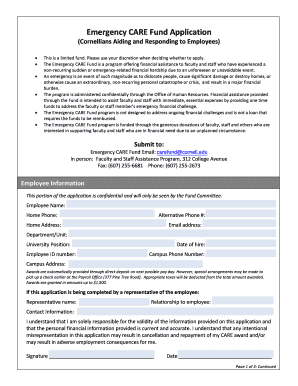
Navigating the Cornell University Emergency CARE Fund Application can be straightforward with the right guidance. This document provides a clear step-by-step approach to assist you in completing the application for financial support due to unexpected hardships.

Follow the steps to complete your application successfully.

  1. Press the ‘Get Form’ button to access the application and open it in your chosen platform.
  2. Fill in the employee information section, which includes your name, contact numbers, home address, email, department or unit, university position, employee ID number, date of hire, campus phone number, and campus address. Ensure that all information is accurate as it is confidential and essential for the Fund Committee.
  3. If you are completing the application on behalf of another person, provide the representative's name, relationship to the employee, and contact information.
  4. In the emergency description section, clearly detail the purpose of your request by describing the circumstances that led to the financial hardship. Be thorough and specific; you may attach additional sheets if necessary.
  5. Estimate the amount of financial assistance you need to address the immediate emergency. Be realistic and clear about your estimate.
  6. List any other agencies or organizations you have reached out to for assistance. Include details about any financial help already received.
  7. Indicate whether you expect any settlement or reimbursement related to your emergency and provide an estimate of that amount if applicable.
  8. Specify if you have an insurance policy that may cover the situation and note any deductible associated with that policy.
  9. Review your available funds; inform if you have savings or other accounts that could cover the immediate need.
  10. If your request is for a medical emergency, confirm whether you have exhausted your health and personal leave, and mention your eligibility for the catastrophic leave policy.
  11. Attach any required proof of the emergency, such as police or fire reports, a death certificate, or other relevant documents.
  12. Finally, carefully read the certification statement, sign and date the form to affirm the validity of your information.
  13. Upon completion, save your changes, download a copy for your records, and submit the application as instructed through email, fax, or in person.

Begin the application process online today to ensure your financial needs are addressed promptly.

Get form

Experience a faster way to fill out and sign forms on the web. Access the most extensive library of templates available.
Get form

Related content

Governor's Emergency Education Relief Fund...
The Department will award these grants to States (governor's offices) based on ... II...
Learn more
Employee Emergency CARE Fund - Cornell University...
The Employee Emergency CARE Fund offers grants of between $200-$1,500 to employees who...
Learn more
Aid - Wikipedia
In international relations, aid is – from the perspective of governments – a voluntary...
Learn more

Related links form

NY DTF ST-119.2-I 2013 NY DTF ST-119.2-I 2012 NY DTF ST-120 2018 NY DTF ST-120 2011

Questions & Answers

Get answers to your most pressing questions about US Legal Forms API.

Contact support

Princeton University Princeton University is the highest scoring Ivy League to make the top ten list of universities with the best financial aid packages.

Students who are admitted and have applied for financial aid and have demonstrated financial need will receive a financial aid package that meets 100% of their demonstrated financial need.

The Employee Emergency CARE Fund offers financial assistance to faculty and staff who have experienced a non-recurring sudden or emergency-related financial hardship due to an unforeseen or unavoidable event. It is funded almost entirely thanks to the generous donations of faculty and staff.

Financial Aid (grants, scholarships, work, and loans) – Cornell is proud to offer financial aid that meets your full financial need.

Cornell Financial Aid More students than ever are able to graduate from Cornell with little to no debt, and about half of all undergraduate students receive substantial financial aid in the form of Cornell grants — this is free money that does not need to be repaid.

The Access Fund provides enrolled full-time undergraduate, graduate, and professional Cornell students who qualify as low-income based on their financial aid package with up to $500 of financial support to help mitigate on-campus barriers, access basic necessities, and assist with unexpected expenses not covered ...

CALL 911 for any situation that requires IMMEDIATE police, fire, or medical response to preserve life or property. From cellular phones call Cornell Police at 607-255-1111 or use a Blue Light or indoor emergency phone.

Low Debt Burden Cornell caps the amount of loans a student can have based on their family's income. The mean debt at graduation among Cornell students who borrow is less than $24,000--substantially lower than the mean debt of $32,600 for all private college graduates.

Get This Form Now!

Use professional pre-built templates to fill in and sign documents online faster. Get access to thousands of forms.
Get form
If you believe that this page should be taken down, please follow our DMCA take down processhere.
Get Cornell University Emergency CARE Fund Application
Get form
  • Adoption
  • Bankruptcy
  • Contractors
  • Divorce
  • Home Sales
  • Employment
  • Identity Theft
  • Incorporation
  • Landlord Tenant
  • Living Trust
  • Name Change
  • Personal Planning
  • Small Business
  • Wills & Estates
  • Packages A-Z
  • Affidavits
  • Bankruptcy
  • Bill of Sale
  • Corporate - LLC
  • Divorce
  • Employment
  • Identity Theft
  • Internet Technology
  • Landlord Tenant
  • Living Wills
  • Name Change
  • Power of Attorney
  • Real Estate
  • Small Estates
  • Wills
  • All Forms
  • Forms A-Z
  • Other Templates
  • Legal Hub
  • About Us
  • Help Portal
  • Legal Resources
  • Blog
  • Affiliates
  • Contact Us
  • Delete My Account
  • Site Map
  • Industries
  • Forms in Spanish
  • Localized Forms
  • State-specific Forms
  • Forms Kit
  • Real Estate Handbook
  • All Guides
  • Notarize
  • Incorporation services
  • For Consumers
  • For Small Business
  • For Attorneys
  • USLegal
  • FormsPass
  • pdfFiller
  • signNow
  • altaFlow
  • DocHub
  • Instapage
Form Packages
  • Adoption
  • Bankruptcy
  • Contractors
  • Divorce
  • Home Sales
  • Employment
  • Identity Theft
  • Incorporation
  • Landlord Tenant
  • Living Trust
  • Name Change
  • Personal Planning
  • Small Business
  • Wills & Estates
  • Packages A-Z
Form Categories
  • Affidavits
  • Bankruptcy
  • Bill of Sale
  • Corporate - LLC
  • Divorce
  • Employment
  • Identity Theft
  • Internet Technology
  • Landlord Tenant
  • Living Wills
  • Name Change
  • Power of Attorney
  • Real Estate
  • Small Estates
  • Wills
  • All Forms
  • Forms A-Z
  • Other Templates
Customer Service
  • Legal Hub
  • About Us
  • Help Portal
  • Legal Resources
  • Blog
  • Affiliates
  • Contact Us
  • Delete My Account
  • Site Map
  • Industries
  • Forms in Spanish
  • Localized Forms
  • State-specific Forms
  • Forms Kit
Legal Guides
  • Real Estate Handbook
  • All Guides
Prepared for you
  • Notarize
  • Incorporation services
Our Customers
  • For Consumers
  • For Small Business
  • For Attorneys
Our Sites
  • USLegal
  • FormsPass
  • pdfFiller
  • signNow
  • altaFlow
  • DocHub
  • Instapage
Social Media
Call us now toll free:
+1 833 426 79 33
As seen in:
© Copyright 1999-2026 airSlate Legal Forms, Inc. 17 Station Street, Ste. 203, Brookline, MA 02445
  • Your Privacy Choices
  • Terms of Service
  • Privacy Notice
  • Content Takedown Policy
  • Bug Bounty Program