Loading
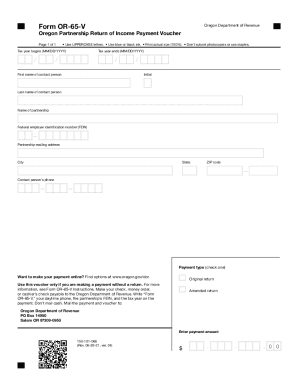
Get Or Or-65-v 2021
How it works
-

Open form follow the instructions
-

Easily sign the form with your finger
-

Send filled & signed form or save
How to use or fill out the OR OR-65-V online
Filling out the OR OR-65-V online is a straightforward process that helps partnerships submit their payment vouchers efficiently. This guide will lead you through each step, ensuring that you accurately complete the form.
Follow the steps to complete the OR OR-65-V online
- Click the ‘Get Form’ button to obtain the OR OR-65-V form and open it in your preferred editor.
- Fill in the tax year information in the format MM/DD/YYYY for both the beginning and ending dates. Make sure to double-check the accuracy of these dates.
- Enter the first name, initial, and last name of the contact person associated with the partnership. Ensure you use UPPERCASE letters for clarity.
- Provide the name of the partnership as it is officially registered. This must also be in UPPERCASE letters.
- Input the partnership's federal employer identification number (FEIN) accurately.
- Complete the partnership mailing address section, including the city, state, and ZIP code.
- Enter the contact person's phone number, ensuring it is correct and up-to-date.
- Select the type of payment by checking the appropriate box, either for an original return or an amended return.
- Indicate the payment amount using the provided format, ensuring that you separate dollars and cents correctly.
- After filling in all fields, review the form to confirm all information is accurate. You can then save changes, download, print, or share the completed form as needed.
Start completing your OR OR-65-V form online today for an efficient filing experience.
Get form
Experience a faster way to fill out and sign forms on the web. Access the most extensive library of templates available.
Get This Form Now!
Use professional pre-built templates to fill in and sign documents online faster. Get access to thousands of forms.