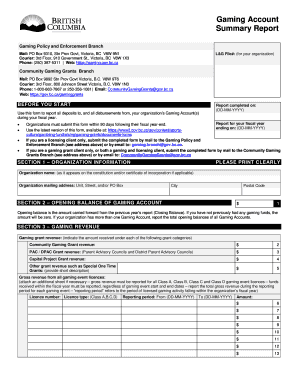
Get Canada Bc Gaming Account Summary Report 2017
How it works
-

Open form follow the instructions
-

Easily sign the form with your finger
-

Send filled & signed form or save
How to fill out the Canada BC Gaming Account Summary Report online
The Canada BC Gaming Account Summary Report is essential for organizations to report all deposits and disbursements from their gaming accounts during their fiscal year. This guide will walk you through the process of completing this report online with clarity and ease.
Follow the steps to successfully complete the report online.
- Click 'Get Form' button to obtain the form and open it for completion.
- Begin by filling out your organization’s information in Section 1. Provide the organization name, mailing address, city, and postal code, ensuring clarity and accuracy as it appears in official documents.
- In Section 2, enter the opening balance of your gaming account. This amount should reflect the closing balance from the previous year’s report.
- Proceed to Section 3 to detail your gaming revenue. Record the amounts for each grant category including community gaming grants and other types, ensuring to maintain a total for all revenue.
- For Section 4, report prize costs and expenses for licensed gaming events. Use the specific categories provided to ensure proper classification of costs.
- In Section 5, calculate the net gaming proceeds and disbursements from your gaming account, which will help in determining the total revenue available for disbursement.
- Complete Section 6 by noting the closing balance, which should align with your accounting records as this will carry over to the next report.
- Fill out Section 7 with your financial institution information and account balances, providing a complete overview of your gaming account status at the fiscal year end.
- If applicable, indicate the specific percentages retained as described in Section 8, ensuring all data on service clubs is accurate.
- In Section 9, briefly describe the community benefit from your organization’s gaming activities, limited to 200 words to remain concise.
- Finally, fill out Section 10 for certification. Ensure two board members sign the report, confirming the details are accurate and endorsed by the leadership.
- Upon completing all sections, users can save changes, download, print, or share the report as necessary.
Complete your Canada BC Gaming Account Summary Report online today to ensure your compliance and support your organization's financial transparency.
Get form
The BC gaming grant is financial assistance provided by the government of British Columbia to support nonprofit organizations in their activities. This grant is designed to aid community-based projects, including those in arts, culture, and sports. By utilizing resources such as the Canada BC Gaming Account Summary Report, organizations can effectively track their funding and expenditures. This summary report is instrumental in demonstrating accountability, ensuring that grants are used to their fullest potential.