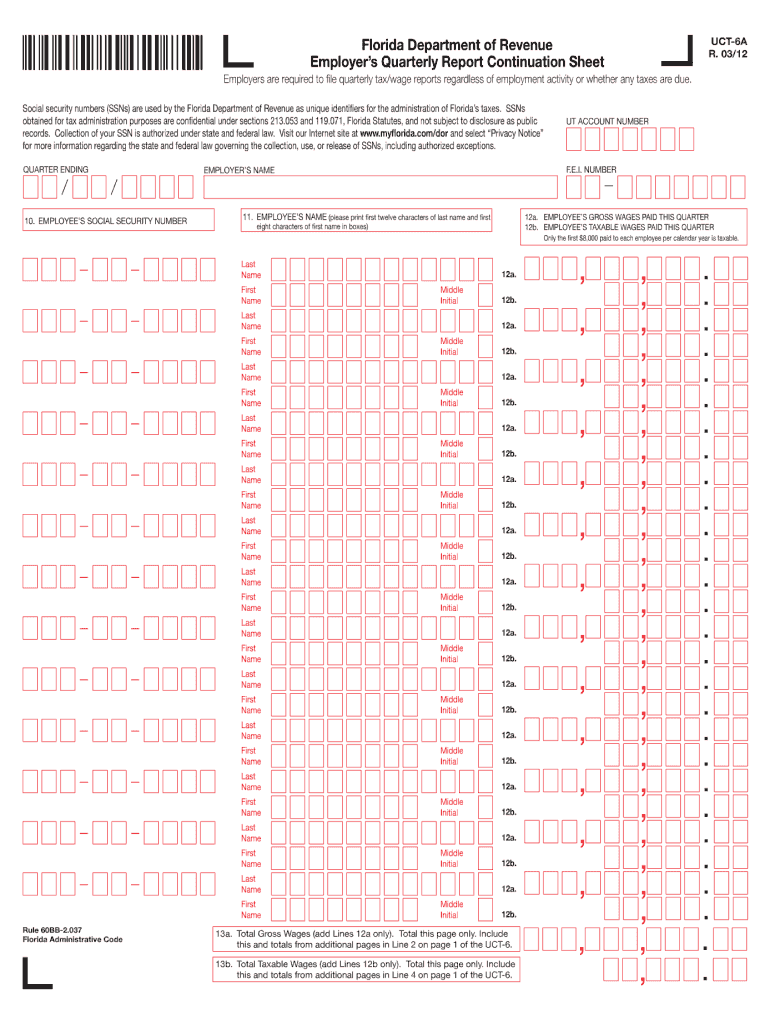
Florida Department of Revenue Employer's Quarterly Report Continuation Sheet Employers are required to file quarterly tax/wage reports regardless of employment activity or whether any taxes are due. Social.
Loading

Open form follow the instructions

Easily sign the form with your finger

Send filled & signed form or save
How to fill out the FL DoR UCT-6A online
Completing the FL DoR UCT-6A form online can streamline your document management process. This guide provides clear, step-by-step instructions to help you accurately fill out each section of the form, ensuring that you meet all requirements.
Follow the steps to complete the FL DoR UCT-6A form effectively.
- Click ‘Get Form’ button to obtain the form and open it in the designated editor.
- Review the top section of the form. This typically includes relevant details such as your name, address, and contact information. Ensure all required fields are completed accurately.
- Proceed to the middle section, which may ask for specific information related to your circumstances. Pay close attention to any criteria set out and fill in the requested data thoroughly.
- In the following part, there may be checkboxes or options to select. Carefully choose all applicable options or alternatives to accurately reflect your situation.
- At the end of the form, review all the information you have provided. Make necessary edits to ensure complete accuracy of your submission.
- Finally, save your changes, and choose to download, print, or share the completed FL DoR UCT-6A form as needed.
Complete your FL DoR UCT-6A form online today to ensure efficient document management.
Experience a faster way to fill out and sign forms on the web. Access the most extensive library of templates available.
Related content
Jun 3, 2011 — 8 If an insurer is claiming the salary tax credit, the insurer must submit...
Withholding Tax Forms ; Form WT-4 Spanish (Fill-in Form), Employee's Wisconsin Withholding...
The Digital Technical journal is a refereed journal published quarterly by Digital...
Get answers to your most pressing questions about US Legal Forms API.
What is the SUTA rate for Florida?
The SUTA rate for Florida can vary based on your business's specific circumstances and tax history. Currently, the Florida Department of Revenue provides guidelines on SUTA rates on its website and updates them annually. To navigate these complexities and ensure accurate reporting of your obligations, consider utilizing resources from USLegalForms to assist you with the FL DoR UCT-6A.
How is the SUTA rate determined?
The SUTA rate is determined based on several factors, including your business's history with unemployment claims and the overall economy of Florida. The Florida Department of Revenue assesses each employer's contribution rate periodically to ensure fair taxation for all businesses. Staying updated on your SUTA rate can help you accurately complete your FL DoR UCT-6A and maintain compliance.
Is Florida reemployment the same as unemployment?
Florida reemployment tax and unemployment benefits serve different purposes. The reemployment tax is a tax on employers to fund unemployment benefits for employees who lose their jobs. While both terms relate to employment, they address different aspects of the employment ecosystem; hence, knowing the difference can empower you in your filing processes, including the FL DoR UCT-6A.
How is Florida unemployment calculated?
Florida unemployment benefits are typically calculated based on your highest earning quarter within a specified base period. This figure is then divided by a set number to arrive at your weekly benefit amount. Understanding these calculations is vital, especially when preparing your FL DoR UCT-6A, as accurate benefits reporting is essential for compliance.
How to calculate Florida reemployment tax?
To calculate Florida reemployment tax, you need to determine your taxable wages and multiply that amount by the current SUTA rate. It's essential to stay informed about the changes in the rate, which the Florida Department of Revenue publishes regularly. Using tools available on platforms like USLegalForms can simplify this process and enhance your accuracy in filing the FL DoR UCT-6A.
What is a Florida UCT 6?
The Florida UCT 6 is a form used to report and remit sales tax to the Florida Department of Revenue. This form is essential for businesses that must comply with state tax regulations. By using the FL DoR UCT-6A, you ensure proper reporting of your sales and tax contributions. Be sure to understand your filing requirements and deadlines to avoid penalties.
How do I file Florida sales tax?
To file Florida sales tax, you need to gather your sales records and log into the Florida Department of Revenue (DoR) website. You will use the FL DoR UCT-6A form to report and submit your sales tax. Ensure that you complete the form accurately, including all necessary details about your sales and taxes collected. If you need assistance, consider using platforms like UsLegalForms to simplify the process.
What is a Florida roof certification?
A Florida roof certification is a document that confirms the condition and expected lifespan of a roof, typically needed for real estate transactions. It provides assurance to buyers and lenders regarding the roof's integrity. While this certification doesn’t directly relate to FL DoR UCT-6A, if you’re an employer in the construction industry, it’s essential for compliance and credibility in your assessments.
Who has to file Florida RT-6?
Any employer who pays wages in Florida is required to file the Florida RT-6 form, which is the Reemployment Tax Report. This includes businesses that have registered with the Florida Department of Revenue. If you have employees, you must ensure timely filing using the FL DoR UCT-6A form, which helps track your reemployment tax contributions.
How much is employer payroll tax in Florida?
Employer payroll tax rates in Florida can vary based on factors such as your company’s history of unemployment claims. Generally, this tax is a percentage of your overall taxable payroll. To find the current rates, consult the Florida Department of Revenue or reference the FL DoR UCT-6A form, which offers insights into your responsibilities as an employer.
Use professional pre-built templates to fill in and sign documents online faster. Get access to thousands of forms.
If you believe that this page should be taken down, please follow our DMCA take down process here.