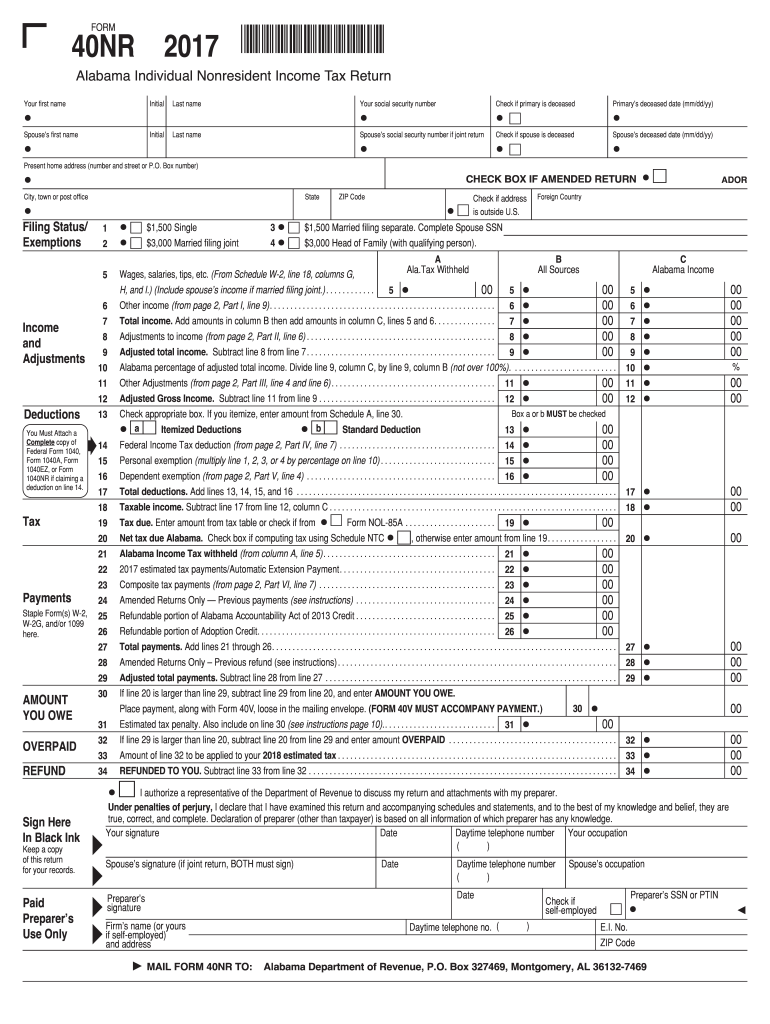
F primary is deceased Spouse s social security number if joint return Check if spouse is deceased Spouse s deceased date (mm/dd/yy) CHECK BOX IF AMENDED RETURN Present home address (number and street or P.O. Box number) City, town or post office Filing Status/ Exemptions State 1 2 5 6 7 8 9 10 11 12 13 Income and Adjustments Deductions You Must Attach a Complete copy of Federal Form 1040, Form 1040A, Form 1040EZ, or Form 104.

Open form follow the instructions

Easily sign the form with your finger

Send filled & signed form or save
How to fill out the AL DoR 40NR online
This guide provides detailed instructions on completing the Alabama Individual Nonresident Income Tax Return (AL DoR 40NR) online. By following these steps, users can efficiently fill out each section of the form, ensuring compliance and accuracy.
Follow the steps to complete the AL DoR 40NR online.
- Click ‘Get Form’ button to obtain the AL DoR 40NR form and open it in the editor.
- Fill in your first name, middle initial, and last name in the provided fields.
- If filing a joint return, enter your spouse’s first name, middle initial, and last name.
- Provide your social security number and check the box if the primary filer is deceased.
- If applicable, enter your spouse’s social security number and mark the box if they are deceased, along with the date of death.
- Check the box if you are filing an amended return.
- Enter your present home address, including the city and zip code.
- Select your filing status and exemptions according to your situation.
- Report your income and any adjustments as outlined in the income and deductions sections.
- Complete the tax payments section with details about any amounts withheld, payments made, and any estimation of payments.
- Sign and date the form, and include your daytime contact number and occupation.
- For joint returns, ensure that both parties sign the document.
- After ensuring that all fields are complete, save changes, and select options to download, print, or share the form.
Complete your AL DoR 40NR online today for a streamlined filing experience.
Experience a faster way to fill out and sign forms on the web. Access the most extensive library of templates available.
Related content
resident of Alabama during the same tax year must file both the Alabama Nonresident Form...
Objetivo : Verificar a relação entre distúrbio de voz e sintomas de disfunção...
Get answers to your most pressing questions about US Legal Forms API.
How to fill out a withholding allowance form?
To fill out a withholding allowance form, identify the number of withholding allowances you are eligible to claim. You’ll need to provide personal details and any additional factors that may affect your withholding. Always refer to the Alabama DoR guidelines when completing this form to ensure accuracy.
Can an Alabama amended return be filed electronically?
Yes, you can file an amended return electronically in Alabama through the Alabama DoR online platform. Filing electronically can speed up the review process and potentially lead to quicker refunds or adjustments. If you are uncertain about the process, consider using resources like uslegalforms, which offer useful tools for filing.
Where to mail form 1040NR?
Form 1040NR should be mailed to the address specified on the IRS website, depending on whether you are enclosing a payment or not. It is crucial to double-check this information to avoid delays. While this is a federal form, Alabama residents earning income as nonresidents should also refer to the state-specific requirements.
Do I have to file an Alabama nonresident tax return?
Yes, if you earn income in Alabama but do not reside there, you must file an Alabama nonresident tax return using Form 40NR. Filing this form ensures compliance with Alabama tax laws and helps manage your tax liabilities correctly. It's advisable to review your income sources to determine whether you need to file.
How to fill out a withholding exemption form?
To fill out a withholding exemption form, start by providing your personal information and the number of allowances you are claiming. List any additional withholding amounts if applicable. For Alabama, ensure to reference the relevant sections of the AL DoR to align with state requirements.
What are the special rules requirement for Form 40 and Form 40NR in Alabama?
Special rules exist for both forms regarding income sources and deductions. For example, nonresidents using Form 40NR can only claim income generated within Alabama. Understanding these rules can significantly impact your tax obligations, so it’s wise to consult a tax professional or visit uslegalforms for comprehensive guidance.
Where do I file Form 40NR in Alabama?
You can file Form 40NR with the Alabama Department of Revenue. It’s important to check the official Alabama DoR website for the most current mailing addresses. Electronic filing options may also be available, which offer a more efficient way to submit your nonresident return.
What is the difference between Form 40 and 40NR in Alabama?
Form 40 is designed for residents of Alabama who need to report their income, while Form 40NR is for nonresidents. If you do not live in Alabama but earn income in the state, you must file Form 40NR. Understanding these differences is essential for accurate tax reporting, and using the correct form helps you avoid penalties.
What tax form do I need for a non-resident?
For non-residents earning income in Alabama, the required tax form is the AL DoR 40NR. This form allows you to report income sourced from the state and settle your tax obligations effectively. Utilizing platforms like uslegalforms can help guide you through the filing process for this specific form.
Where do I file form 40 in Alabama?
You can file form 40 in Alabama with the Alabama Department of Revenue. Whether you choose to file online or submit a paper form, both options are available for your convenience. Filing the AL DoR 40NR through uslegalforms can simplify this process and help you stay organized.
Use professional pre-built templates to fill in and sign documents online faster. Get access to thousands of forms.
If you believe that this page should be taken down, please follow our DMCA take down process here.
This form is available in several versions. Select the version you need from the drop-down list below.