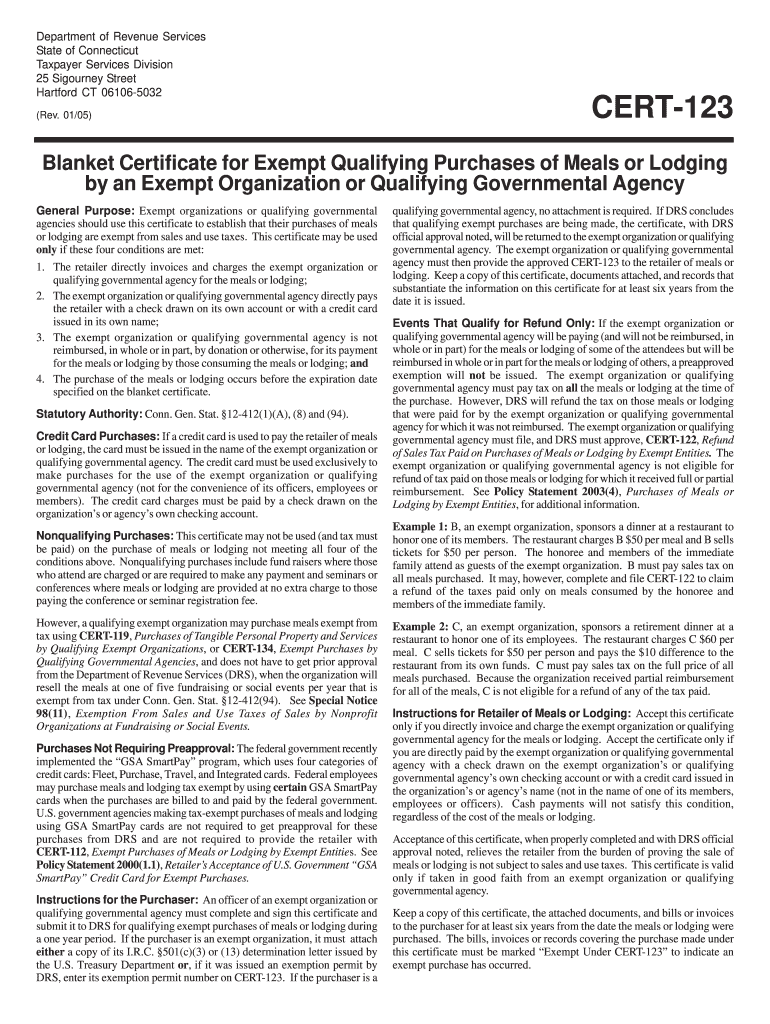
Odging using GSA SmartPay cards are not required to get preapproval for these purchases from DRS and are not required to provide the retailer with CERT-112, Exempt Purchases of Meals or Lodging by Exempt Entities. See Policy Statement 2000(1.1), Retailer s Acceptance of U.S. Government GSA SmartPay Credit Card for Exempt Purchases. Instructions for the Purchaser: An officer of an exempt organization or qualifying governmental agency must complete and sign this certificate and submit it t.
Loading

Open form follow the instructions

Easily sign the form with your finger

Send filled & signed form or save
How to fill out the CT DRS CERT-123 online
This guide provides detailed instructions on how to properly fill out the CT DRS CERT-123 form online. It is designed to be user-friendly and accessible for individuals regardless of their legal experience.
Follow the steps to complete the CT DRS CERT-123 online.
- Press the ‘Get Form’ button to access the form and open it in your editing tool.
- Indicate whether the form is for an exempt organization or a qualifying governmental agency by checking the appropriate box.
- Provide the federal employer identification number and address of the exempt organization or governmental agency.
- If applicable, enter the Connecticut exemption permit number. If not, attach the I.R.C. §501(c)(3) or (13) determination letter.
- Fill in the name and address of the retailer that will provide the meals or lodging.
- Check the boxes next to the types of service provided, either meals, lodging, or both.
- Describe the purpose or reason for the event, providing specific details about the occasion.
- Answer the questions regarding reimbursement and invoicing clearly with 'Yes' or 'No'.
- Complete the declaration section, affirming the conditions stated and ensuring all information is accurate.
- Sign and date the form where indicated, including your printed name, contact number, and title.
- Submit the completed form to the Department of Revenue Services for approval before use.
Complete your CT DRS CERT-123 online for efficient handling of qualifying exempt purchases.
Experience a faster way to fill out and sign forms on the web. Access the most extensive library of templates available.
Related content
General Purpose: Exempt organizations or qualifying governmental agencies should use this...
The exempt organization or qualifying governmental agency must file, and DRS must approve...
The qualifying exempt organization declares that the tangible personal property or taxable...
Get answers to your most pressing questions about US Legal Forms API.
Do Connecticut tax exempt certificates expire?
Yes, Connecticut tax-exempt certificates can expire if not renewed periodically. It's crucial to keep track of your certificate's validity and ensure it remains active to avoid unexpected sales tax charges. Using resources like CT DRS CERT-123 can assist you in managing your certificates effectively.
How to get a reseller certificate in CT?
To obtain a reseller certificate in Connecticut, you must fill out the application available from the Department of Revenue Services. You will need to provide information about your business, including your tax identification number. With CT DRS CERT-123, you can navigate the application process smoothly, ensuring you have all necessary documentation.
How to fill out a Connecticut registration and title application?
To fill out a Connecticut registration and title application, start with your vehicle information, including make, model, and year. Ensure you provide your personal details, such as your name and address accurately. It’s important to sign and date the application to confirm that all information is true. If you need more help, using CT DRS CERT-123 can clarify this process and make it easier.
What is an example of a tax exemption?
An example of a tax exemption could be a nonprofit organization purchasing supplies for charitable programs, thereby avoiding sales tax. This exemption ensures that funds go directly to their mission rather than tax liabilities. To understand various exemptions better, CT DRS CERT-123 provides a comprehensive overview that can be beneficial.
How to fill out an ST-120 form sample?
Filling out an ST-120 form can be simple when you have the right instructions. Enter your name, address, and the seller’s information clearly. You also need to indicate the items being purchased and provide the reason for the exemption. For a detailed example, consult the CT DRS CERT-123, which can guide you through each necessary step.
How to fill out a Connecticut resale certificate?
To fill out a Connecticut resale certificate, begin with your name and business details. Specify the nature of the goods you are purchasing and confirm that they are for resale. Don’t forget to include your Tax ID number and your signature to sign off on the document. Leveraging CT DRS CERT-123 will provide additional assistance during this task.
How to fill out a Texas sales and use tax resale certificate?
When completing a Texas sales and use tax resale certificate, start by entering your name, address, and the seller's details. Clearly identify the items you intend to resell and include your sales tax permit number. Your signature is crucial, as it verifies the information provided. CT DRS CERT-123 can serve as a useful reference throughout this procedure.
How to fill out a sales tax exemption certificate?
Filling out a sales tax exemption certificate is straightforward. Begin by providing your name and address, along with the seller’s information. Clearly state the reason for the exemption, and make sure to sign the form for authenticity. For more clarity, refer to CT DRS CERT-123 for best practices in completing this document.
How to fill out the ST3 form in Minnesota?
To fill out the ST3 form in Minnesota, you need to provide accurate information, starting with your name and address. Ensure you include a description of the items you are purchasing and the reason for the exemption. Do not forget to sign and date the form, as this validates your claim. Using CT DRS CERT-123 can help streamline the process by providing essential guidance.
How long is a Connecticut resale certificate good for?
In Connecticut, a resale certificate typically remains valid until it is revoked or the user ceases to operate their business. It is wise to regularly check the status and validity of all resale certificates you hold. Keeping your CT DRS CERT-123 and other documents organized will help ensure compliance and prevent unnecessary issues.
Use professional pre-built templates to fill in and sign documents online faster. Get access to thousands of forms.
If you believe that this page should be taken down, please follow our DMCA take down process here.