Loading
Form preview
  • US Legal Forms
  • Other Templates
  • Tax Forms
  • Connecticut Tax Forms
  • Ct Drs Cert-119 2004

Get Ct Drs Cert-119 2004-2026

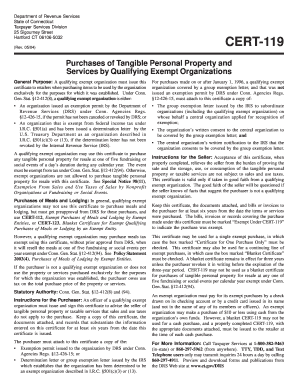
Vered by the group exemption letter; and The central organization s written notification to the IRS that the organization consents to be covered by the group exemption letter. Instructions for the Seller: Acceptance of this certificate, when properly completed, relieves the seller from the burden of proving the sale and the storage, use, or consumption of the tangible personal property or taxable services are not subject to sales and use taxes. This certificate is valid only if taken in go.

How it works

  1. Open form

    Open form follow the instructions

  2. Easily sign form

    Easily sign the form with your finger

  3. Share form

    Send filled & signed form or save

How to fill out the CT DRS CERT-119 online

The CT DRS CERT-119 is an important document for qualifying exempt organizations in Connecticut, allowing them to purchase tangible personal property and services without paying sales tax. This guide provides comprehensive, step-by-step instructions for filling out the form online, ensuring users can confidently complete it.

Follow the steps to successfully complete the CT DRS CERT-119 online

  1. Click ‘Get Form’ button to obtain the form and open it in the editor.
  2. Input the name of the purchaser in the designated field. This should be the official name of the qualifying exempt organization making the purchase.
  3. Fill in the address of the purchaser, ensuring that it matches the organization's registered address.
  4. Enter the CT Tax Registration Number in the space provided. This identifier is crucial for the tax exemption process.
  5. If applicable, include the exemption permit number. If the organization does not have an exemption permit, provide an explanation in the designated space.
  6. Provide the Federal Employer Identification Number (EIN) of the organization in the corresponding field.
  7. Next, input the name of the seller. This should be the name of the business or individual from whom the exempt purchase is being made.
  8. Fill in the seller's address, making sure it is accurate to prevent any delivery or communication issues.
  9. Enter the CT Tax Registration Number for the seller if available, along with their Federal Employer ID Number.
  10. Select the appropriate box to indicate whether this is a blanket certificate or a certificate for one purchase only.
  11. If applicable, note the number of prior fundraising or social events during the current calendar year for which exemption was claimed.
  12. Check the boxes for tangible personal property or taxable services, and provide a detailed description of each item purchased.
  13. The authorized person from the qualifying exempt organization must sign the certificate, print their name, and include their title and the date of signing.
  14. Once all the fields are completed, review the information for accuracy before saving your changes. You can then download, print, or share the completed form as needed.

Complete your CT DRS CERT-119 form online today to ensure your purchases are tax-exempt.

Get form

Experience a faster way to fill out and sign forms on the web. Access the most extensive library of templates available.
Get form

Related content

CERT-119
General Purpose: A qualifying exempt organization must issue this certificate to retailers...
Learn more
CERT-119, Purchases of Tangible Personal Property...
General Purpose: A qualifying exempt organization must issue this certificate to retailers...
Learn more
CT Exemption Certificate
M Blanket certificate (CERT-119 may not be used as a blanket certificate for purchases of...
Learn more

Related links form

NY DTF ET-85 2008 NY DTF ET-85-I 2012 NY DTF ET-90 2000 NY DTF FT-400/401 2017

Questions & Answers

Get answers to your most pressing questions about US Legal Forms API.

Contact support

The Cert 119 form, also known as the CT DRS CERT-119, is utilized to claim exemptions or benefits available for specific tax categories in Connecticut, particularly for seniors and people with special circumstances. This form simplifies the process of applying for tax relief in Connecticut. If you believe you qualify for exemptions or credits, completing the Cert 119 can be a crucial step. For accurate guidelines, always refer to the Connecticut Department of Revenue Services website.

In Connecticut, the taxation of Social Security benefits depends on your overall income level. If your combined income surpasses specific thresholds set by the IRS, a portion of your Social Security may be subject to taxation. It's helpful to consult the CT DRS resources for additional information regarding local tax policies. Having the CT DRS CERT-119 form handy can assist in understanding how your Social Security is affected.

Calculating the tax on your Social Security benefits involves determining your total income and applying specific guidelines from the IRS. Generally, if your provisional income exceeds a certain threshold, a portion of your benefits may be taxable. The CT DRS provides insight into how Connecticut taxes Social Security, which is valuable information when filling out forms, including the CT DRS CERT-119. For precise guidance, consider consulting with a tax professional.

Yes, Connecticut tax-exempt certificates can expire depending on the type of certificate issued. Businesses should regularly check their certificates to ensure they remain valid. For certain exemptions related to sales tax, it's crucial to be aware of the expiration dates outlined by the CT DRS. Utilizing the CT DRS CERT-119 form may help clarify any confusion regarding statuses.

In Connecticut, seniors may qualify for various tax breaks, including exemptions or credits that can reduce their property tax burden. One notable resource for understanding these breaks is the CT DRS CERT-119 form, which helps seniors apply for tax relief programs. By using this form, seniors can enjoy the benefits they deserve. Always check the latest guidelines from the Connecticut Department of Revenue Services for updates.

In Connecticut, a resale certificate is valid until it is canceled or is no longer relevant to your business operations. It is advisable to keep track of any changes in business status or ownership. Businesses should regularly review their CT DRS CERT-119 to ensure they meet all ongoing compliance requirements.

To obtain a CT sales tax number, you must register your business with the Connecticut Department of Revenue Services. The process involves completing an application and providing necessary documentation. Once registered, you will receive a sales tax number, which is essential for making purchases with the CT DRS CERT-119.

Tax-exempt status can indeed expire based on changes in circumstances or regulations. For instance, if your organization changes its purpose or structure, its tax-exempt status might be affected. Therefore, staying informed about the requirements surrounding documents like the CT DRS CERT-119 is vital for maintaining your tax-exempt status.

Yes, generally, you need a separate tax-exempt certificate for each state where you make tax-exempt purchases. Each state has its own requirements and forms, so it is important to research those specific details. To simplify your compliance, consider utilizing the CT DRS CERT-119 in Connecticut and ensuring you obtain similar certificates for other states.

To obtain a tax-exempt certificate in Connecticut, you need to fill out the CT DRS CERT-119 form and submit it to the Connecticut Department of Revenue Services. This form allows eligible organizations to make purchases without paying sales tax. Make sure to provide all required documentation to avoid delays in receiving your certificate.

Get This Form Now!

Use professional pre-built templates to fill in and sign documents online faster. Get access to thousands of forms.
Get form
If you believe that this page should be taken down, please follow our DMCA take down processhere.
Get CT DRS CERT-119
Get form
  • Adoption
  • Bankruptcy
  • Contractors
  • Divorce
  • Home Sales
  • Employment
  • Identity Theft
  • Incorporation
  • Landlord Tenant
  • Living Trust
  • Name Change
  • Personal Planning
  • Small Business
  • Wills & Estates
  • Packages A-Z
  • Affidavits
  • Bankruptcy
  • Bill of Sale
  • Corporate - LLC
  • Divorce
  • Employment
  • Identity Theft
  • Internet Technology
  • Landlord Tenant
  • Living Wills
  • Name Change
  • Power of Attorney
  • Real Estate
  • Small Estates
  • Wills
  • All Forms
  • Forms A-Z
  • Other Templates
  • Legal Hub
  • About Us
  • Help Portal
  • Legal Resources
  • Blog
  • Affiliates
  • Contact Us
  • Delete My Account
  • Site Map
  • Industries
  • Forms in Spanish
  • Localized Forms
  • State-specific Forms
  • Forms Kit
  • Real Estate Handbook
  • All Guides
  • Notarize
  • Incorporation services
  • For Consumers
  • For Small Business
  • For Attorneys
  • USLegal
  • FormsPass
  • pdfFiller
  • signNow
  • altaFlow
  • DocHub
  • Instapage
Form Packages
  • Adoption
  • Bankruptcy
  • Contractors
  • Divorce
  • Home Sales
  • Employment
  • Identity Theft
  • Incorporation
  • Landlord Tenant
  • Living Trust
  • Name Change
  • Personal Planning
  • Small Business
  • Wills & Estates
  • Packages A-Z
Form Categories
  • Affidavits
  • Bankruptcy
  • Bill of Sale
  • Corporate - LLC
  • Divorce
  • Employment
  • Identity Theft
  • Internet Technology
  • Landlord Tenant
  • Living Wills
  • Name Change
  • Power of Attorney
  • Real Estate
  • Small Estates
  • Wills
  • All Forms
  • Forms A-Z
  • Other Templates
Customer Service
  • Legal Hub
  • About Us
  • Help Portal
  • Legal Resources
  • Blog
  • Affiliates
  • Contact Us
  • Delete My Account
  • Site Map
  • Industries
  • Forms in Spanish
  • Localized Forms
  • State-specific Forms
  • Forms Kit
Legal Guides
  • Real Estate Handbook
  • All Guides
Prepared for you
  • Notarize
  • Incorporation services
Our Customers
  • For Consumers
  • For Small Business
  • For Attorneys
Our Sites
  • USLegal
  • FormsPass
  • pdfFiller
  • signNow
  • altaFlow
  • DocHub
  • Instapage
Social Media
Call us now toll free:
+1 833 426 79 33
As seen in:
© Copyright 1999-2026 airSlate Legal Forms, Inc. 17 Station Street, Suite 303, Brookline, MA 02445
  • Your Privacy Choices
  • Terms of Service
  • Privacy Notice
  • Content Takedown Policy
  • Bug Bounty Program