Loading

Open form follow the instructions

Easily sign the form with your finger

Send filled & signed form or save
How to fill out the AL DoR 40NR online
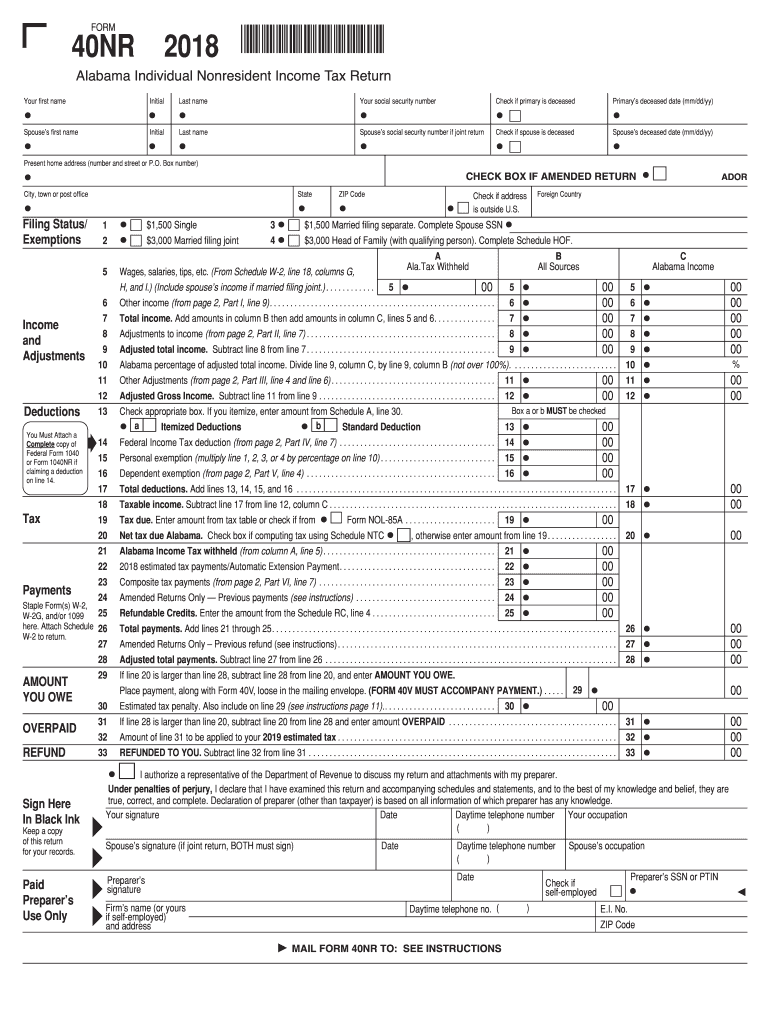
Filling out the AL DoR 40NR form is a crucial step for nonresidents seeking to file their Alabama state income tax returns. This guide provides a clear, step-by-step approach to completing the form online, ensuring all necessary information is accurately submitted.
Follow the steps to successfully complete the AL DoR 40NR online.
- Click ‘Get Form’ button to obtain the form and open it in the editor.
- Enter your personal details in the designated fields, including your first name, middle initial, and last name. Enter your social security number, ensuring that it is accurate.
- If applicable, check the box indicating if the primary filer is deceased and provide the date of death.
- Fill in your spouse's information if you are filing jointly. This includes their first name, middle initial, last name, and social security number. Check the box if your spouse is deceased and include the date.
- Provide your current home address, specifying the house number, street, city, state, and zip code. If you are filing an amended return, check the appropriate box.
- Select your filing status by checking the appropriate box for single, married filing joint, married filing separately, or head of family.
- Proceed to list your income and adjustments. You will need a complete copy of federal Form 1040 or Form 1040NR if claiming a deduction.
- Proceed with the deductions section, ensuring you specify whether you are taking itemized or standard deductions. Complete the calculations for taxable income.
- Review the total tax due and the amounts you may have already paid, including withholdings and estimated tax payments.
- If applicable, check for any refundable credits and ensure that totals are calculated accurately.
- In the last section, sign and date the form. Include your contact information and occupation, and provide your spouse's signature if filing jointly.
- Once completed, save your changes, download the form, and print a copy for your records. You may also share the completed form as required.
Complete your AL DoR 40NR form online today to ensure a smooth tax filing process.
Experience a faster way to fill out and sign forms on the web. Access the most extensive library of templates available.
Related content
resident of Alabama during the same tax year must file both the Alabama Nonresident Form...
Objetivo : Verificar a relação entre distúrbio de voz e sintomas de disfunção...
Get answers to your most pressing questions about US Legal Forms API.
What is the difference between Form 40 and 40NR in Alabama?
The main difference between Form 40 and 40NR lies in the residency status of the taxpayer. Form 40 is for Alabama residents who earn income, while Form 40NR is specifically designed for nonresidents who earn income from Alabama sources. It is crucial to choose the correct form based on your residency status for accurate tax reporting.
What is form 40 NR?
Form 40NR is Alabama's nonresident income tax return form that you must complete if you earned income in the state while living elsewhere. This form allows nonresidents to report their Alabama-sourced income and calculate their tax obligation. Understanding how to fill out this form correctly is essential to meet your filing requirements.
Can you electronically file an Alabama tax return?
Yes, you can electronically file your Alabama tax return, which includes both resident and nonresident forms such as the AL DoR 40NR. Many online tax preparation services offer this option, making it convenient and efficient for taxpayers. Make sure to choose a platform that supports electronic filing to expedite the process.
Are you required to file both form 40 and form 40NR for your Alabama income?
Generally, you do not need to file both form 40 and form 40NR. If you are a nonresident earning income in Alabama, you will primarily file form 40NR. However, if you have resident income as well, consult a tax professional to determine how to best handle your specific tax obligations.
How to file a non-resident tax return?
Filing a non-resident tax return in Alabama typically involves completing form 40NR. First, gather all necessary income documents and ensure that you accurately report your earnings from Alabama sources. You can file this form paper or electronically, depending on your preferences and the resources you have.
Do I have to file an Alabama nonresident tax return?
Whether you need to file an Alabama nonresident tax return depends on your income sources and residency status. If you earned income in Alabama while being a nonresident, you will generally need to file using form 40NR. It is important to check the specific requirements, as they can vary based on individual circumstances.
What is the difference between single and head of household?
The main difference between single and head of household status relates to your living situation and dependents. If you are single and do not have dependents, you likely qualify as single. However, if you provide a home for a qualifying dependent, you may qualify for head of household status, which typically offers better tax benefits under the AL DoR 40NR.
Where do I file Form 40NR in Alabama?
To file Form 40NR in Alabama, you typically send the completed form to the Alabama Department of Revenue. Ensure you check the latest mailing addresses on their official website, as these may change. Additionally, you can file electronically through approved methods for faster processing. If you want to make this process easier, US Legal Forms offers options to file your forms efficiently and correctly.
What are the special rules requirement for Form 40 and Form 40NR in Alabama?
In Alabama, both Form 40 and Form 40NR have specific rules that taxpayers must adhere to. These include filing deadlines, eligibility criteria, and documentation requirements. It's important to understand that non-residents filing Form 40NR have to consider their state income correctly and comply with Alabama tax laws. For comprehensive guidance, US Legal Forms provides detailed resources to help you navigate these requirements smoothly.
How to fill out a withholding exemption form?
Filling out a withholding exemption form requires you to identify your eligibility for exemption clearly. Typically, you’ll need to provide basic personal information and a valid reason for your exemption. Make sure to follow any guidelines set forth by state tax authorities so that your form aligns with requirements for the AL DoR 40NR. You can find helpful resources on platforms like US Legal Forms to assist you with this process.
Use professional pre-built templates to fill in and sign documents online faster. Get access to thousands of forms.
If you believe that this page should be taken down, please follow our DMCA take down process here.
This form is available in several versions. Select the version you need from the drop-down list below.