Loading
Form preview
  • US Legal Forms
  • Other Templates
  • Tax Forms
  • Connecticut Tax Forms
  • Ct Drs Au-960 2011

Get Ct Drs Au-960 2011

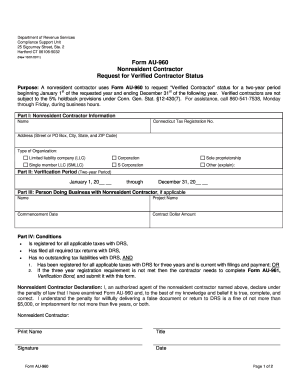
Ithholding for Connecticut income tax, business entity tax, and Connecticut composite income tax. o For C Corporations this generally means sales and use tax, withholding for Connecticut income tax, and corporation business tax. The nonresident contractor has filed all required tax returns with DRS, The nonresident contractor has no outstanding tax liabilities with DRS, AND 1. Has been registered for all applicable taxes with DRS for three years and is current with filings and payme.

How it works

  1. Open form

    Open form follow the instructions

  2. Easily sign form

    Easily sign the form with your finger

  3. Share form

    Send filled & signed form or save

How to fill out the CT DRS AU-960 online

Filling out the CT DRS AU-960 form correctly is essential for nonresident contractors seeking verified contractor status. This guide will provide a clear, step-by-step approach to assist you in completing the form online with ease.

Follow the steps to complete the CT DRS AU-960 form efficiently.

  1. Press the ‘Get Form’ button to obtain the form and open it in your preferred editor.
  2. In Part I, provide your name, complete address (including street or PO Box, city, state, and ZIP code), and Connecticut tax registration number. Make sure to check the appropriate box related to your type of organization.
  3. Proceed to Part II and specify the two-year verification period. Enter the start date as January 1 of the requested year and the end date as December 31 of the following year.
  4. In Part III, if applicable, enter the name of the person doing business with the nonresident contractor, the project name, commencement date, and the total contract dollar amount for all known or proposed contracts during the verification period. If you require additional space, please attach a separate sheet.
  5. Ensure that you meet the conditions outlined in Part IV. Confirm that you are registered for all applicable taxes, have filed all required tax returns, and have no outstanding tax liabilities with DRS. Also, verify whether you meet the three-year registration requirement or if you need to complete Form AU-961.
  6. Complete the Nonresident Contractor Declaration by signing and dating the form. It is crucial that an authorized agent of the nonresident contractor signs this declaration.
  7. Once all sections are completed, save your changes, download, print, or share the form as needed. Finally, mail your completed Form AU-960 to the Department of Revenue Services at the provided address.

Begin completing your document online today for efficient processing.

Get form

Experience a faster way to fill out and sign forms on the web. Access the most extensive library of templates available.

Related content

Form AU-960
Purpose: A nonresident contractor uses Form AU-960 to request Verified Contractor status...
Learn more
Kantharidis research group - Department of...
Dr Phillip Kantharidis is a Senior Research Fellow in the Department of Diabetes. His main...
Learn more
Instalação Operação Manutenção
AVISO DE SEGURANÇA. Apenas pessoal qualificado deverá instalar e reparar o equipamento...
Learn more

Related links form

NY DTF ET-141 2015 NY DTF ET-141 1999 NY DTF ET-30 2014 NY DTF ET-30 2012

Questions & Answers

Get answers to your most pressing questions about US Legal Forms API.

Contact support

The best way to obtain a surety bond is to work with a trusted licensed broker. They can help you find the right bond at competitive rates. Additionally, utilizing the resources available through the CT DRS AU-960 will streamline the process and ensure compliance with state regulations.

To secure a surety bond in Connecticut, first identify the type of bond you need. Next, apply with a surety provider, supplying necessary documents and financial information. The CT DRS AU-960 platform can assist you in navigating regulations and choosing the right bonding options for your specific needs.

Getting a surety bond in Connecticut involves choosing a reputable bonding company. Start by gathering required documentation and then request a quote. For additional support, the CT DRS AU-960 can provide resources that simplify the requirements and expedite your bonding process.

To obtain your CT 1040, visit the Connecticut Department of Revenue Services (DRS) website. There, you can easily download the form or complete it online. If you need help, tools related to the CT DRS AU-960 feature can guide you through the filing process, ensuring you include all necessary information accurately.

You can indeed file your CT tax return online through the CT DRS's online services. This method is efficient and secure, allowing you to submit your return quickly. Leveraging resources from uslegalforms can help make your submission process smoother and ensure that you meet all CT DRS AU-960 requirements effectively.

To file CT-1120 Ext online, you must use the CT DRS's electronic filing system specifically designed for extension requests. Ensure you have all relevant information at your fingertips when you start the process. For further assistance, platforms like uslegalforms can provide templates and support to facilitate your filing in accordance with CT DRS AU-960.

Any corporation that conducts business in Connecticut is required to file CT-1120. This includes domestic and foreign corporations doing business within the state. If your business meets these criteria, it's essential to file to remain compliant with CT DRS AU-960 regulations. For clarity on your obligations, consider reaching out to tax professionals or services like uslegalforms.

Yes, you can file form 1120 online through the CT DRS's established electronic filing system. This is a convenient option that saves you time and allows for quicker processing of your tax return. Utilizing tools and resources available from uslegalforms can enhance your experience when filing according to CT DRS AU-960 guidelines.

Filing CT 1120 online can be done through the CT DRS's e-file system. You will need to gather your financial information and have all necessary documents on hand. Using a reliable platform like uslegalforms can simplify the process by providing guidance and templates that meet CT DRS AU-960 requirements. Make sure to follow the prompts to ensure accuracy.

To register for CT withholding tax, you must complete the registration process through the Connecticut Department of Revenue Services (CT DRS). You can do this online using their portal, or you can submit a paper form. Be sure to have your business details ready, as this will help streamline your registration. For detailed guidelines, review the information related to CT DRS AU-960.

Get This Form Now!

Use professional pre-built templates to fill in and sign documents online faster. Get access to thousands of forms.
If you believe that this page should be taken down, please follow our DMCA take down processhere.
Get CT DRS AU-960
  • Adoption
  • Bankruptcy
  • Contractors
  • Divorce
  • Home Sales
  • Employment
  • Identity Theft
  • Incorporation
  • Landlord Tenant
  • Living Trust
  • Name Change
  • Personal Planning
  • Small Business
  • Wills & Estates
  • Packages A-Z
  • Affidavits
  • Bankruptcy
  • Bill of Sale
  • Corporate - LLC
  • Divorce
  • Employment
  • Identity Theft
  • Internet Technology
  • Landlord Tenant
  • Living Wills
  • Name Change
  • Power of Attorney
  • Real Estate
  • Small Estates
  • Wills
  • All Forms
  • Forms A-Z
  • Other Templates
  • Legal Hub
  • About Us
  • Help Portal
  • Legal Resources
  • Blog
  • Affiliates
  • Contact Us
  • Delete My Account
  • Site Map
  • Industries
  • Forms in Spanish
  • Localized Forms
  • State-specific Forms
  • Forms Kit
  • Real Estate Handbook
  • All Guides
  • Notarize
  • Incorporation services
  • For Consumers
  • For Small Business
  • For Attorneys
  • USLegal
  • FormsPass
  • pdfFiller
  • signNow
  • altaFlow
  • DocHub
  • Instapage
Form Packages
  • Adoption
  • Bankruptcy
  • Contractors
  • Divorce
  • Home Sales
  • Employment
  • Identity Theft
  • Incorporation
  • Landlord Tenant
  • Living Trust
  • Name Change
  • Personal Planning
  • Small Business
  • Wills & Estates
  • Packages A-Z
Form Categories
  • Affidavits
  • Bankruptcy
  • Bill of Sale
  • Corporate - LLC
  • Divorce
  • Employment
  • Identity Theft
  • Internet Technology
  • Landlord Tenant
  • Living Wills
  • Name Change
  • Power of Attorney
  • Real Estate
  • Small Estates
  • Wills
  • All Forms
  • Forms A-Z
  • Other Templates
Customer Service
  • Legal Hub
  • About Us
  • Help Portal
  • Legal Resources
  • Blog
  • Affiliates
  • Contact Us
  • Delete My Account
  • Site Map
  • Industries
  • Forms in Spanish
  • Localized Forms
  • State-specific Forms
  • Forms Kit
Legal Guides
  • Real Estate Handbook
  • All Guides
Prepared for you
  • Notarize
  • Incorporation services
Our Customers
  • For Consumers
  • For Small Business
  • For Attorneys
Our Sites
  • USLegal
  • FormsPass
  • pdfFiller
  • signNow
  • altaFlow
  • DocHub
  • Instapage
Social Media
Call us now toll free:
+1 833 426 79 33
As seen in:
© Copyright 1999-2026 airSlate Legal Forms, Inc. 17 Station Street, Ste. 203, Brookline, MA 02445
  • Your Privacy Choices
  • Terms of Service
  • Privacy Notice
  • Content Takedown Policy
  • Bug Bounty Program
CT DRS AU-960
This form is available in several versions.
Select the version you need from the drop-down list below.
2017 CT DRS AU-960
Select form
  • 2017 CT DRS AU-960
  • 2011 CT DRS AU-960
Select form