Loading
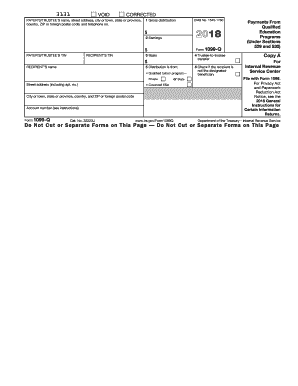
Get Irs 1099-q 2018
This website is not affiliated with IRS
How it works
-

Open form follow the instructions
-

Easily sign the form with your finger
-

Send filled & signed form or save
How to fill out the IRS 1099-Q online
Filling out the IRS 1099-Q form online can seem daunting, but with this comprehensive guide, you will understand each section and how to complete it accurately. This form is essential for reporting distributions from qualified tuition programs and Coverdell education savings accounts.
Follow the steps to complete the IRS 1099-Q form with ease.
- Click ‘Get Form’ button to obtain the form and open it in the online editor.
- Fill in the payer's or trustee's details. This includes their name, street address, city or town, state or province, country, ZIP code, and telephone number.
- Input the gross distribution amount in Box 1. This represents the total amount distributed from the qualified tuition program or Coverdell ESA.
- Enter the earnings portion of the gross distribution in Box 2. This is the amount that reflects the earnings from the account.
- Fill in Box 3 with your basis in the account. This amount relates to your original contributions to the qualified education program.
- If applicable, check Box 4 to indicate a trustee-to-trustee transfer was made between accounts.
- Complete Box 5, specifying if the distribution is from a qualified tuition program or Coverdell ESA.
- In Box 6, indicate if the recipient is not the designated beneficiary by checking the box if it applies.
- Double-check all entered information for accuracy before proceeding to the next step.
- Finally, save your changes. You can choose to download, print, or share the completed form as necessary.
Get started on filling out your IRS 1099-Q form online today!
Get form
Experience a faster way to fill out and sign forms on the web. Access the most extensive library of templates available.
Related links form
The IRS 1099-Q is typically issued to the recipient of the funds, which can be either the parent or the student. This designation is important for tax reporting purposes because it determines how the income is treated on the tax return. Make sure to clarify who the recipient is so you can report it accurately.
Get This Form Now!
Use professional pre-built templates to fill in and sign documents online faster. Get access to thousands of forms.