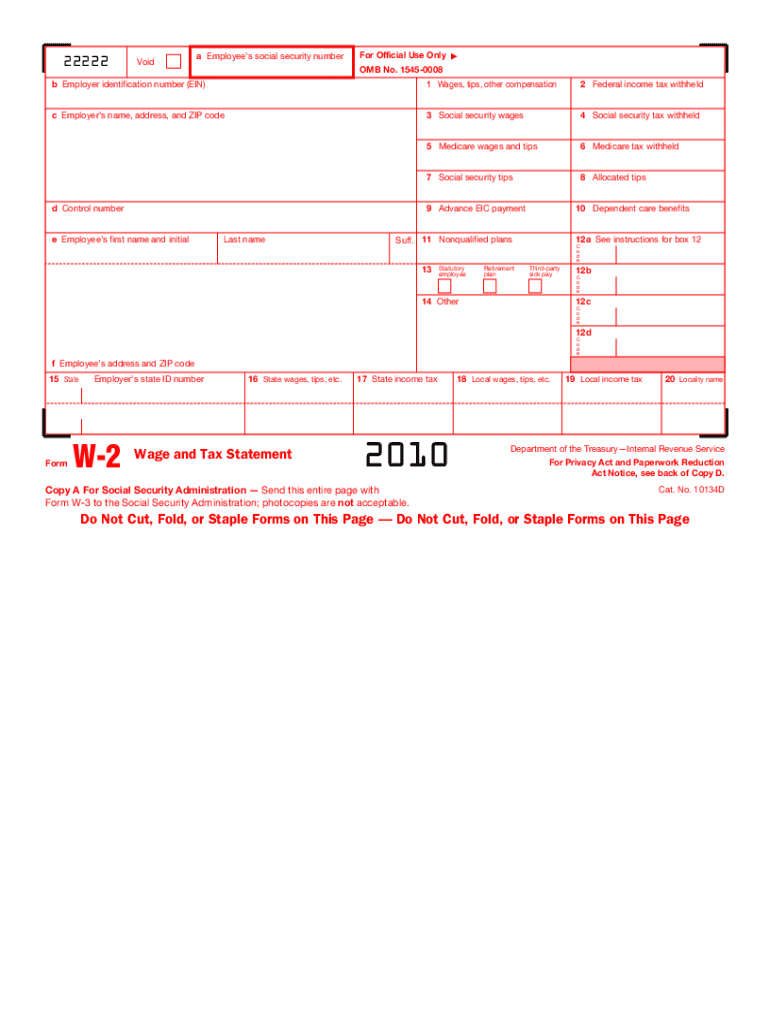
5 Medicare wages and tips 6 Medicare tax withheld 7 Social security tips 8 Allocated tips d Control number 9 Advance EIC payment e Employee s first name and initial 10 Dependent care benefits Suff. 11 Nonqualified plans Last name 13 Statutory employee Retirement plan 12a See instructions for box 12 C o d e Third-party sick pay 12b C o d e 12c 14 Other C o d e 12d C o d e f Employee s address and ZIP code 15 State Form Employer s state ID number W-2 Wage and Tax Stat.

Open form follow the instructions

Easily sign the form with your finger

Send filled & signed form or save
How to fill out the IRS W-2 online
Filling out the IRS W-2 form online is an important task for employees and employers alike. This guide will provide clear, step-by-step instructions on how to accurately complete each section of the form, ensuring compliance with tax regulations.
Follow the steps to efficiently complete your IRS W-2 online.
- Press the ‘Get Form’ button to acquire the W-2 form and open it in the online editor.
- In box 'a', enter the employee's social security number accurately, ensuring that the number is free from errors.
- In box 'b', input the employer identification number (EIN), which is crucial for tax purposes.
- Fill in box 'c' with the employer’s name, address, and ZIP code to clearly identify the entity that issued the W-2.
- In box '1', report total wages, tips, and other compensation the employee received.
- Provide the total federal income tax withheld in box '2' from the employee's earnings.
- Input the social security wages in box '3', which includes all earnings subject to social security tax.
- Report the amount of social security tax withheld in box '4'.
- In box '5', include all Medicare wages and tips, which are needed for proper tax reporting.
- Enter the total Medicare tax withheld in box '6'.
- Use box '7' to report social security tips.
- Record any allocated tips in box '8' on the form.
- Document any advance earned income credit payments in box '9', if applicable.
- Fill in box '10' with the total dependent care benefits, if applicable.
- In box '11', indicate any nonqualified plans.
- Complete box '12' with codes as necessary, referring to the instructions for specific codes that apply.
- If applicable, indicate statutory employee status in box '13', along with retirement plan details.
- Verify and record the employee's home address in box 'f', ensuring accuracy.
- Complete state tax-related boxes (boxes '15' through '20') as necessary, providing state wages and applicable taxes.
- Once all information is entered accurately, save your changes, and choose to download, print, or share the completed form as needed.
Ensure accuracy by following this guide to fill out your W-2 form online today.
Experience a faster way to fill out and sign forms on the web. Access the most extensive library of templates available.
Related content
Jan 17, 2025 — Important information on employment tax withholding obligations and Form...
IRS Form W-2, or 'Wage and Tax Statement,' reports an employee's income, taxes withheld...
May 2, 2017 — Do not use these forms to report wages subject to U.S. income tax...
Get answers to your most pressing questions about US Legal Forms API.
What is the penalty for filing W-2s with mismatched names and Social Security numbers?
Filing IRS W-2s with mismatched names and Social Security numbers can lead to penalties from the IRS. These penalties may include fines and delays in processing your tax return. To prevent this, ensure accuracy on your W-2 and update any discrepancies with your employer promptly.
Does the name on my W-2 need to match my social security card?
Indeed, the name on your IRS W-2 must match your Social Security card for correct tax processing. If there is a difference, it can lead to delays and potential penalties. To avoid these issues, confirm that your personal information is consistent across all official documents.
How to read a W-2 for dummies?
Reading an IRS W-2 can be simple once you know what to look for. Start by identifying the employer's details at the top and your information below it. The form will list your earnings and the taxes withheld in distinct boxes. Understanding these figures is crucial for accurate tax reporting. Resources like uslegalforms can provide additional clarity.
Does the name on W-2 have to match the Social Security card?
Yes, the name on your IRS W-2 should match your Social Security card to avoid discrepancies during tax filing. A mismatch can result in delays or complications in the processing of your return. If you have changed your name, make sure to update your Social Security records before filing.
How do I fill out a W-2 step by step?
Filling out an IRS W-2 involves several straightforward steps. Start by entering your employer’s information, including their name and tax ID. Next, fill in your details such as your name, address, and Social Security number. Finally, report your earnings and withheld taxes in the appropriate boxes. For guidance, you might find uslegalforms a helpful resource.
What happens if my name doesn't match my Social Security card?
If the name on your IRS W-2 doesn't match your Social Security card, this mismatch may raise flags during tax processing. It's essential to update your Social Security records to reflect your current name. You can then get an accurate W-2 from your employer to ensure smooth tax filings.
What if my W-2 doesn't match my name?
If your IRS W-2 does not match your name, it could lead to complications with tax filings. First, check your records to confirm the correct name. Then, reach out to your employer to request a correction to the W-2. Make sure to get an updated form before filing your taxes to avoid further issues.
What is a W-2 in the USA?
2 in the USA is a wage and tax statement issued by employers to their employees annually. It details the total wages earned and the taxes withheld during the year. This form is essential for completing tax returns as it summarizes an individual’s income for the IRS. Utilizing resources like uslegalforms can help simplify any confusion surrounding W2 forms and their implications.
Is W-2 only for US citizens?
The IRS W-2 form is not limited to US citizens; it applies to various employees, including those on work visas. Foreign nationals who work for a US employer will also receive a W-2 if they are classified as employees. This inclusivity ensures that all employees can meet their tax obligations. When it comes to understanding your status and responsibilities, uslegalforms can offer valuable assistance.
What is a W-2 visa in the USA?
There isn't a specific W-2 visa in the USA; however, the W-2 form is critical for foreign nationals working on various visa types. This form provides important information about an employee's earnings and tax withholdings. It plays a vital role in the tax obligations of employees in the USA, regardless of their visa status. If you need assistance regarding tax reporting, consider uslegalforms to guide you.
Use professional pre-built templates to fill in and sign documents online faster. Get access to thousands of forms.
If you believe that this page should be taken down, please follow our DMCA take down process here.
This form is available in several versions. Select the version you need from the drop-down list below.