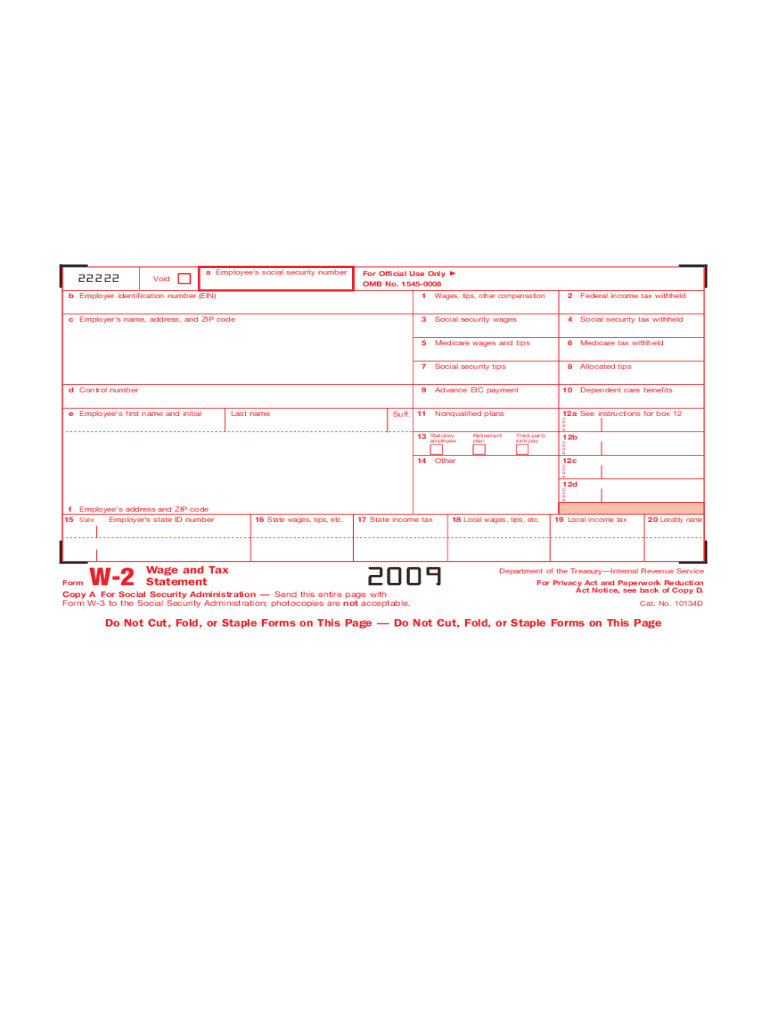
R (EIN) 1 Wages, tips, other compensation 2 Federal income tax withheld c Employer s name, address, and ZIP code 3 Social security wages 4 Social security tax withheld 5 Medicare wages and tips 6 Medicare tax withheld 7 Social security tips 8 Allocated tips 9 Advance EIC payment 10 Nonqualified plans 12a d Control number e Employee s first name and initial Last name Suff. 11 13 Statutory employee 14 Retirement plan Dependent care benefits C o d e Third-party.

Open form follow the instructions

Easily sign the form with your finger

Send filled & signed form or save
How to fill out the IRS W-2 online
Filling out the IRS W-2 form correctly is essential for accurate reporting of wages and taxes withheld. This guide provides comprehensive, step-by-step instructions tailored to assist users of all experience levels in completing the form online.
Follow the steps to complete the IRS W-2 form online.
- Click the ‘Get Form’ button to access the W-2 form and open it in your preferred editor.
- Enter the employee’s social security number in box 'a'. Ensure that this information is accurate to avoid complications later on.
- In box 'b', input the employer identification number (EIN), which is essential for identifying your employer.
- Fill out box 'c' with the employer’s name, address, and ZIP code. This provides necessary contact information.
- In box '1', report the total wages, tips, and other compensation for the employee.
- Enter the amount of federal income tax withheld from the employee’s wages in box '2'.
- For box '3', record the total social security wages the employee earned.
- Input the amount of social security tax withheld in box '4'. This ensures that the correct amount is reported.
- In box '5', report the total Medicare wages and tips.
- Complete box '6' with the amount of Medicare tax withheld.
- For box '7', enter any reported social security tips if applicable.
- In box '8', list allocated tips as required.
- Box '9' is for advance earned income credit payments, if applicable.
- In box '10', report any nonqualified plans if they apply.
- Utilize box '12' for additional information regarding benefits and codes related to various retirement and other plans.
- Complete the employee’s first name, initial, and last name in boxes 'e' and add any suffix as needed.
- In box 'f', provide the employee’s address and ZIP code.
- Fill in state information in box '15', including the employer’s state ID number and state wages/tips in boxes '16' and '17'.
- Finally, ensure all information is accurate, save your changes, download the completed form, and print copies for distribution to state or local governments and employees.
Complete your IRS W-2 form accurately and efficiently online today!
Experience a faster way to fill out and sign forms on the web. Access the most extensive library of templates available.
Related content
Jan 17, 2025 — Important information on employment tax withholding obligations and Form...
IRS Form W-2, or 'Wage and Tax Statement,' reports an employee's income, taxes withheld...
May 2, 2017 — Do not use these forms to report wages subject to U.S. income tax...
Get answers to your most pressing questions about US Legal Forms API.
What is the easiest way to get a W-2?
The easiest way to obtain your IRS W-2 is generally through your employer’s payroll system online. Most employers enable employees to access their W-2s digitally, saving you time. If you cannot find it online, consider contacting your employer directly or submitting a request to the IRS. For those needing assistance, US Legal Forms offers resources that can help you with retrieving your W-2.
How do I access W-2?
You can access your IRS W-2 by logging into your employer's payroll or HR portal if they offer online access. If your employer provides physical forms, check your mailbox for the W-2 sent at the beginning of each year. Additionally, you can request copies from the IRS using Form 4506-T. Utilizing platforms like US Legal Forms can provide guidance throughout this process.
What is the easiest way to get an old W-2?
To obtain an old IRS W-2, you can start by reaching out to your employer from that tax year. Employers are required to keep records of W-2 forms for at least four years. If that option is not available, you can request a copy from the IRS by filling out Form 4506-T. Keep in mind that using services like US Legal Forms can streamline this process for you.
What is W2 in US visa?
2 refers to the employment status of individuals who hold US visas and are legally employed in the country. These individuals receive a 2 form just like US citizens, which outlines their income and tax withholdings. This process ensures that even visa holders contribute to the tax system and comply with IRS regulations. Recognizing your 2 status can help clarify your tax obligations while working in the USA.
What is a W-2 in the USA?
2 in the USA is an IRS form that employers provide to employees, detailing their annual wages and the taxes withheld. This form serves as a key document for tax filing purposes, ensuring compliance with federal tax laws. Employees must report this information on their tax returns to accurately determine their tax liabilities or refunds. Understanding what a W2 represents is essential for every worker.
Is W-2 only for US citizens?
No, the W-2 form is not exclusively for US citizens. Non-citizens who work legally in the USA may also receive a W-2 if they are employed by a US-based organization. This includes individuals with work visas, residing in the country legally. Understanding eligibility is crucial for navigating work opportunities in the USA.
What are W2 tax terms in the USA?
2 tax terms in the USA include gross income, which is the total earnings before deductions, and net income, which is what remains after taxes and deductions. Other important terms relate to withholdings, such as Social Security and Medicare taxes, which are deducted from employees’ paychecks. These concepts are essential for understanding your tax obligations associated with the IRS 2. Being familiar with these terms helps in effective tax management.
How does W-2 work in the USA?
The W-2 process in the USA involves employees receiving this tax form from their employer, detailing compensation and tax withholdings for the year. Employers use IRS guidelines to calculate and report taxes withheld from earnings. Employees then use this information when filing their annual tax returns. Understanding how W-2 works helps in better financial planning.
What are W-2 candidates in the USA?
2 candidates are individuals seeking employment where they will receive a 2 form for tax purposes. These candidates typically look for fulltime or parttime positions with a single employer, focusing on roles that offer benefits and job security. hen hiring 2 candidates, employers must follow IRS guidelines regarding payroll and tax reporting. Finding the right 2 candidates can benefit both employers and employees.
Is there another way to get my W-2?
Yes, there are additional methods to obtain your IRS W-2. You can try using online services, such as uslegalforms, which provide assistance in obtaining lost forms. Additionally, the IRS can help retrieve your tax information, or you might consider filing Form 4852 as an alternative solution.
Use professional pre-built templates to fill in and sign documents online faster. Get access to thousands of forms.
If you believe that this page should be taken down, please follow our DMCA take down process here.
This form is available in several versions. Select the version you need from the drop-down list below.