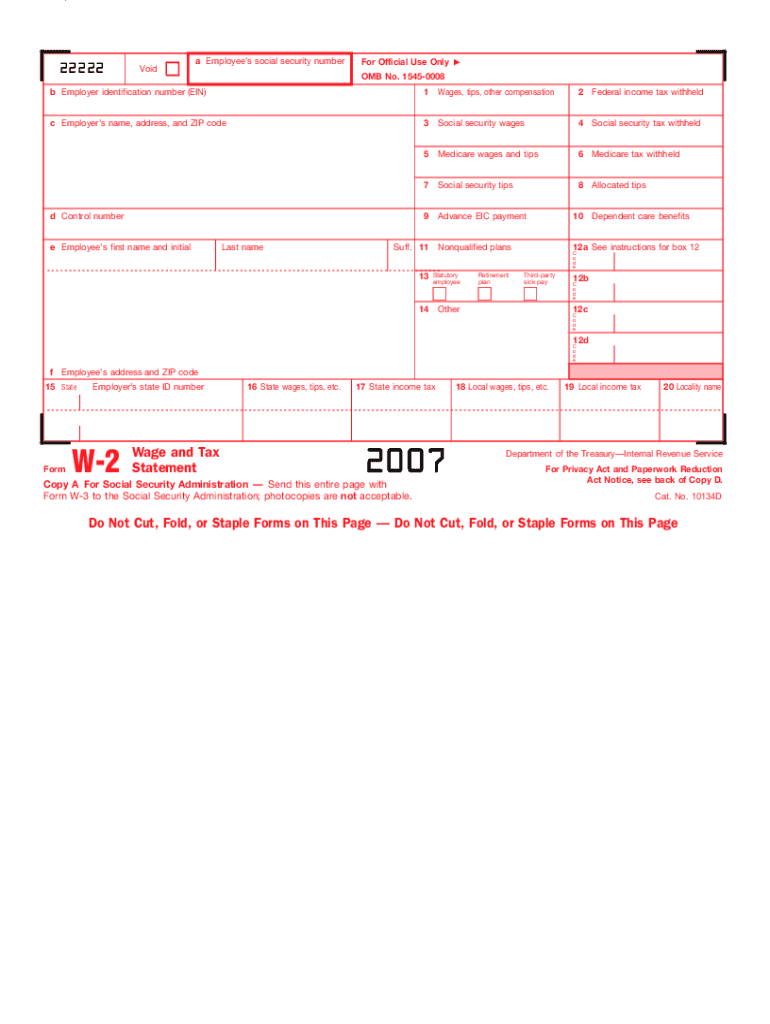
Payment 10 Nonqualified plans 12a d Control number e Employee s first name and initial Last name Suff. 11 13 Statutory employee 14 Retirement plan Dependent care benefits C o d e Third-party sick pay 12b C o d e 12c Other C o d e 12d C o d e f Employee s address and ZIP code 15 State Form Employer s state ID number W-2 16 State wages, tips, etc. Wage and Tax Statement Copy 1 For State, City, or Local Tax Department 17 State income tax 2007 18 Local wages, ti.

Open form follow the instructions

Easily sign the form with your finger

Send filled & signed form or save
How to fill out the IRS W-2 online
The IRS W-2 form is crucial for reporting wages, tips, and other compensation, as well as federal income tax withheld. This guide provides clear, step-by-step instructions tailored for users of all backgrounds to fill out the IRS W-2 online effectively.
Follow the steps to complete the W-2 form online.
- Click ‘Get Form’ button to obtain the W-2 form and open it in your online editing tool.
- In box 'a', enter the employee's social security number accurately.
- In box 'b', input the employer's identification number (EIN) as provided.
- Provide the employer's name, address, and ZIP code in box 'c'.
- Enter the total wages, tips, and other compensation in box '1'.
- Fill in the amount of federal income tax withheld in box '2'.
- Report social security wages in box '3' and the corresponding social security tax withheld in box '4'.
- In box '5', document Medicare wages and tips, and in box '6', input Medicare tax withheld.
- Fill boxes for social security tips in '7', allocated tips in '8', advance EIC payment in '9', and nonqualified plans in '10'.
- Complete boxes '12' with any necessary codes and information regarding retirement plans or third-party sick pay.
- Provide the employee's address and ZIP code in box 'f' and state information in box '15'.
- Fill in the employer's state ID number, state wages, state income tax, local wages, and local taxes in boxes '16' through '20'.
- Once all fields are accurately filled out, save changes, and prepare to download, print, or share the form as needed.
Complete your W-2 form online today to ensure accurate reporting of your income and taxes.
Experience a faster way to fill out and sign forms on the web. Access the most extensive library of templates available.
Related content
Jan 17, 2025 — Important information on employment tax withholding obligations and Form...
IRS Form W-2, or 'Wage and Tax Statement,' reports an employee's income, taxes withheld...
May 2, 2017 — Do not use these forms to report wages subject to U.S. income tax...
Get answers to your most pressing questions about US Legal Forms API.
What is a W-2 in the USA?
2 in the USA is a crucial tax document provided by employers to their employees at the end of each tax year. It outlines wages earned and taxes withheld, which are necessary for filing income tax returns. Understanding the significance of your IRS W2 can lead to a smoother tax filing process.
What is a W-2 visa in the USA?
2 visa does not exist as a formal category; rather, it often refers to employment arrangements associated with visa holders who receive a W2 form. This is crucial for reporting income earned while working in the US. It's important to keep accurate records for your IRS W2 submissions to remain compliant with tax laws.
Is W-2 only for US citizens?
The W-2 form is not exclusively for US citizens; it applies to many types of employees, including permanent residents and certain visa holders. Any employee working in the US under taxable compensation will receive a W-2 from their employer. Thus, both citizens and non-citizens must comply with the IRS W-2 requirements.
What is W-2 in US visa?
When discussing W-2 in relation to a US visa, it often pertains to the type of employment authorized by the visa. Certain visa categories require the issuance of a W-2 form to verify employment and tax status. If you're navigating this process, it's essential to understand the implications of your visa status on your IRS W-2 reporting.
What are W-2 tax terms in the USA?
2 tax terms in the USA include various components that relate to employee taxation. This includes gross income, withheld federal and state taxes, Social Security, and Medicare contributions, all reported on the IRS 2 form. Familiarizing yourself with these terms can assist you in filing your taxes accurately.
What is a W-2 role in the USA?
In the USA, a W-2 role typically refers to a job position where the employer withholds taxes from an employee's earnings. This designation indicates that the employee will receive a W-2 form at the end of the year, which details their annual wages and the taxes withheld. Understanding your W-2 role helps you manage your tax obligations effectively.
What is the easiest way to get a W-2?
The simplest way to get a W-2 is to ask your employer directly to provide you with a copy. If your employer has switched to electronic filing, you may find your IRS W-2 available through their online system. In cases where you cannot reach your employer, the IRS can assist in providing the necessary documentation. To make this process even smoother, uslegalforms offers tools and resources that help you request and secure your W-2 effortlessly.
How do I access W-2?
You can access your IRS W-2 through several channels. First, check with your employer, as many companies offer online portals for employees to download their forms. If this option is unavailable, you can also contact the IRS for copies. To streamline the process, consider using uslegalforms for guidance on obtaining and managing your W-2 documents.
What is the easiest way to get an old W-2?
To obtain an old IRS W-2, start by requesting a copy from your employer. If your employer is unavailable, you can contact the IRS directly for help. They can provide you with a Transcript of your tax return, which includes the details of your W-2. Additionally, using uslegalforms can simplify your request process and help you navigate the necessary steps efficiently.
Does the name on my W-2 need to match my social security card?
Yes, the name on your IRS W-2 should match the name on your Social Security card. This consistency helps the IRS correctly identify your earnings and tax obligations. If there’s a mismatch, it could lead to processing delays or issues with your tax return. Ensure your documents align to maintain a smooth filing process.
Use professional pre-built templates to fill in and sign documents online faster. Get access to thousands of forms.
If you believe that this page should be taken down, please follow our DMCA take down process here.
This form is available in several versions. Select the version you need from the drop-down list below.