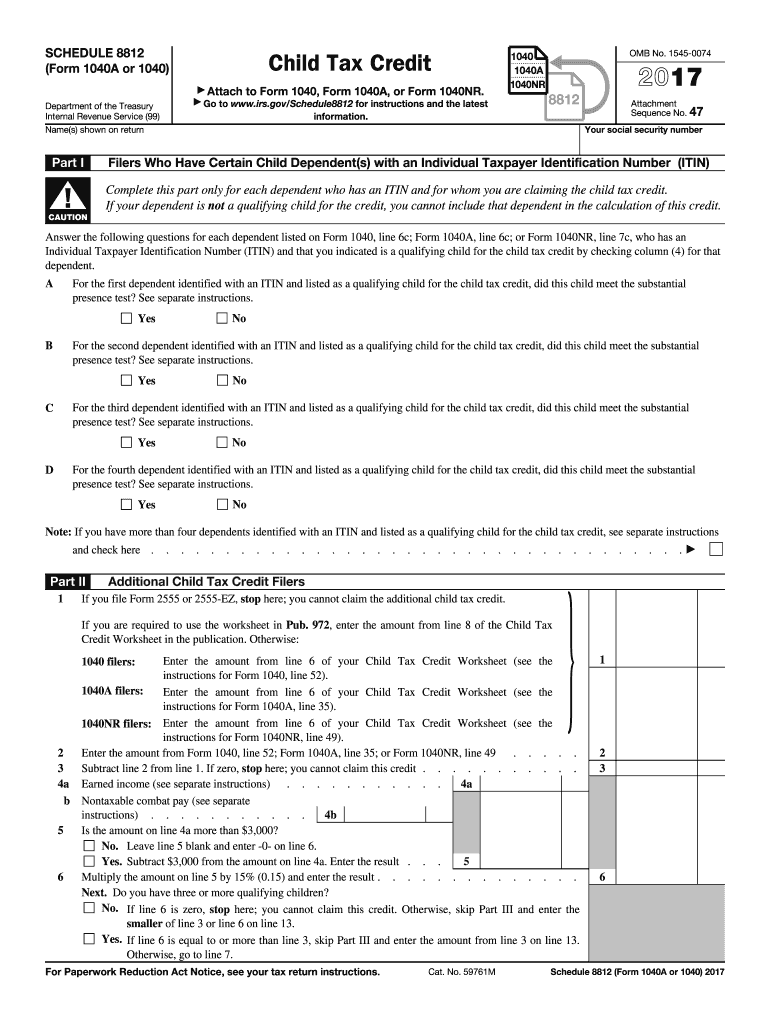
. . . . . . . . . Is the amount on line 4a more than $3,000? No. Leave line 5 blank and enter -0- on line 6. Yes. Subtract $3,000 from the amount on line 4a. Enter the result . . . 5 Multiply the amount on line 5 by 15% (0.15) and enter the result . . . . . . . . . . . . . . Next. Do you have three or more qualifying children? No. If line 6 is zero, stop here; you cannot claim this credit. Otherwise, skip Part III and enter the smaller of line 3 or line 6 on line 13. Yes. If line 6 is equal to.
Loading

Open form follow the instructions

Easily sign the form with your finger

Send filled & signed form or save
How to fill out the IRS 1040 - Schedule 8812 online
Filling out the IRS 1040 - Schedule 8812 online is essential for claiming the child tax credit. This guide provides clear, step-by-step instructions to assist users in accurately completing the form and maximizing their benefits.
Follow the steps to successfully complete the IRS 1040 - Schedule 8812.
- Click the ‘Get Form’ button to access and open the form in your editor.
- Enter your name as it appears on your tax return in the designated field at the top of the form.
- Provide your social security number in the space provided.
- In Part I, enter details for each dependent child who has an Individual Taxpayer Identification Number (ITIN) and is claimed for the child tax credit. Answer the substantial presence test question for each child listed.
- Continue to Part II, where you will calculate the additional child tax credit. Depending on your prior calculations, refer to your Child Tax Credit Worksheet to fill in the relevant amounts.
- If applicable, follow the instructions specifically for users with three or more qualifying children in Part III, detailing your qualifying amounts.
- Lastly, review all entries for accuracy, save your changes, and choose an appropriate option to download, print, or share your completed form.
Start completing your IRS 1040 - Schedule 8812 online for a smoother tax experience.
Experience a faster way to fill out and sign forms on the web. Access the most extensive library of templates available.
Related content
Oct 16, 2024 — Use Schedule 8812 (Form 1040) to figure your child tax credits, to report...
Part I. Child Tax Credit and Credit for Other Dependents. 1. Enter the amount from line 11...
Purpose of Form Use Form 8812 to figure your additional child tax credit. The...
Get answers to your most pressing questions about US Legal Forms API.
How do I claim the child tax credit on my taxes?
To claim the child tax credit, you need to complete IRS 1040 - Schedule 8812 and include it with your Form 1040 when filing your taxes. Ensure you meet the eligibility requirements, including income limits and qualifying child status. Once you fill out Schedule 8812 accurately, attach it and submit it to the IRS to benefit from this credit. Utilizing ulegalforms can help streamline the process if you need further assistance.
At what age do parents stop getting the child tax credit?
Parents can claim the child tax credit until the child turns 17 years old. Therefore, once the child reaches this age, you can no longer claim that credit for them on IRS 1040 - Schedule 8812. It's important to stay updated on any changes to the tax code, as rules may vary year to year. For personalized advice about your tax situation, consider reaching out to a tax professional or using ulegalforms for guidance.
How do I file a Schedule 8812?
Filing IRS 1040 - Schedule 8812 involves specific steps. First, download the form from the IRS website or access it through tax preparation software. Fill it out based on your eligibility for the child tax credit, attaching all supporting documents if required. Finally, submit it along with your Form 1040, and if you have questions, ulegalforms can provide the resources you need to simplify the process.
Is Schedule 8812 the same as 1040?
No, IRS 1040 - Schedule 8812 is not the same as Form 1040. Form 1040 is your main tax return where you report your income, while Schedule 8812 is specifically for claiming the child tax credit. You need to complete both forms if you are claiming the credit. Be sure to fill out Schedule 8812 accurately and attach it to your IRS 1040 to ensure you receive the full benefit.
What disqualifies you from a child tax credit?
Several factors can disqualify you from claiming the child tax credit on IRS 1040 - Schedule 8812. For instance, your income may exceed the IRS guidelines, or the qualifying child may not meet age or residency requirements. Additionally, if another taxpayer claims the child as a dependent, you will not be eligible. It’s essential to review the IRS guidelines carefully to ensure you're eligible.
How to file Schedule 8812?
To file IRS 1040 - Schedule 8812, start by gathering all necessary information about your qualifying children. You will need their names, dates of birth, and Social Security numbers. Complete the form using the instructions provided by the IRS, and don't forget to attach it to your IRS 1040 return before submission. If you're unsure about any steps, ulegalforms can guide you through the filing process, ensuring accuracy and compliance.
What is the dependent tax credit on 1040?
The dependent tax credit on the IRS 1040 applies to taxpayers with qualifying dependents, providing potential tax benefits. This credit can help reduce your tax liability based on the number of dependents you claim. Understanding how this interacts with the Child Tax Credit, reported on Schedule 8812, can enhance your filing strategy. Always verify eligibility to ensure you claim every dollar you're entitled to.
How to fill out the Child Tax Credit?
Filling out the Child Tax Credit involves reviewing the eligibility criteria and properly completing the IRS 1040 and Schedule 8812 forms. Ensure all required information about your dependents is accurate and complete. By following the IRS guidelines step by step, you can maximize your credits. Utilizing the resources on uslegalforms can also help clarify your process.
Where do you find child tax credit on a tax return?
You can find the Child Tax Credit section on your tax return typically on the IRS 1040 and related forms. Specifically, refer to line 19 for the credit's amount and review Schedule 8812 for additional calculations. Understanding where this credit appears can simplify your filing process. Ensure you keep meticulous records to support your claims.
Where do I put a child tax credit on a 1040?
For the IRS 1040, after you've calculated your Child Tax Credit using Schedule 8812, enter the total on line 19. This ensures that your credit is officially recorded and considered in your total tax due. Properly positioning your credit is vital for a smooth filing process. Always double-check your entries to prevent any errors.
Use professional pre-built templates to fill in and sign documents online faster. Get access to thousands of forms.
If you believe that this page should be taken down, please follow our DMCA take down process here.
This form is available in several versions. Select the version you need from the drop-down list below.