Loading
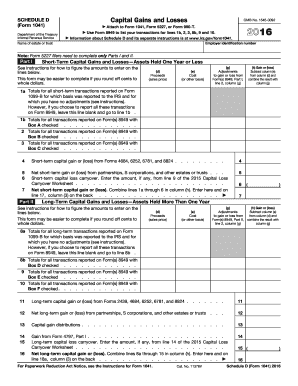
Get Irs 1041 - Schedule D 2016
This website is not affiliated with IRS
How it works
-

Open form follow the instructions
-

Easily sign the form with your finger
-

Send filled & signed form or save
How to fill out the IRS 1041 - Schedule D online
Filling out the IRS 1041 - Schedule D is essential for reporting capital gains and losses for estates and trusts. This guide provides clear, step-by-step instructions to help users accurately complete this form online, ensuring compliance with tax regulations.
Follow the steps to fill out the IRS 1041 - Schedule D online
- Click ‘Get Form’ button to access the IRS 1041 - Schedule D form and open it in your preferred editor.
- Begin with Part I, which addresses short-term capital gains and losses. Report proceeds from each sale in column (d), and any adjustments to gain or loss in column (g). Enter the cost or other basis in column (e). Calculate the gain or loss by subtracting the cost from the proceeds and combining with any adjustments in column (h).
- Continue through lines 1a through 6 under Part I. If you choose to report transactions on Form 8949, leave line 1a blank and proceed to line 1b. Fill in the totals for short-term transactions according to the appropriate checks on your Form 8949.
- Switch to Part II for long-term capital gains and losses. Repeat the process from Part I, entering proceeds, adjustments, and costs for each transaction in the applicable columns.
- Complete all necessary sections, including the summary in Part III. This section requires combining the net short-term and long-term gains or losses.
- If applicable, fill out Part IV for capital loss limitations. Take care to enter the smaller of your reported loss or $3,000.
- Lastly, in Part V, compute your tax based on capital gains. Ensure that you have filled out the necessary numbers from previous sections and follow the instructions carefully.
- After reviewing the form for accuracy, save your changes. You can then download, print, or share the completed IRS 1041 - Schedule D as needed.
Complete your documents online to ensure a smooth filing process.
Get form
Experience a faster way to fill out and sign forms on the web. Access the most extensive library of templates available.
Related links form
Entering box D on TurboTax is straightforward, especially when navigating through the investment section. Simply locate the appropriate field for entering your capital gains or losses, and follow the prompts provided by TurboTax. This ensures that your entries reflect the information on IRS 1041 - Schedule D accurately. UsLegalForms can also guide you through the process if you need additional assistance.
Get This Form Now!
Use professional pre-built templates to fill in and sign documents online faster. Get access to thousands of forms.