Loading

Open form follow the instructions

Easily sign the form with your finger

Send filled & signed form or save
How to fill out the IRS 5500-EZ online
The IRS 5500-EZ form is essential for reporting information about one-participant retirement plans. This guide offers clear and supportive instructions to help users fill out this form accurately online.
Follow the steps to complete the IRS 5500-EZ form online.
- Click ‘Get Form’ button to obtain the form and open it in your chosen editor.
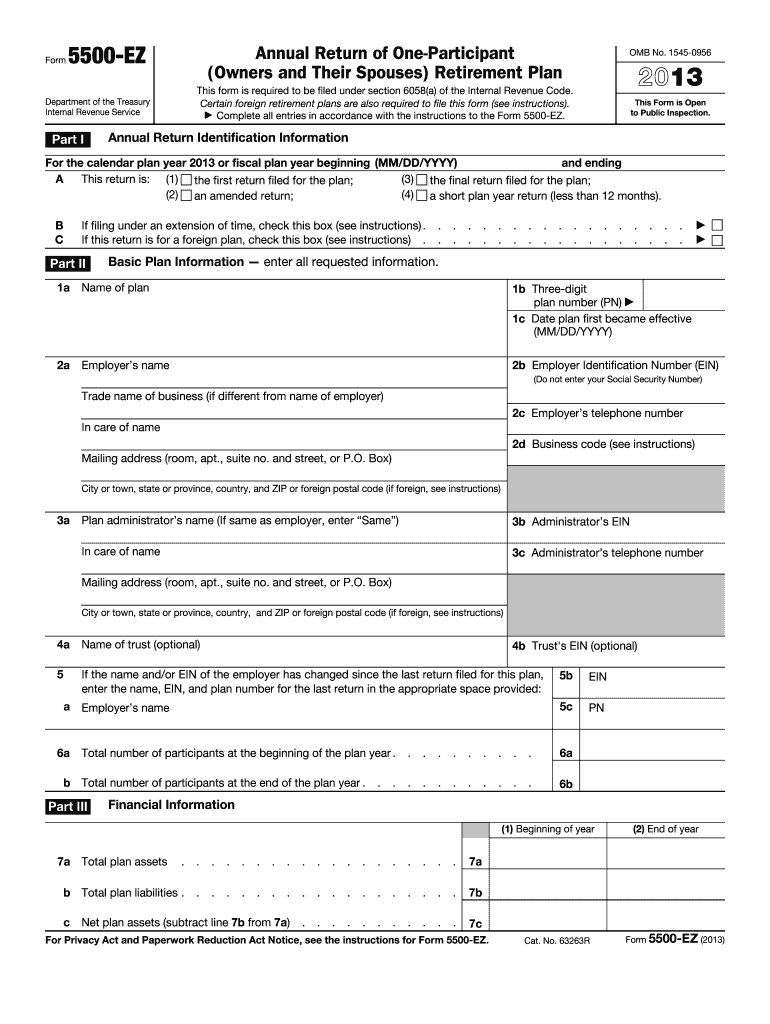
- In Part I, identify the annual return. Indicate if this is the first, amended, final, or short plan year return for the plan. If applicable, check if filing under an extension or for a foreign plan.
- In Part II, provide basic plan information. Enter the name of the plan, the three-digit plan number, and the date the plan first became effective. Include the employer’s name, Employer Identification Number (EIN), and business details, including the mailing address.
- Continue in Part II by entering the plan administrator's information, including their name, EIN, and contact details. If the administrator is the same as the employer, write 'Same' for the name.
- Enter the name of the trust and provide previous name or EIN details if there has been a change since the last return filed.
- In Part III, fill out financial information. Report the total number of participants at the beginning and end of the plan year and include total plan assets and liabilities.
- Provide details on contributions received from participants and employers, and check for compliance with funding questions in Part IV.
- Complete the compliance and funding section by answering questions regarding participant loans and minimum funding requirements, ensuring accuracy in the reported amounts.
- Finally, review your entries for accuracy, sign the form where required, and provide the date of signing. You may also include the preparer's information if applicable.
- Once completed, save your changes, and you can download, print, or share the completed form as needed.
Complete your IRS 5500-EZ online today to ensure compliance and accurate reporting.
Experience a faster way to fill out and sign forms on the web. Access the most extensive library of templates available.
Related content
Nov 12, 2024 — Form 5500-EZ is used by one-participant plans and certain foreign plans...
2 days ago — One-participant plans must file Form 5500-EZ if plan assets exceed $250,000...
Jan 26, 2017 — You must file Form 5500EZ or Form. 5500SF. All oneparticipant plans...
Get answers to your most pressing questions about US Legal Forms API.
Can you switch from 5500-sf to 5500-ez?
Yes, you can switch from Form 5500-SF to IRS Form 5500-EZ if your plan qualifies under the one-participant or foreign plan category. This change might be necessary if your plan's structure evolves over time. Ensuring you file the correct form is essential to maintain compliance with IRS policies. The uslegalforms platform can assist you in making this transition smoothly and accurately.
Who files the IRS form 5500?
Typically, the plan administrator or the plan sponsor files IRS Form 5500, ensuring retirement plans meet IRS reporting requirements. If you own a one-participant plan or a foreign plan, as the sponsor, you are responsible for filing Form 5500-EZ. Utilizing uslegalforms can simplify your filing process and help you stay compliant with IRS regulations.
What is the penalty for filing 5500-EZ?
The penalty for not filing IRS Form 5500-EZ on time can be steep, often reaching $250 per day up to a maximum of $150,000. Additionally, late filings may attract other consequences like loss of tax advantages for your retirement plan. Timely and accurate filing is crucial, so utilizing a service like uslegalforms can save you from financial setbacks and ensure your submission meets all requirements.
What happens if you don't file form 5500-EZ?
Failing to file Form 5500-EZ can lead to significant penalties from the IRS. Your plan may lose its tax-exempt status, which could result in unintended tax liabilities. Furthermore, the IRS generally imposes late filing penalties for each day the form is overdue. To prevent these issues, consider using uslegalforms, which can help you file on time and maintain compliance.
What are the different types of Form 5500?
There are several variants of Form 5500, including the standard Form 5500, Form 5500-SF for small plans, and Form 5500-EZ for one-participant and foreign plans. Each version serves a unique purpose and aligns with the specific needs of various retirement plans. Knowing which form to file ensures compliance and avoids penalties. You can find easy guidance on uslegalforms to determine which form is right for your situation.
What is the difference between 5500 and 5500-EZ?
The key distinction lies in the type of retirement plans they cover. Form 5500 is typically required for larger retirement plans that have multiple participants, while IRS Form 5500-EZ caters specifically to one-participant plans and foreign plans. Understanding this difference is vital for meeting the correct filing requirements. Using the uslegalforms platform can guide you through the nuances of these forms.
Who is required to file form 5500-EZ?
The requirement to file Form 5500-EZ falls on plan sponsors who maintain one-participant plans or foreign plans. If your plan includes only you and your spouse, filing is necessary to meet IRS guidelines. This requirement safeguards your retirement savings from unnecessary tax liabilities. Proper filing through platforms like uslegalforms simplifies this process and helps you stay compliant.
Who must file IRS form 5500-EZ?
IRS Form 5500-EZ must be filed by one-participant retirement plans and foreign plans that do not qualify for a simplified reporting method. If you are the sole owner of a business or a participant in your plan, you fall into this category. Filing this form keeps your plan in compliance with IRS regulations and avoids potential penalties. It's essential to ensure timely submission to maintain your plan's tax-advantaged status.
How to fill out EZ tax form?
Filling out the IRS 5500-EZ involves gathering necessary information about your retirement plan, including assets and participant details. You can streamline this process by using available tax preparation software or consulting with a professional. Platforms like USLegalForms offer solutions to make the filing process easier and more accurate.
Who is exempt from filing Form 5500-EZ?
Certain plans are exempt from filing Form 5500-EZ, such as those that cover only owners, partners, or their spouses. Additionally, plans with assets under $250,000 at the end of the plan year do not require filing. Understanding these exemptions can save you time and stress when managing your retirement plan.
Use professional pre-built templates to fill in and sign documents online faster. Get access to thousands of forms.
If you believe that this page should be taken down, please follow our DMCA take down process here.
This form is available in several versions. Select the version you need from the drop-down list below.