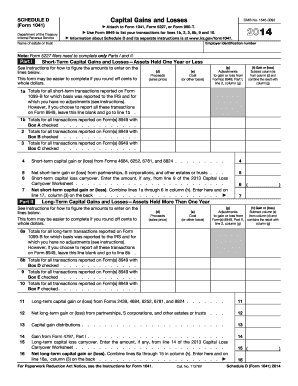
Orms 2439, 4684, 6252, 6781, and 8824 . . . . 11 12 Net long-term gain or (loss) from partnerships, S corporations, and other estates or trusts . . . 12 13 Capital gain distributions . . . 13 14 15 Gain from Form 4797, Part I . . . . . . . . . . . . . . . . . . . . . . . . Long-term capital loss carryover. Enter the amount, if any, from line 14 of the 2013 Capital Loss Carryover Worksheet . . . . . . . . . . . . . . . . . . . . . . . . . . Net long-term capital gain or (loss). Co.

How it works
  • Open form

    Open form follow the instructions

  • Easily sign form

    Easily sign the form with your finger

  • Share form

    Send filled & signed form or save

How to fill out the IRS 1041 - Schedule D online

Filling out the IRS 1041 - Schedule D is an important step in reporting capital gains and losses for estates and trusts. This guide provides a detailed step-by-step approach to help you complete the form accurately and comprehensively.

Follow the steps to accurately complete the IRS 1041 - Schedule D online.

  1. Click the ‘Get Form’ button to obtain the IRS 1041 - Schedule D and launch it in your preferred editor.
  2. Begin by entering the employer identification number and the name of the estate or trust at the top of the form. This is essential for identification purposes.
  3. Proceed to Part I for short-term capital gains and losses. Report transactions for assets held one year or less. Enter the proceeds or sales price in column (d) and the cost or other basis in column (e).
  4. For each transaction, if applicable, include adjustments to gain or loss from Form(s) 8949 in column (g). Calculate the gain or loss by subtracting column (e) from column (d) and adding any adjustments from column (g) in column (h).
  5. Fill out lines 1a through 6 for the totals of all relevant transactions. If you are reporting on Form 8949, leave applicable lines blank as directed.
  6. Move to Part II for long-term capital gains and losses on assets held for more than one year. Repeat the process of entering proceeds in column (d) and cost in column (e), followed by adjustments in column (g) and calculating gain or loss in column (h).
  7. Complete lines 8a through 15, following similar procedures as in Part I, ensuring accurate reporting for long-term transactions.
  8. In Part III, provide a summary of net short-term and long-term gains or losses. Enter values as instructed in the respective lines.
  9. If there is a net loss, complete Part IV for capital loss limitation as needed. Calculate and enter the smaller of the loss or $3,000 on line 20.
  10. Complete Part V if applicable, to compute taxes using maximum capital gains rates. Follow any additional instructions in the form to ensure accuracy.
  11. Finally, review the entire form for accuracy, and once satisfied with the completion, you can save changes, download, print, or share the form with appropriate parties.

Start completing your IRS 1041 - Schedule D online today to ensure timely and accurate filing.

Get form

Experience a faster way to fill out and sign forms on the web. Access the most extensive library of templates available.

Related content

2024 Instructions for Schedule D (Form 1041)

Use Schedule D to report the following. • The overall capital gains and losses from...

Learn more
2012 Instructions for Schedule D (Form 1041)

Jan 22, 2013 — Purpose of Form. Use Schedule D (Form 1041) to report gains and losses...

Learn more
f1045--2017.pdf

19. Enter the loss, if any, from line 21 of your 2017 Schedule D (Form 1040). (Estates and...

Learn more
Questions & Answers

Get answers to your most pressing questions about US Legal Forms API.

Contact support

What is a Schedule D for capital gains tax?

Schedule D is specifically designed for reporting capital gains and losses from the sale of assets for tax purposes. When filling out IRS 1041 - Schedule D, you're detailing how much profit or loss you realized from these transactions. This information is crucial for determining your overall tax liability.

Code D in box 11 of Form 1041 pertains to the distribution of capital gains from the estate to beneficiaries. This code identifies the nature of income reported on IRS 1041 - Schedule D and ensures that beneficiaries correctly account for these amounts on their personal tax returns. Be mindful of this when filing.

Form 1120 Schedule D is used by corporations to report capital gains and losses on their tax returns. This form helps businesses calculate their overall taxable income, much like the IRS 1041 - Schedule D does for estates and trusts. Understanding these forms is crucial for accurate corporate tax filing.

To obtain a Schedule D form, visit the IRS website for downloads or consider using tax preparation software which typically includes all necessary forms automatically. If you prefer a more guided approach, platforms like uslegalforms offer resources to help you secure the IRS 1041 - Schedule D easily.

You can find the Schedule D form directly on the IRS website in the forms and publications section. Additionally, tax preparation software and platforms, like uslegalforms, often provide easy access to this form. You’ll have the IRS 1041 - Schedule D readily available for your needs.

The IRS issues Schedule D; however, it is ultimately the responsibility of individual taxpayers to prepare and submit it. As a user of the IRS 1041 - Schedule D, your responsibility is to ensure accurate information is reflected when filing your tax return. Various platforms, such as uslegalforms, can help navigate this process.

Yes, there is a Schedule D specifically for Form 1041. If you are acting in a fiduciary capacity or managing an estate, you will need to file IRS 1041 - Schedule D to report any capital gains and losses associated with the estate's assets. This ensures proper compliance with tax regulations.

Schedule D summarizes the overall capital gains and losses, while Form 8949 details each individual transaction. When filing your taxes, you typically complete Form 8949 first and then use the total figures from it to complete IRS 1041 - Schedule D. Understanding this distinction helps ensure accurate tax reporting.

Schedule D is generally prepared by taxpayers who need to report capital gains and losses. It is not sent by any particular entity; rather, you as the taxpayer will fill it out and include it with your tax return. This process is essential for those dealing with IRS 1041 - Schedule D.

To access Schedule D on TurboTax, open your return and navigate to the 'Wages & Income' section. Look for the 'Investment Income' category, where you will find options to start your Schedule D preparation. Following the prompts will help you accurately fill out the IRS 1041 - Schedule D.

Get This Form Now!

Use professional pre-built templates to fill in and sign documents online faster. Get access to thousands of forms.

If you believe that this page should be taken down, please follow our DMCA take down process here.

IRS 1041 - Schedule D Form

This form is available in several versions. Select the version you need from the drop-down list below.

Get IRS 1041 - Schedule D