Loading
Form preview
  • US Legal Forms
  • Other Templates
  • Tax Forms
  • Executive Department Treasury IRS Forms
  • Irs 5500-ez Instructions 2018

Get Irs 5500-ez Instructions 2018-2026

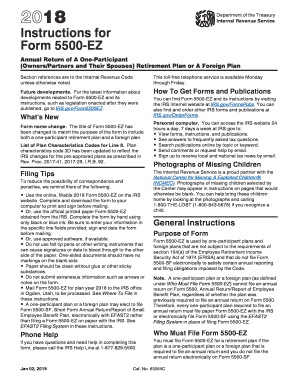
Toll-free telephone service is available Monday through Friday. Section references are to the Internal Revenue Code unless otherwise noted. Future developments. For the latest information about developments related to Form 5500-EZ and its instructions, such as legislation enacted after they were published, go to IRS.gov/Form5500EZ. What's New Form name change. The title of Form 5500-EZ has been changed to match the purpose of the form to include both a one-participant retirement plan and a for.

This website is not affiliated with IRS

How it works

  1. Open form

    Open form follow the instructions

  2. Easily sign form

    Easily sign the form with your finger

  3. Share form

    Send filled & signed form or save

How to fill out the IRS 5500-EZ Instructions online

Filing the IRS 5500-EZ requires careful attention to detail to ensure compliance with reporting obligations for retirement plans. This guide outlines the necessary steps to complete the form effectively online, making the process clearer and more manageable.

Follow the steps to successfully complete the IRS 5500-EZ Instructions online.

  1. Click the ‘Get Form’ button to access the IRS 5500-EZ form and open it in your preferred editor.
  2. Begin by entering the calendar or fiscal year of your retirement plan at the top of the form. Use the format MM/DD/YYYY for accuracy.
  3. Complete Part I by indicating if this is the first return or if it is an amended return. Ensure to tick the appropriate box.
  4. In Part II, fill in basic plan information such as the plan name, plan number, and employer details, including the employer identification number (EIN).
  5. Report details about participants in Part II, including the total number of participants at the beginning and end of the plan year.
  6. Next, in Part III, provide the plan's financial information, which includes total assets and contributions during the plan year.
  7. Part IV requires that you enter applicable plan characteristics codes that describe your plan throughout the reporting year.
  8. Complete Part V with compliance and funding questions, including any participant loans and the required minimum contributions.
  9. Once all sections are completed, review all entries for accuracy and completeness before saving your changes.
  10. Download and print the completed form. Ensure it is signed and dated before mailing it to the designated IRS address.

Start filling out your IRS 5500-EZ Instructions online today to ensure timely compliance.

Get form

Experience a faster way to fill out and sign forms on the web. Access the most extensive library of templates available.
Get form

Related content

2024 - Instructions for Form 5500-EZ
Form 5500-EZ is for one-participant plans (owners/partners and their spouses) and foreign...
Learn more
Instructions for Form 5500
by CYS Note — See Form 5500EZ and its instructions to see if the plan meets the...
Learn more
Reporting and Disclosure Guide for Employee...
The Form 5500-EZ cannot be submitted electronically through EFAST2. However, a...
Learn more

Related links form

Canada IMM 1295 E 2019 Canada IMM 1295 E 2019 HI AQS 278 2009 CBP 6059B 2007

Questions & Answers

Get answers to your most pressing questions about US Legal Forms API.

Contact support

Form 5500-EZ must be filed by certain one-participant retirement plans and small pension plans, as well as plans that do not meet the requirements for Form 5500 or 5500-SF. If you are responsible for managing a qualified plan and it fits this criteria, you are required to file according to IRS 5500-EZ Instructions. Ensuring timely compliance helps avoid penalties while keeping your plan in good standing.

To fill out the IRS EIN application, first, determine the eligibility requirements and gather necessary information about your business. You can complete the application online on the IRS website, or you can use a form to submit via mail or fax. Following the proper steps ensures you receive your EIN promptly, which is necessary for filing Form 5500-EZ according to IRS 5500-EZ Instructions.

The difference between 5500 and 5500-EZ primarily revolves around the types of plans they cater to and their reporting complexity. Form 5500 is intended for larger plans, requiring extensive financial and operational details. Conversely, Form 5500-EZ is streamlined for smaller plans or certain one-participant plans, minimizing reporting demands according to IRS 5500-EZ Instructions.

To file Form 5500-EZ, you need to download the form from the IRS website, complete all required sections, and submit it electronically or by mail. Make sure to review the IRS 5500-EZ Instructions for any specific guidelines for completing the form. Using a platform like US Legal Forms can simplify this process, providing you with the accurate forms and instructions you need.

Reasonable cause for filing Form 5500-EZ late typically involves circumstances beyond your control that prevented timely filing. This may include natural disasters, serious illness, or other valid reasons. It's important to document your situation thoroughly, as this can support your case when applying for relief under IRS 5500-EZ Instructions.

The form you should file depends on the size and type of your retirement plan. If your plan covers fewer than 100 participants and qualifies for simplified reporting, you can file Form 5500-EZ. However, if your plan has 100 or more participants or requires more comprehensive disclosures, you should file Form 5500 according to IRS 5500-EZ Instructions.

The main difference between Form 5500 and Form 5500-EZ lies in their filing requirements and the complexity of the information required. Form 5500 is typically used by larger plans and requires more detailed disclosures. Meanwhile, Form 5500-EZ is designed for one-participant plans or certain small plans, making it simpler to complete according to IRS 5500-EZ Instructions.

Yes, you can switch from Form 5500-SF to Form 5500-EZ if you meet the eligibility criteria for the EZ form. The IRS allows you to make this switch as long as your plan qualifies for simplified reporting under IRS 5500-EZ Instructions. This can help streamline your filing process and reduce your paperwork burden.

Yes, form 5500 can also be filed electronically through the appropriate channels. E-filing usually reduces processing times and enhances record-keeping. Following the IRS 5500-EZ Instructions can guide you in navigating this process smoothly.

The plan administrator bears the responsibility for filing form 5500-EZ. This role can include the business owner or an appointed representative. Familiarizing yourself with the IRS 5500-EZ Instructions will clarify your responsibilities and help ensure timely submission.

Get This Form Now!

Use professional pre-built templates to fill in and sign documents online faster. Get access to thousands of forms.
Get form
If you believe that this page should be taken down, please follow our DMCA take down processhere.
Get IRS 5500-EZ Instructions
Get form
  • Adoption
  • Bankruptcy
  • Contractors
  • Divorce
  • Home Sales
  • Employment
  • Identity Theft
  • Incorporation
  • Landlord Tenant
  • Living Trust
  • Name Change
  • Personal Planning
  • Small Business
  • Wills & Estates
  • Packages A-Z
  • Affidavits
  • Bankruptcy
  • Bill of Sale
  • Corporate - LLC
  • Divorce
  • Employment
  • Identity Theft
  • Internet Technology
  • Landlord Tenant
  • Living Wills
  • Name Change
  • Power of Attorney
  • Real Estate
  • Small Estates
  • Wills
  • All Forms
  • Forms A-Z
  • Other Templates
  • Legal Hub
  • About Us
  • Help Portal
  • Legal Resources
  • Blog
  • Affiliates
  • Contact Us
  • Delete My Account
  • Site Map
  • Industries
  • Forms in Spanish
  • Localized Forms
  • State-specific Forms
  • Forms Kit
  • Real Estate Handbook
  • All Guides
  • Notarize
  • Incorporation services
  • For Consumers
  • For Small Business
  • For Attorneys
  • USLegal
  • FormsPass
  • pdfFiller
  • signNow
  • altaFlow
  • DocHub
  • Instapage
Form Packages
  • Adoption
  • Bankruptcy
  • Contractors
  • Divorce
  • Home Sales
  • Employment
  • Identity Theft
  • Incorporation
  • Landlord Tenant
  • Living Trust
  • Name Change
  • Personal Planning
  • Small Business
  • Wills & Estates
  • Packages A-Z
Form Categories
  • Affidavits
  • Bankruptcy
  • Bill of Sale
  • Corporate - LLC
  • Divorce
  • Employment
  • Identity Theft
  • Internet Technology
  • Landlord Tenant
  • Living Wills
  • Name Change
  • Power of Attorney
  • Real Estate
  • Small Estates
  • Wills
  • All Forms
  • Forms A-Z
  • Other Templates
Customer Service
  • Legal Hub
  • About Us
  • Help Portal
  • Legal Resources
  • Blog
  • Affiliates
  • Contact Us
  • Delete My Account
  • Site Map
  • Industries
  • Forms in Spanish
  • Localized Forms
  • State-specific Forms
  • Forms Kit
Legal Guides
  • Real Estate Handbook
  • All Guides
Prepared for you
  • Notarize
  • Incorporation services
Our Customers
  • For Consumers
  • For Small Business
  • For Attorneys
Our Sites
  • USLegal
  • FormsPass
  • pdfFiller
  • signNow
  • altaFlow
  • DocHub
  • Instapage
Social Media
Call us now toll free:
+1 833 426 79 33
As seen in:
© Copyright 1999-2026 airSlate Legal Forms, Inc. 17 Station Street, Suite 303, Brookline, MA 02445
  • Your Privacy Choices
  • Terms of Service
  • Privacy Notice
  • Content Takedown Policy
  • Bug Bounty Program