Loading
Form preview
  • US Legal Forms
  • Other Templates
  • More Forms
  • More Uncategorized Forms
  • Preparticipation Sports Physical Form

Get Preparticipation Sports Physical Form

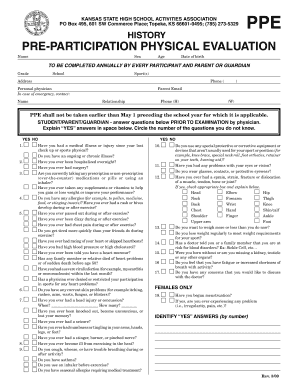
Date of birth TO BE COMPLETED ANNUALLY BY EVERY PARTICIPANT AND PARENT OR GUARDIAN Grade School Sport(s) Address Parent Email Personal physician In case of emergency, contact: Name Relationship Phone (H) Phone ( ) (W) PPE shall not be taken earlier than May 1 preceding the school year for which it is applicable. STUDENT/PARENT/GUARDIAN - answer questions below PRIOR TO EXAMINATION by physician. Explain YES answers in space below. Circl.

How it works

  1. Open form

    Open form follow the instructions

  2. Easily sign form

    Easily sign the form with your finger

  3. Share form

    Send filled & signed form or save

How to fill out the Preparticipation Sports Physical Form online

Completing the Preparticipation Sports Physical Form online is an essential step for students wishing to participate in sports. This guide provides clear, step-by-step instructions to ensure that users can fill out the form accurately and confidently.

Follow the steps to complete the form efficiently.

  1. Click the ‘Get Form’ button to access the Preparticipation Sports Physical Form and open it in your chosen online editor.
  2. Begin by entering the participant’s personal information including their name, sex, age, date of birth, grade, school, and sport(s) they will be participating in. Make sure to fill in each field completely to avoid any delays.
  3. Provide the participant's address and a parent or guardian's email address. This information is important for communication regarding the physical evaluation.
  4. Identify a personal physician for the participant and include emergency contact details such as name, relationship, and phone number. This is crucial for access to medical assistance if needed.
  5. If any 'YES' answers are given, use the provided space to explain these answers in detail. This ensures that the examining physician has a comprehensive understanding of the participant's health conditions.
  6. Fill out the physical examination section where the physician will enter findings related to height, weight, pulse, vision, blood pressure, and any abnormal findings.
  7. Once the examination is complete, the physician must sign and provide their name, date, and contact information confirming the participant’s fitness to engage in sports.
  8. Finally, obtain consent from the parent or guardian, which includes reviewing the KSHSAA eligibility checklist. They must sign and date the form, acknowledging all information is accurate.
  9. After completing all sections of the form, ensure to save changes, and download a copy for your records. The form may also be printed or shared as required.

Complete the Preparticipation Sports Physical Form online today to ensure a smooth and efficient process for sports participation.

Get form

Experience a faster way to fill out and sign forms on the web. Access the most extensive library of templates available.
Get form

Related content

Preparticipation Physical Evaluation History Form
1. Has a doctor ever denied or restricted your participation in sports for any reason? 2...
Learn more
MEDICAL ELIGIBILITY FORM
I have examined the student named on this form and completed the preparticipation physical...
Learn more
Mr. Lee (internet broadcaster)
There were many difficulties with the spectator system, such as the difficulty of seeing...
Learn more

Related links form

ATION MECHANICAL PERMIT APPLIC - Byron Township - Byrontownship Cmgc Bid Item Pricing Proposal Form - Colorado Department Of ... ParentGuardian Release Agreement And Consent To Emergency Bb - Static Dpsk12 High School FAFSA Completion User Guide - DPS-Counseling

Questions & Answers

Get answers to your most pressing questions about US Legal Forms API.

Contact support

In addition to the Preparticipation Sports Physical Form, you may need a consent form signed by a parent or guardian if you're a minor. Bringing any relevant medical records, like vaccination history, is also useful. This paperwork ensures the healthcare provider has all necessary information to assess your health comprehensively.

The Preparticipation Sports Physical Form is a vital document used to assess whether an athlete is ready to safely participate in sports. This form evaluates your medical history and current health conditions, identifying any potential risks. Using this evaluation helps protect your well-being while participating in competitive activities.

During a sports physical, the healthcare provider will ask you about your health history, including injuries, medications, and any chronic conditions. Expect questions about your family's medical history as well, as some conditions can be hereditary. This thorough inquiry helps ensure that you are fit to participate in sports without putting your health at risk.

For a sports physical, you'll primarily need the Preparticipation Sports Physical Form. This form should include sections to document your medical history and any necessary health evaluations. In some cases, a parent or guardian may need to sign the form, so it’s vital to have them involved in the process.

Filling out a physical examination form, particularly the Preparticipation Sports Physical Form, involves providing accurate and thorough information about your medical history and any current health issues. Start by filling in personal details like your name and age. Then, answer questions about past injuries, ongoing medications, and allergies; being honest ensures safe participation in sports.

When you attend a sports physical, it's essential to bring your Preparticipation Sports Physical Form along with any previous medical records, including vaccination history. These documents help the healthcare provider understand your medical background and current health status. Additionally, be sure to bring any required identification or insurance information to facilitate the process.

The preparticipation physical exam in sports is an evaluation performed to ensure that an athlete is medically fit to participate. It focuses on assessing any health risks that may be associated with sports activities. This includes a review of medical history, a physical examination, and sometimes specific tests. Completing the Preparticipation Sports Physical Form is a critical part of this process, as it serves as an official record.

The correct order of a physical examination usually follows these steps: inspection, palpation, percussion, and auscultation. Start with a thorough visual assessment, then use touch to identify areas of concern. Follow this with tapping to detect fluid or organ size, and finally, listen to the heart and lungs. Document all these steps on the Preparticipation Sports Physical Form to create a comprehensive record.

The four components of a physical exam include inspection, palpation, percussion, and auscultation. Inspection involves observing the individual's physical state, while palpation entails feeling for abnormalities. Percussion refers to tapping on specific areas to evaluate organ size and function, and auscultation is listening to internal sounds using a stethoscope. Documenting these findings on the Preparticipation Sports Physical Form is essential for clarity.

Yes, many pediatricians perform sports physicals as part of adolescent healthcare. They are well equipped to evaluate young athletes, ensuring they are fit for participation in sports. These evaluations often include developmental aspects and any specific concerns regarding the child's health. Make sure to have your pediatrician complete the Preparticipation Sports Physical Form to ensure compliance with sports regulations.

Get This Form Now!

Use professional pre-built templates to fill in and sign documents online faster. Get access to thousands of forms.
Get form
If you believe that this page should be taken down, please follow our DMCA take down processhere.
Get Preparticipation Sports Physical Form
Get form
  • Adoption
  • Bankruptcy
  • Contractors
  • Divorce
  • Home Sales
  • Employment
  • Identity Theft
  • Incorporation
  • Landlord Tenant
  • Living Trust
  • Name Change
  • Personal Planning
  • Small Business
  • Wills & Estates
  • Packages A-Z
  • Affidavits
  • Bankruptcy
  • Bill of Sale
  • Corporate - LLC
  • Divorce
  • Employment
  • Identity Theft
  • Internet Technology
  • Landlord Tenant
  • Living Wills
  • Name Change
  • Power of Attorney
  • Real Estate
  • Small Estates
  • Wills
  • All Forms
  • Forms A-Z
  • Other Templates
  • Legal Hub
  • About Us
  • Help Portal
  • Legal Resources
  • Blog
  • Affiliates
  • Contact Us
  • Delete My Account
  • Site Map
  • Industries
  • Forms in Spanish
  • Localized Forms
  • State-specific Forms
  • Forms Kit
  • Real Estate Handbook
  • All Guides
  • Notarize
  • Incorporation services
  • For Consumers
  • For Small Business
  • For Attorneys
  • USLegal
  • FormsPass
  • pdfFiller
  • signNow
  • altaFlow
  • DocHub
  • Instapage
Form Packages
  • Adoption
  • Bankruptcy
  • Contractors
  • Divorce
  • Home Sales
  • Employment
  • Identity Theft
  • Incorporation
  • Landlord Tenant
  • Living Trust
  • Name Change
  • Personal Planning
  • Small Business
  • Wills & Estates
  • Packages A-Z
Form Categories
  • Affidavits
  • Bankruptcy
  • Bill of Sale
  • Corporate - LLC
  • Divorce
  • Employment
  • Identity Theft
  • Internet Technology
  • Landlord Tenant
  • Living Wills
  • Name Change
  • Power of Attorney
  • Real Estate
  • Small Estates
  • Wills
  • All Forms
  • Forms A-Z
  • Other Templates
Customer Service
  • Legal Hub
  • About Us
  • Help Portal
  • Legal Resources
  • Blog
  • Affiliates
  • Contact Us
  • Delete My Account
  • Site Map
  • Industries
  • Forms in Spanish
  • Localized Forms
  • State-specific Forms
  • Forms Kit
Legal Guides
  • Real Estate Handbook
  • All Guides
Prepared for you
  • Notarize
  • Incorporation services
Our Customers
  • For Consumers
  • For Small Business
  • For Attorneys
Our Sites
  • USLegal
  • FormsPass
  • pdfFiller
  • signNow
  • altaFlow
  • DocHub
  • Instapage
Social Media
Call us now toll free:
+1 833 426 79 33
As seen in:
© Copyright 1999-2026 airSlate Legal Forms, Inc. 17 Station Street, Ste. 203, Brookline, MA 02445
  • Your Privacy Choices
  • Terms of Service
  • Privacy Notice
  • Content Takedown Policy
  • Bug Bounty Program