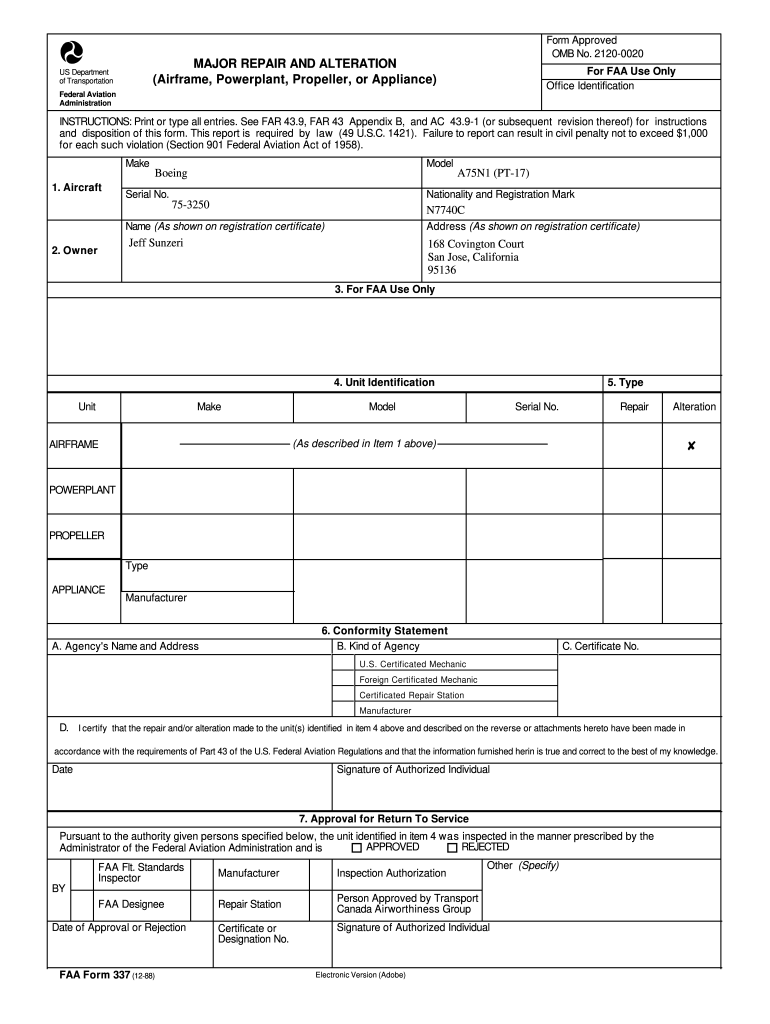
Dentification Federal Aviation Administration INSTRUCTIONS: Print or type all entries. See FAR 43.9, FAR 43 Appendix B, and AC 43.9-1 (or subsequent revision thereof) for instructions and disposition of this form. This report is required by law (49 U.S.C. 1421). Failure to report can result in civil penalty not to exceed $1,000 for each such violation (Section 901 Federal Aviation Act of 1958). Make 1. Aircraft Model Boeing Serial No. Nationality and Registration Mark 75-3250 N7740C Addr.
Loading

Open form follow the instructions

Easily sign the form with your finger

Send filled & signed form or save
How to fill out the FAA 337 online
Filling out the FAA Form 337 is a crucial step in documenting major repairs and alterations undertaken on an aircraft. This guide provides a clear and detailed approach to help users navigate and complete the form accurately online.
Follow the steps to successfully complete the FAA 337 form.
- Click ‘Get Form’ button to obtain the form and open it in the editor.
- Begin by filling out Section 1, which includes the aircraft model, serial number, nationality, and registration mark. Ensure the information matches the registration certificate.
- In Section 2, provide the owner's name and address as they appear on the registration certificate.
- Section 4 requires you to identify the unit involved in the repair or alteration. Specify the unit's make, model, and serial number, and indicate whether it is an airframe, powerplant, propeller, or appliance.
- In Section 6, provide the conformity statement by selecting the kind of agency responsible for the work. Indicate the agency's name and address, license or certificate number, and sign and date to certify the accuracy of the information provided.
- For Section 7, record the approval for return to service by the proper authority. Indicate whether the unit was approved or rejected, and include a signature and date.
- Section 8 is for detailing the description of the work accomplished. If additional space is needed, attach another sheet labeled with the aircraft nationality and registration mark along with the completion date.
- Review all sections for accuracy and ensure all required fields are filled out. After confirming that all information is correct, save your changes, and download the form for your records or print and share it as needed.
Complete your FAA Form 337 online today for a seamless documentation process.
Experience a faster way to fill out and sign forms on the web. Access the most extensive library of templates available.
Related content
Questions concerning FAA Form 337, should be addressed to your local FSDO. The mailing...
337 is to provide aircraft owners and operators with a record of major repairs or...
Mar 14, 2015 — 337, 337A (USAF 02B), 337B, T337B, 337C, 337E, T337E,. T337C, 337D...
Get answers to your most pressing questions about US Legal Forms API.
Where do I mail my FAA Form 337?
Mail your FAA Form 337 to the FAA's Aircraft Registration Branch at the address provided on their website. It is essential to ensure that your form is complete and includes any supporting documentation required. This careful approach helps facilitate a smoother review process for your FAA 337, getting you the needed acknowledgment quickly.
Where do I mail my FAA 337 form?
To mail your FAA 337 form, send it to the address specified by the FAA guidelines, typically found on their official site. Make sure your form is signed and dated to avoid potential issues with processing. Remember that it is crucial to keep a copy for your records before submitting it to ensure everything is properly documented.
Where to mail aircraft registration?
Mailing your aircraft registration can be done by sending the completed form to the FAA's Aircraft Registration Branch. You will find the specific mailing address listed on their website, ensuring your registration is processed without delays. Having your FAA 337 on hand will assist in further clarifying your aircraft’s status during this process.
How do I file an FAA report?
Filing an FAA report involves gathering the required documentation related to your incident and accessing the FAA's reporting system online. You will need to complete the necessary forms, including the FAA 337 if applicable. By following the step-by-step process outlined on their website, you can ensure your report is filed accurately and securely.
How do I submit my FAA form 337 electronically?
To submit your FAA form 337 electronically, visit the FAA's official website and navigate to the appropriate section for electronic submissions. You may need to register for an account to upload your form securely. After completing your FAA 337, ensure all necessary information is filled in correctly before submitting it through the online portal.
What information should be included on the attached sheet of an FAA form 337 if more space was needed for the work description?
When you attach an additional sheet to the FAA Form 337, include a clear heading that identifies the work being described. List all relevant details such as the nature of the work, dates of completion, and any pertinent part numbers. This thoroughness ensures the FAA has the complete context around the repairs or alterations documented on the FAA 337.
What information is generally contained in aircraft specifications or type certificate data sheets?
Typically, aircraft specifications and type certificate data sheets include information about the aircraft's model, weight, dimensions, and engine specifications. They may also detail performance metrics and systems installed on the aircraft. This information is crucial for anyone working with the FAA 337, as it allows for accurate reporting and compliance with aviation standards.
What is the procedure if additional space is needed on the FAA Form 337 to describe the repair or alteration?
If you find that additional space is needed on the FAA Form 337, you can attach a separate sheet of paper to provide more details. Be sure to label the additional sheet clearly, referencing the FAA 337. This ensures that all necessary information is included, helping to prevent delays in processing your submission.
How to fill out FAA drone registration?
Filling out the FAA drone registration involves entering your information, including name, address, and the drone’s serial number. Make sure you follow guidelines laid out for the FAA 337 to ensure all information is accurate. After completing the registration, you will receive a unique registration number. Using resources like USLegalForms can help simplify this process.
What document contains the instructions for completion of FAA Form 337?
The instructions for completing the FAA Form 337 are available in the FAA publication that details the procedures for reporting repairs and alterations. You can find these instructions on the FAA's official website or in the guidance provided with the form. Knowing these instructions will help you avoid common mistakes while filling out the FAA 337 and ensure compliance.
Use professional pre-built templates to fill in and sign documents online faster. Get access to thousands of forms.
If you believe that this page should be taken down, please follow our DMCA take down process here.
This form is available in several versions. Select the version you need from the drop-down list below.