Loading
Get Prometour Credit Card Payment Form
How it works
-

Open form follow the instructions
-

Easily sign the form with your finger
-

Send filled & signed form or save
How to fill out the Prometour Credit Card Payment Form online
Filling out the Prometour Credit Card Payment Form online is a straightforward process that ensures your payment is processed efficiently. This guide will walk you through each section of the form, providing detailed instructions to help you complete it accurately.
Follow the steps to complete your payment form with ease.
- Click ‘Get Form’ button to obtain the form and open it in the editor.
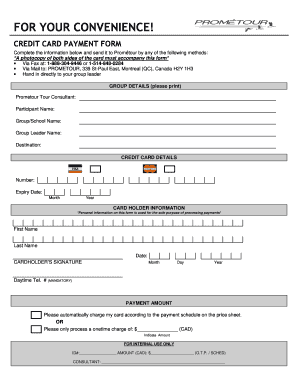
- Begin by entering the group details in the appropriate fields. Include the name of the Prometour tour consultant, participant name, group or school name, group leader's name, and the destination.
- Next, fill in the credit card details. Provide the credit card number and expiry date, ensuring the month and year are entered correctly.
- In the cardholder information section, input the first name and last name of the person whose name appears on the credit card. Also, enter the date, making sure to follow the correct format.
- Sign in the designated area to authorize the payment. Include the month, day, and year of the signature.
- Enter a mandatory daytime telephone number for contact purposes.
- Specify the payment amount. You can choose to have your card charged according to the payment schedule on the price sheet or indicate a one-time charge amount, ensuring it is in Canadian dollars.
- Review the entire form for accuracy and completeness. Make any necessary corrections before continuing.
- Once satisfied, save your changes, download a copy, print it, or share the form as needed based on your preferred submission method.
Start filling out your Prometour Credit Card Payment Form online today for a smooth payment experience.
Related links form
To fill out an authorization form like the Prometour Credit Card Payment Form, start with the necessary details about the transaction. Provide your credit card information and any additional required details. After reviewing your entries for accuracy, sign the form to complete your authorization.