Loading
Get Fl Building Permit Application - North Palm Beach Village 2023-2026
How it works
-

Open form follow the instructions
-

Easily sign the form with your finger
-

Send filled & signed form or save
How to fill out the FL Building Permit Application - North Palm Beach Village online
Filling out the FL Building Permit Application for North Palm Beach Village is a crucial step in ensuring that your construction or improvement project complies with local regulations. This guide offers a clear, step-by-step process to help you complete the application online efficiently and accurately.
Follow the steps to complete your building permit application online.
- Click 'Get Form' button to obtain the form and open it in your editing tool.
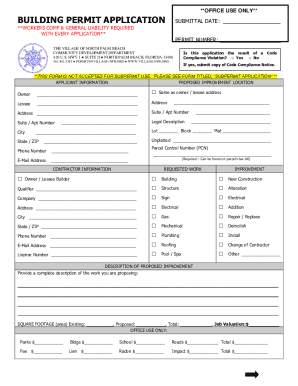
- Begin by entering the submittal date and indicate whether the application is the result of a code compliance violation by selecting 'Yes' or 'No'. If 'Yes', attach a copy of the Code Compliance Notice.
- Complete the Applicant Information section. Fill out the owner's name, or check the 'Same as owner/lessee address' box if applicable. If there is a lessee, provide their information as well. Enter the address details including suite or apartment number, city, state, and ZIP code.
- Enter the contractor information, including lot, block, and parcel control number, which can be found on the property tax bill.
- In the Requested Work section, check the box that best describes the builder's status—owner/lessee builder or contractor. Provide the contractor's details, including their company name, contact information, and license number.
- Specify the type of work requested by checking the appropriate boxes for building type (e.g., building, structure, sign, etc.).
- In the Improvement section, indicate the nature of the improvement work, such as new construction, alteration, or addition.
- Provide a detailed description of the proposed improvement in the dedicated space provided.
- Input the square footage for existing and proposed areas, along with the total square footage and job valuation.
- Complete the Supplemental Construction Lien Law Information section as applicable, particularly for projects over the specified financial limits.
- Fill out the fee simple titleholder’s mortgage company details if relevant. If not applicable, select the appropriate option.
- Acknowledge the application certification by reading the statements provided, affirming that the information is accurate, and confirming compliance with construction laws.
- Sign and date the owner's affidavit and ensure it is acknowledged correctly. This may include notarization.
- Once all sections are completed, review the application for accuracy. You can then save changes, download, print, or share the completed form as necessary.
Start your building permit application online today and ensure your project complies with local requirements.
How long does it take for a permit to be approved? Residential Construction Permits require an average of 14 working days for approval or response. Additional approvals from other departments are also required to issue a permit. Commercial Construction Permits require an average of 28 working days for approval.