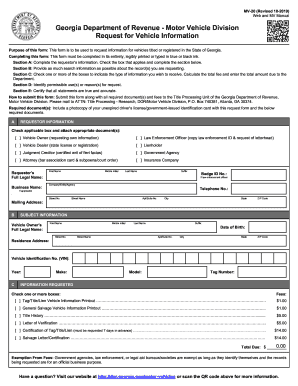
Formation for vehicles titled or registered in the State of Georgia. How to submit this Form: This completed form, legibly printed or typed, must be submitted along with all required document(s) and fees to the Georgia Department of Revenue, Motor Vehicle Division. Any alteration or correction voids this form. Please mail completed form, required documentation(s) and fees to ATTN: Title Processing Research, DOR/Motor Vehicle Division, P.O. Box 740381, Atlanta, GA 30374. Required Document(s):.
Open form follow the instructions
Easily sign the form with your finger
Send filled & signed form or save
How to fill out the GA MV-20 online
The GA MV-20 form is essential for requesting vehicle information in the State of Georgia. This guide provides a detailed overview of how to correctly fill out the form online, ensuring a smooth submission process.
Follow the steps to successfully complete the GA MV-20 online.
- Click 'Get Form' button to obtain the form and open it in the editor.
- In Section A, enter the requestor’s information. Choose the appropriate box that reflects your status (e.g., vehicle owner, law enforcement officer) and provide your full legal name, telephone number, and mailing address.
- In Section B, provide as much search information about the vehicle as possible. Enter the vehicle owner's full legal name, residence address, date of birth, and the vehicle identification number (VIN).
- In Section C, select one or more types of information you wish to receive by checking the corresponding boxes. Calculate the total fee based on your selections and write the total amount due.
- In Section D, indicate the permissible use(s) or reason(s) for your request by checking all applicable boxes as per the guidelines provided.
- In Section E, certify that all statements made in the form are true and accurate by signing and dating the certification section.
- Review the completed form for accuracy. Save your changes, download the form, and prepare it for submission.
- Submit the completed form along with any required documents and fees to the Title Processing Unit of the Georgia Department of Revenue, Motor Vehicle Division.
Complete your documents online for a streamlined experience.
Experience a faster way to fill out and sign forms on the web. Access the most extensive library of templates available.
Related content
MV-20 Request for Motor Vehicle Data. MV-20 Motor Vehicle Data Request Form (PDF, 258 KB)...
Twenty (20) model years old and older vehicles are exempt from odometer disclosure...
Purpose of this Form: This form is to be used to request information for vehicles titled...
Get answers to your most pressing questions about US Legal Forms API.
Does a power of attorney have to be filed with the court in Georgia?
In Georgia, a power of attorney generally does not need to be filed with the court unless it is being used for specific legal purposes. However, for vehicle transactions like those involving the GA MV-20, it's often beneficial to keep a copy easily accessible. Always consult with legal experts if you're uncertain about filing requirements.
How to fill out power of attorney forms?
Filling out power of attorney forms requires you to choose the right type of form based on your specific circumstances. Make sure to provide accurate information about yourself and your designated agent. If it concerns vehicle matters, including references to the GA MV-20 can clarify your intentions and streamline the process.
How to fill out a Georgia power of attorney?
To fill out a Georgia power of attorney, start by selecting the appropriate form that suits your needs. Clearly identify the agent and outline the powers you wish to grant, referencing the GA MV-20 if it pertains to your vehicle. Once completed, sign the document before a notary public to give it legal standing.
How to fill out form 20?
Filling out form 20 involves entering specific information such as the vehicle identification number and ownership details. The GA MV-20 is essential for this process, especially when dealing with vehicle title transfers. Carefully review the instructions that accompany form 20 to ensure you've completed all necessary sections.
How to fill out a Georgia secure power of attorney form?
When filling out a Georgia secure power of attorney form, you need to clearly designate the agent and specify the powers granted. Make sure to use the correct form and reference the GA MV-20 if it relates to vehicle transactions. After completing the form, both you and your agent should sign it in front of a notary to ensure its validity.
How to fill out a vehicle title application?
To fill out a vehicle title application, start by gathering the necessary documents, including your current title and registration. Ensure that you correctly complete the GA MV-20 form, providing accurate vehicle details such as the VIN and your personal information. Double-check your entries to avoid delays in processing your application.
What is a 40 5 20 GA citation?
The 40 5 20 GA citation refers to a specific traffic violation related to operating a vehicle without proper registration in Georgia. Understanding this citation is essential, especially if you are navigating the GA MV-20 registration requirements. If you receive such a citation, consider reviewing your registration status and ensuring you have completed your registration process accurately.
How do I check my vehicle registration status in Georgia?
To check your vehicle registration status in Georgia, go to the Georgia Department of Revenue’s official website. You will be prompted to input your vehicle identification number (VIN) and license plate number. This easy access to your GA MV-20 information allows you to verify that your registration is up to date, helping you avoid any potential issues.
Can I drive my car while waiting for a registration sticker in Georgia?
In Georgia, you can legally drive your car while waiting for your registration sticker if you have completed your GA MV-20 registration process. However, ensure that you have all necessary documentation with you, including your vehicle registration receipt. This receipt serves as proof that your registration is in process, allowing you to drive without interruption.
How to check vehicle registration status in GA?
To check your vehicle registration status in Georgia, visit the Georgia Department of Revenue's website. You will need to enter your details such as the vehicle’s VIN and your license plate number. This simple step will provide you with the current status of your GA MV-20 registration, ensuring you stay informed and compliant.
Use professional pre-built templates to fill in and sign documents online faster. Get access to thousands of forms.
If you believe that this page should be taken down, please follow our DMCA take down process here.