Loading
Get Su684
How it works
-

Open form follow the instructions
-

Easily sign the form with your finger
-

Send filled & signed form or save
How to fill out the Su684 online
Filling out the Su684 form online is an essential step for individuals seeking assistance from Services Australia regarding their medical conditions and capacity to work. This guide will support you with a clear, step-by-step approach to ensure you complete the form accurately and efficiently.
Follow the steps to accurately fill out the Su684 form online
- Click 'Get Form' button to obtain the form and open it in the preferred editing tool.
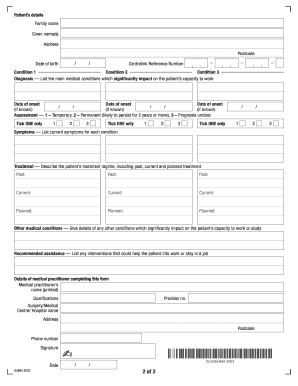
- Begin by entering the patient’s details in the designated sections, including their family name, given name(s), address, postcode, date of birth, and Centrelink reference number.
- In the condition sections, list the main medical conditions the patient faces that impact their ability to work. Be specific.
- For each condition, provide the date of onset, and select the appropriate assessment of the condition from the provided options: temporary, permanent, or prognosis unclear.
- Document the current symptoms experienced by the patient for each listed condition in the symptoms section.
- Detail the treatment the patient is undergoing, separating past, current, and planned treatments for clarity.
- In the other medical conditions section, include any additional conditions affecting the patient's capacity to work or study.
- Provide any recommended assistance or interventions that could help the patient remain in work or find employment.
- Finally, input the details of the medical practitioner completing the form, including their name, qualifications, provider number, medical center name, address, phone number, and signature with the date.
- After ensuring all information is accurate, save changes, download the document, print it for mailing, or use the option to share the form with the relevant parties.
Complete and submit your documents online to facilitate the assistance process.