Loading
Form preview
  • US Legal Forms
  • Other Templates
  • More Forms
  • More Multi-State Forms
  • Gadsden State Community College Private Transportation Release Consent Form 2008

Get Gadsden State Community College Private Transportation Release Consent Form 2008-2026

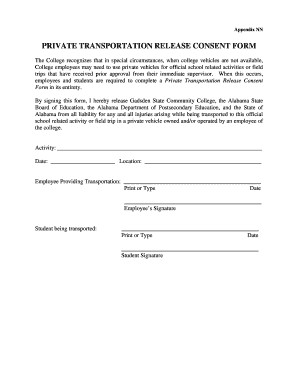
Appendix IN PRIVATE TRANSPORTATION RELEASE CONSENT From The College recognizes that in special circumstances, when college vehicles are not available, College employees may need to use private vehicles.

How it works

  1. Open form

    Open form follow the instructions

  2. Easily sign form

    Easily sign the form with your finger

  3. Share form

    Send filled & signed form or save

How to fill out the Gadsden State Community College Private Transportation Release Consent Form online

Filling out the Gadsden State Community College Private Transportation Release Consent Form online is an essential step for users involved in official school-related activities or field trips. This guide provides clear instructions to ensure that you can complete the form accurately and efficiently.

Follow the steps to successfully complete the form

  1. Click ‘Get Form’ button to obtain the form and open it in the editor.
  2. In the first section, provide details about the activity for which transportation is being arranged. Clearly write the name of the activity on the line provided.
  3. Enter the date of the activity in the designated field. Make sure to use the correct format to avoid confusion.
  4. Fill in the location of the activity where indicated. This helps to clarify where users will be transported.
  5. In the section for the employee providing transportation, print or type the name of the employee who will be responsible for driving. This information is crucial for accountability.
  6. Add the date below the employee's name for record-keeping purposes. This should coincide with the date listed for the activity.
  7. The employee must sign the form in the designated area to confirm their agreement to provide transportation.
  8. Next, provide the name of the student being transported, again ensuring to print or type it clearly.
  9. Enter the date next to the student’s name, with the same considerations as for the employee's date.
  10. Finally, the student should sign the form to acknowledge their consent to be transported.
  11. After filling out all the necessary sections, save your changes. You can download, print, or share the completed form as needed.

Complete your documents online for a smoother process.

Get form

Experience a faster way to fill out and sign forms on the web. Access the most extensive library of templates available.
Get form

Related content

SSS-FY 2016
12, P042A151387, Gadsden State Community College, AL, 600, $ 849,782, Regular. 13...
Learn more
PRIVATE TRANSPORTATION RELEASE CONSENT FORM
Form F/8.15-A. PRIVATE TRANSPORTATION RELEASE CONSENT FORM. The College recognizes that in...
Learn more
INSTRUCTIONS FOR COMPLETING THE FLORIDA ......
Traffic crashes can be reported by the use of a long or short form Florida Traffic...
Learn more

Related links form

2009 Form1120 20092106form 2009 2106 Ez Form F2555 2009 Form

Get This Form Now!

Use professional pre-built templates to fill in and sign documents online faster. Get access to thousands of forms.
Get form
If you believe that this page should be taken down, please follow our DMCA take down processhere.
Get Gadsden State Community College Private Transportation Release Consent Form
Get form
  • Adoption
  • Bankruptcy
  • Contractors
  • Divorce
  • Home Sales
  • Employment
  • Identity Theft
  • Incorporation
  • Landlord Tenant
  • Living Trust
  • Name Change
  • Personal Planning
  • Small Business
  • Wills & Estates
  • Packages A-Z
  • Affidavits
  • Bankruptcy
  • Bill of Sale
  • Corporate - LLC
  • Divorce
  • Employment
  • Identity Theft
  • Internet Technology
  • Landlord Tenant
  • Living Wills
  • Name Change
  • Power of Attorney
  • Real Estate
  • Small Estates
  • Wills
  • All Forms
  • Forms A-Z
  • Other Templates
  • Legal Hub
  • About Us
  • Help Portal
  • Legal Resources
  • Blog
  • Affiliates
  • Contact Us
  • Delete My Account
  • Site Map
  • Industries
  • Forms in Spanish
  • Localized Forms
  • State-specific Forms
  • Forms Kit
  • Real Estate Handbook
  • All Guides
  • Notarize
  • Incorporation services
  • For Consumers
  • For Small Business
  • For Attorneys
  • USLegal
  • FormsPass
  • pdfFiller
  • signNow
  • altaFlow
  • DocHub
  • Instapage
Form Packages
  • Adoption
  • Bankruptcy
  • Contractors
  • Divorce
  • Home Sales
  • Employment
  • Identity Theft
  • Incorporation
  • Landlord Tenant
  • Living Trust
  • Name Change
  • Personal Planning
  • Small Business
  • Wills & Estates
  • Packages A-Z
Form Categories
  • Affidavits
  • Bankruptcy
  • Bill of Sale
  • Corporate - LLC
  • Divorce
  • Employment
  • Identity Theft
  • Internet Technology
  • Landlord Tenant
  • Living Wills
  • Name Change
  • Power of Attorney
  • Real Estate
  • Small Estates
  • Wills
  • All Forms
  • Forms A-Z
  • Other Templates
Customer Service
  • Legal Hub
  • About Us
  • Help Portal
  • Legal Resources
  • Blog
  • Affiliates
  • Contact Us
  • Delete My Account
  • Site Map
  • Industries
  • Forms in Spanish
  • Localized Forms
  • State-specific Forms
  • Forms Kit
Legal Guides
  • Real Estate Handbook
  • All Guides
Prepared for you
  • Notarize
  • Incorporation services
Our Customers
  • For Consumers
  • For Small Business
  • For Attorneys
Our Sites
  • USLegal
  • FormsPass
  • pdfFiller
  • signNow
  • altaFlow
  • DocHub
  • Instapage
Social Media
Call us now toll free:
+1 833 426 79 33
As seen in:
© Copyright 1999-2026 airSlate Legal Forms, Inc. 17 Station Street, Ste. 203, Brookline, MA 02445
  • Your Privacy Choices
  • Terms of Service
  • Privacy Notice
  • Content Takedown Policy
  • Bug Bounty Program