Loading
Get T-cash Service Request Form - Trust Bank Limited
How it works
-

Open form follow the instructions
-

Easily sign the form with your finger
-

Send filled & signed form or save
How to fill out the T-cash Service Request Form - Trust Bank Limited online
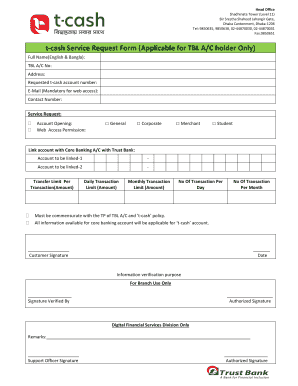
Filling out the T-cash Service Request Form is a straightforward process that allows users to access Trust Bank Limited's T-cash services. This guide provides clear, step-by-step instructions for completing the form online, ensuring that all necessary information is accurately submitted.
Follow the steps to complete the T-cash Service Request Form online.
- Click the ‘Get Form’ button to obtain the form and open it for editing.
- Enter your full name in both English and Bangla as requested in the designated field.
- Provide your Trust Bank Limited account number in the specified section to verify your eligibility.
- Fill in your current address to ensure accurate communication from the bank.
- Indicate the requested T-cash account number as per your preference.
- Input a valid email address in the mandatory field to facilitate web access.
- Enter your contact number to allow the bank to reach out regarding your application.
- Select the specific service request from the available options, marking the appropriate checkbox for account opening, web access permission, or other services.
- If linking a core banking account, provide the account numbers to be linked in the designated spaces.
- Specify the transfer limit per transaction and the daily and monthly transaction limits as required.
- Declare the number of transactions you wish to perform per day and per month.
- Review all provided information for accuracy. Finally, add your signature and date to finalize your request.
- Once completed, you can save changes, download, print, or share the form as necessary.
Complete your T-cash Service Request Form online today to enjoy seamless banking services.
Whenever you want to access your account, all you have to do is open your web browser and visit your bank's website. After the page loads, look for the tab or button that says “online banking." Click the link that says “online banking” or "login" to access your account.