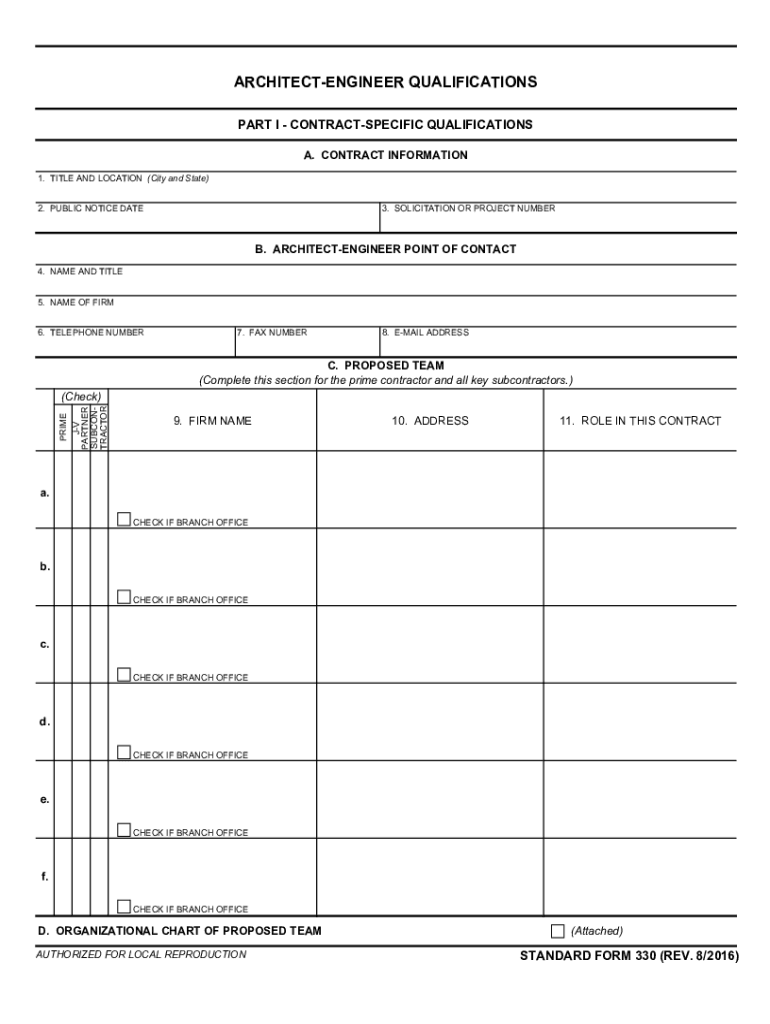
ARCHITECTENGINEER QUALIFICATIONSOMB Control Number: 90000157 Expiration Date: 2/29/2024Paperwork Reduction Act Statement This information collection meets the requirements of 44 USC 3507, as amended.
Loading

Open form follow the instructions

Easily sign the form with your finger

Send filled & signed form or save
How to fill out the GSA SF 330 online
This guide provides a comprehensive overview of the GSA SF 330 form, aimed at helping users navigate and complete the document efficiently and accurately. Whether you are an architect-engineer firm or a user assisting in the application process, follow these instructions to ensure your submission meets all requirements.
Follow the steps to successfully complete the GSA SF 330 online
- Click ‘Get Form’ button to obtain the form and open it for editing.
- In Part I, Section A, fill in the contract information by entering the title and location of the contract as specified in the public announcement. Include the public notice date and the relevant solicitation or project number.
- In Section B, provide the contact details for the architect-engineer point of contact, including their name, title, firm name, phone number, fax number, and email address.
- In Section C, list the proposed team by detailing the firm names, addresses, and roles for each contractor, partner, and subcontractor involved in the project.
- Attach an organizational chart following Section C to illustrate the proposed team structure, including names and roles of key personnel.
- Proceed to Section E, where you must complete resumes for each key personnel involved in the contract, detailing their experience, education, professional registrations, and relevant projects.
- In Section F, input information on example projects that best exhibit the proposed team's qualifications for the contract, detailing project titles, completion years, owners, and descriptions.
- Section G requires a matrix listing key personnel and their participation in the example projects outlined in Section F.
- For Section H, provide any additional information specifically requested by the agency or to address selection criteria not covered in previous sections.
- Finally, in Section I, the authorized representative must sign and date the form to confirm the accuracy of the information provided before submission.
- After completing the form online, you can save changes, download, print, or share the final document according to your needs.
Complete the GSA SF 330 form online today to streamline your application process.
Experience a faster way to fill out and sign forms on the web. Access the most extensive library of templates available.
Related content
Form: SF330. Architect-Engineer Qualifications. Current Revision Date: 08/2016. Authority...
STANDARD FORM 330 (REV. 8/2016) PAGE 1 OF INSTRUCTIONS. Prescribed by GSA - FAR (48 CFR)...
The New Castle Court facilities are located in a 575,000 SF, 14-story facility located in...
Get answers to your most pressing questions about US Legal Forms API.
What is an SF 330?
Contracting for architect-engineer and construction services follows a special procedure, based on the professional qualifications and experience of the applicant. This Standard Form 330, Architect-Engineer Qualifications is used to judge contractor worthiness by the federal government.
What is the purpose of GSA Form SF 91?
What is the purpose of GSA Form SF-91? a.To report any injury or illness that has occurred in the workplace.
What does GSA stand for?
What Does GSA Stand For? GSA stands for the General Services Administration which is a government agency that was established in 1949.
Use professional pre-built templates to fill in and sign documents online faster. Get access to thousands of forms.
If you believe that this page should be taken down, please follow our DMCA take down process here.
This form is available in several versions. Select the version you need from the drop-down list below.