Loading
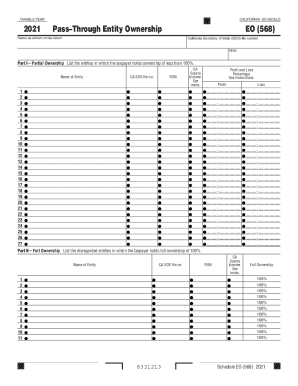
Get Ca Eo (568) 2021
How it works
-

Open form follow the instructions
-

Easily sign the form with your finger
-

Send filled & signed form or save
How to fill out the CA EO (568) online
Filling out the California Schedule EO (568) online is an important step for taxpayers with ownership interests in pass-through entities. This guide will provide you with detailed instructions to ensure that you complete the form accurately.
Follow the steps to fill out the CA EO (568) effectively
- Click ‘Get Form’ button to obtain the document and open it for editing.
- Enter the taxable year at the top of the form. Ensure that you provide the correct year for which you are reporting.
- In Part I, list all entities in which you hold less than 100% ownership. For each entity, fill in the following details: name of the entity, CA SOS file number, FEIN, source of income, profit and loss percentages.
- Double-check all entered information for accuracy and completeness.
Start filling out your CA EO (568) online today to ensure compliance and accurate reporting.
Get form
Experience a faster way to fill out and sign forms on the web. Access the most extensive library of templates available.
Get This Form Now!
Use professional pre-built templates to fill in and sign documents online faster. Get access to thousands of forms.