Loading
Get Nc Dor D-400tc 2022-2026
How it works
-

Open form follow the instructions
-

Easily sign the form with your finger
-

Send filled & signed form or save
How to fill out the NC DoR D-400TC online
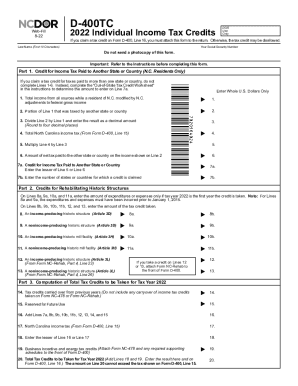
The NC DoR D-400TC is a critical form for individuals claiming tax credits on their North Carolina income tax return. This guide provides step-by-step instructions to assist users in accurately filling out the form online.
Follow the steps to successfully complete the form.
- Press the ‘Get Form’ button to access the form and open it in your preferred online document editor.
- Begin by entering your social security number and last name in the provided fields. Be careful to ensure these details are accurate as they are crucial for processing your tax credits.
- In Part 1, report your total income from all sources while a resident of North Carolina, including any necessary adjustments to federal gross income. Enter this total in Line 1.
- Indicate the portion of the income reported on Line 1 that was taxed by another state or country in Line 2.
- Calculate the decimal amount for Line 3 by dividing the amount in Line 2 by that in Line 1, rounding to four decimal places.
- Transfer the total North Carolina income tax from Form D-400, Line 15 to Line 4 of the D-400TC.
- Complete Line 5 by multiplying the amount on Line 4 by the decimal result from Line 3.
- Document the net tax amount paid to another state or country as shown on Line 6.
- Enter the least value from Line 5 or Line 6 in Line 7a for the credit for income tax paid to another state or country.
- In Line 7b, specify the number of states or countries for which you are claiming a credit.
- Move on to Part 2 to report any credits for rehabbing historic structures. Fill in amounts on Lines 8a to 13 where applicable.
- Record any tax credits you have taken in Lines 8b to 13 in their respective sections.
- In Part 3, document any tax credits that you are carrying over from previous years in Line 14.
- For Line 16, sum Lines 7a, 8b, 9b, 10b, 11b, 12, 13, 14, and 15.
- Enter your North Carolina income tax from Form D-400, Line 15 in Line 17.
- For Line 18, record the lesser amount between Line 16 and Line 17.
- Report any business incentive and energy tax credits in Line 19. Ensure you attach the required forms.
- Finally, calculate the total amount of tax credits to be claimed for the tax year 2022 in Line 20 and ensure to enter this amount on Form D-400, Line 16.
- Make sure to save your changes, and you can choose to download, print, or share the completed form as needed.
Complete the NC DoR D-400TC online today to ensure your tax credits are accurately recorded.
The standard deduction for tax years after 2021 increases to: $25,500 for taxpayers with a filing status of married filing jointly or surviving spouse; $19,125 for taxpayers with a filing status of head of household; and. $12,750 for taxpayers with a filing status of single or married filing separately.