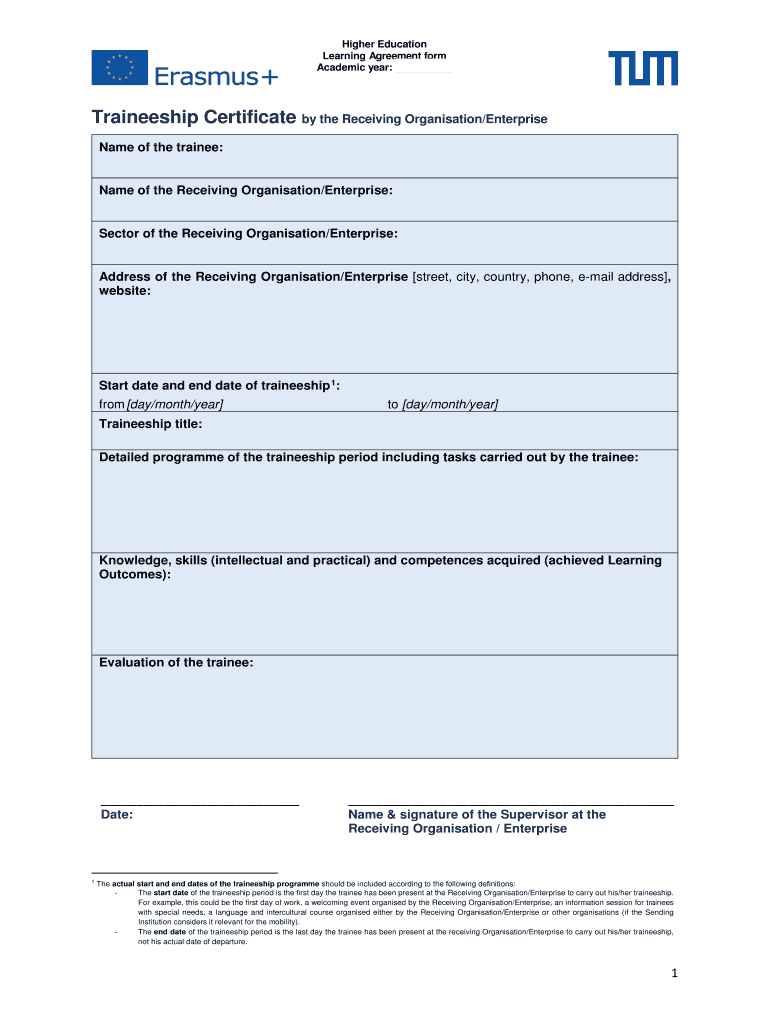
Higher Education Learning Agreement form Academic year: Traineeship Certificate by the Receiving Organisation/Enterprise Name of the trainee:Name of the Receiving Organisation/Enterprise:Sector of.

Open form follow the instructions

Easily sign the form with your finger

Send filled & signed form or save
How to fill out the Traineeship Certificate - International.tum.de online
The Traineeship Certificate is a vital document that captures the essential details of your traineeship experience. This guide will provide you with clear and concise instructions to ensure you fill out the form accurately and effectively.
Follow the steps to complete your Traineeship Certificate with ease.
- Click the ‘Get Form’ button to access the Traineeship Certificate online. This will open the fillable form in your chosen editor.
- Enter the name of the trainee in the designated field. This should be the full name as it appears in official documents.
- Fill in the name of the Receiving Organisation/Enterprise. Ensure that the name is accurate to avoid any discrepancies.
- Specify the sector of the Receiving Organisation/Enterprise. This section should clearly define the industry or field where the traineeship took place.
- Provide the full address of the Receiving Organisation/Enterprise, including street, city, country, phone number, and email address. Additionally, include the website URL if available.
- Input the start date and end date of the traineeship. This should reflect the first and last day the trainee was present at the organisation.
- Write the traineeship title. This should succinctly describe the nature of the traineeship.
- Include a detailed programme of the traineeship period, outlining the tasks that were carried out by the trainee during this time.
- Describe the knowledge, skills, and competences acquired by the trainee. This should correlate with the learning outcomes achieved during the traineeship.
- Provide an evaluation of the trainee. This section should offer constructive feedback and highlight the strengths demonstrated during the traineeship.
- Fill in the date of completion for the form, along with the name and signature of the Supervisor at the Receiving Organisation/Enterprise.
- Once all fields are filled, you can save the changes, download the completed document, print it, or share it as needed.
Complete your Traineeship Certificate online to ensure a smooth documentation process.
Experience a faster way to fill out and sign forms on the web. Access the most extensive library of templates available.
Related content
In order to be eligible to be certified as an EMT-Basic, a person must: ... and field...
Please be aware that TUM is unable to expedite your visa procedure in Munich!...
3M-spil er designet til brug som en del af et arbejdspositionerings- eller redningssystem...
Use professional pre-built templates to fill in and sign documents online faster. Get access to thousands of forms.
If you believe that this page should be taken down, please follow our DMCA take down process here.