Loading
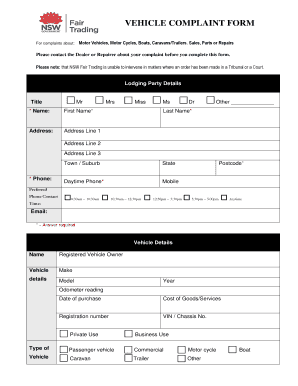
Get Vehicle Complaint Form - Fair Trading Nsw
How it works
-

Open form follow the instructions
-

Easily sign the form with your finger
-

Send filled & signed form or save
How to fill out the Vehicle Complaint Form - Fair Trading NSW online
Filing a complaint about a vehicle can be a straightforward process when you have the right guidance. This guide will provide you with detailed instructions on how to complete the Vehicle Complaint Form for Fair Trading NSW online, ensuring that you provide all necessary information accurately.
Follow the steps to complete the Vehicle Complaint Form online.
- Click ‘Get Form’ button to obtain the form and open it in the editing platform.
- Begin by filling out your details in the Lodging Party section. Provide your title, first and last name, address (including town/suburb, state, and postcode), and your phone and email contact information. Make sure to complete all fields marked with an asterisk, as these are required.
- Proceed to the Vehicle Details section. Enter specifics about the vehicle involved, including make, model, year, odometer reading, date of purchase, cost of goods/services, registration number, and VIN/chassis number. Indicate whether the vehicle is for private or business use, and select the vehicle type.
- In the Trader Details section, provide the name of the business you are complaining about, along with the contact person's name (if applicable), their ABN/ACN, address details, phone, mobile, and email address. Ensure that the trader’s license number is included as well.
- Detail your complaint in the Complaint Details section. Specify who your complaint is with (dealer or repairer) and what the problem is related to. Include whether it concerns a new or used vehicle purchase, repairs, warranties, or financial agreements. Answer whether the issue is technical or contractual.
- Attach any relevant documents to your complaint, such as contracts, invoices, proof of purchase, or correspondence with the trader. Ensure you answer any questions about previous complaints lodged and provide reference numbers where applicable.
- Provide a brief outline of your dispute in the designated area. You may attach additional pages if needed and indicate whether you have discussed this complaint with the trader and their response.
- Complete the Acknowledgment and Declarations section by signing and dating the form to confirm that the information provided is true and correct.
- Once all sections are complete, review the filled-out form for accuracy. You can then save your changes, download, print, or share the form as needed.
Complete your Vehicle Complaint Form online today and ensure your voice is heard.
Go to the company website. ... Contact the Better Business Bureau. ... Contact the Federal Trade Commission (FTC). ... Check out the Ripoff Report. ... Email spam@uce.gov. ... Try Yelp. ... Post on Planet Feedback. ... Google your attorney general.